How to Build an AI Chatbot for Your Website (No Code)
How small teams can deploy a 24/7 AI chatbot trained exclusively on verified company knowledge without writing code.

How small teams can deploy a 24/7 AI chatbot trained exclusively on verified company knowledge without writing code.
Website visitors in 2026 expect instant, accurate answers to operational questions. If a prospective client lands on your pricing or service page with an urgent question, making them wait hours for an email response guarantees they will evaluate alternatives. Learning how to build ai chatbot for website deployment solves this problem by providing a digital assistant that answers inquiries around the clock.
However, the rush to deploy conversational AI has left many sites with poorly configured widgets. Many businesses deploy unconstrained models that hallucinate incorrect discount codes, misquote cancellation terms, or confuse simple user requests.
You do not need to hire software engineers or train proprietary models from scratch to launch a dependable assistant. By utilizing no-code builders powered by Retrieval-Augmented Generation (RAG), you can connect your existing documentation, knowledge base articles, and sitemaps into an intelligent widget. This step-by-step guide explains how to gather your data, set deterministic guardrails, embed the widget on your site, and configure human escalation paths.
Always test the chatbot in the builder’s private playground before you publish the embed script to your live website.
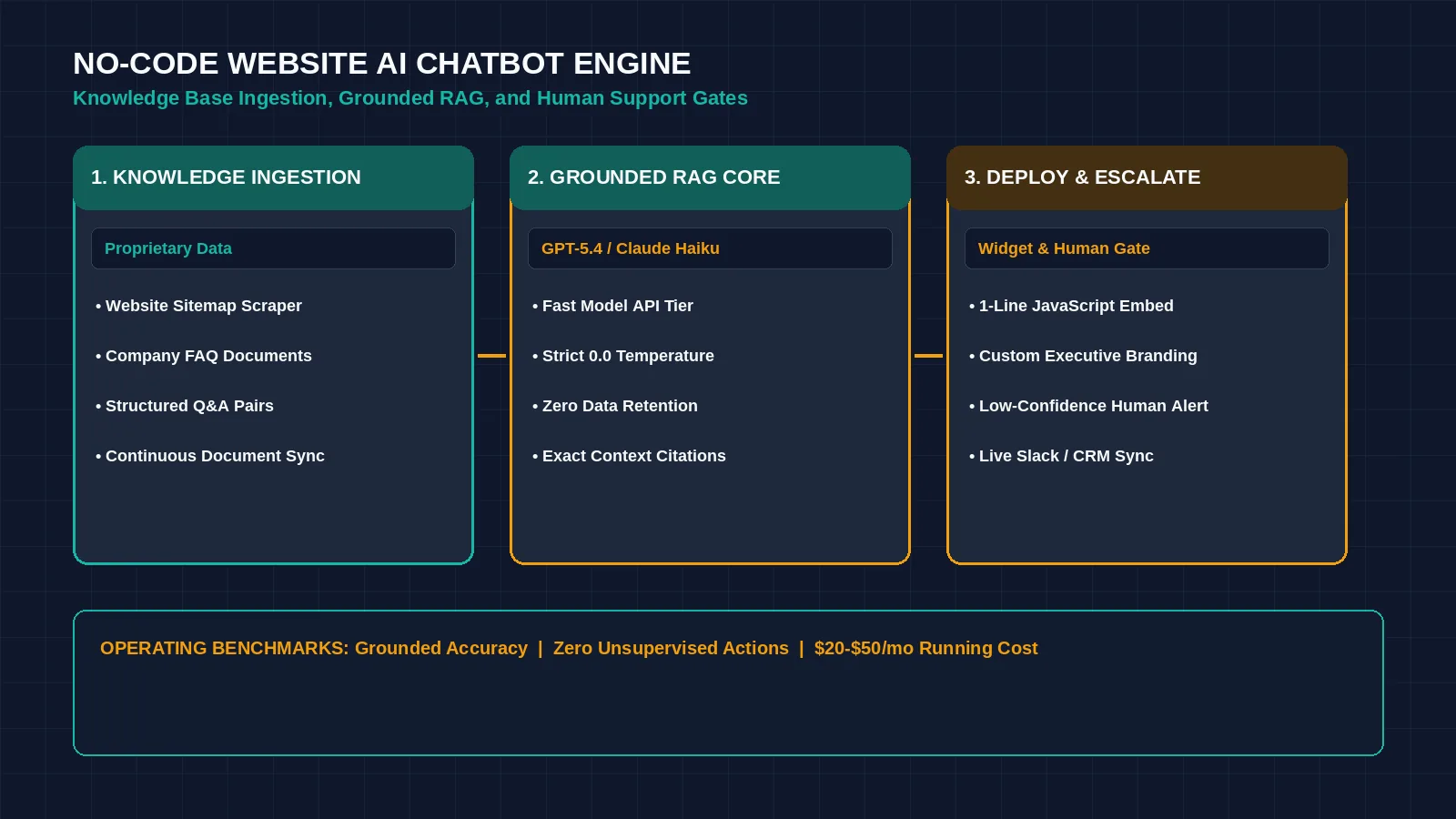
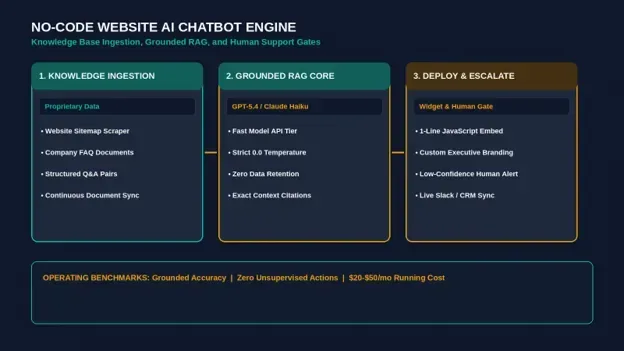
Figure 1: No-code AI chatbot platforms allow businesses to train assistants on proprietary documentation with strict factual guardrails. Credit: AI-generated illustration by Minute Mind AI.
What to Know Before You Build an AI Chatbot for Your Website
Before selecting software, establish clear boundaries regarding what an automated chatbot should handle and where human team members must step in.
What AI Chatbots Handle Reliably
- Recurring Informational Inquiries: Providing immediate answers regarding pricing tiers, standard service inclusions, office hours, and return procedures.
- Lead Qualification & Meeting Scheduling: Inquiring about project scope and team size, collecting work email addresses, and offering direct booking links.
- Multilingual Translation: Answering international inquiries in real time across dozens of languages without dedicated multilingual staff.
What Requires Human Support
- Contract & Pricing Negotiations: Custom discounting or tailored commercial terms must never be delegated to an automated bot.
- Sensitive Account Actions: Modifications involving database record deletions or payment refunds require verified human authorization.
- Escalated Customer Frustration: When an inquiry displays negative sentiment or a risk of cancellation, the conversation should transition to a human specialist immediately.
What You Need to Build One
Deploying a no-code website chatbot requires three primary components:
| Requirement | Description | Practical Standard |
|---|---|---|
| Structured Knowledge Base | The source documents the assistant references to generate answers. | Export clean Markdown files, text documents, or PDF guides with verified, current policies. |
| No-Code Chatbot Platform | The interface that indexes documents and processes conversation context. | Select tools with verifiable RAG architectures, such as Chatbase or Voiceflow. |
| Website Header Access | The ability to insert an asynchronous JavaScript tag into your site’s HTML. | Compatible with WordPress, Webflow, Shopify, Framer, and custom static sites. |
Step 1: Gather and Prepare Your Knowledge Base
A chatbot’s reliability depends directly on the structure and accuracy of the source documentation you provide. This system uses Retrieval-Augmented Generation (RAG): when a user asks a question, the assistant semantically searches only your uploaded content for matching context before generating an answer. If your documentation contains conflicting terms, the assistant will produce contradictory responses.
- 1. Crawl Verified Public Pages: Point your builder to your sitemap URL to ingest public product pages, service overviews, and existing documentation.
- 2. Upload Internal Reference Docs: Export verified FAQ sheets and standard operating procedures from Notion or Google Docs as clean text or PDF files.
- 3. Create Explicit Q&A Pairs: For nuanced operational policies, draft clear question-and-answer pairs covering edge cases, warranty details, and geographic availability.
Step 2: Configure the Reasoning Engine and System Prompt
Once documents are uploaded, configure the assistant’s operating instructions inside the builder’s prompt settings. The System Prompt defines the boundaries the model must adhere to throughout every user session:
| AI WEBSITE CHATBOT · SYSTEM PROMPT & STRICT GROUNDING |
|---|
| SYSTEM PROMPT: You are the official customer operations assistant for Apex Solutions (Sample — replace with your business name). Your sole task is to answer visitor questions using ONLY the provided Knowledge Base documents. Operating Rules: |
Understanding the Temperature Parameter
Inside your builder’s model settings, adjust the Temperature slider to 0.0 or 0.1. Setting temperature to zero minimizes sampling randomness, forcing the model to produce deterministic, consistent answers based on your source text. While a low temperature does not eliminate errors caused by conflicting source data, it prevents the model from generating creative extrapolations.
Step 3: Embed and Style the Chatbot on Your Website
After validating answers inside the platform playground, deploy the widget to your public website:
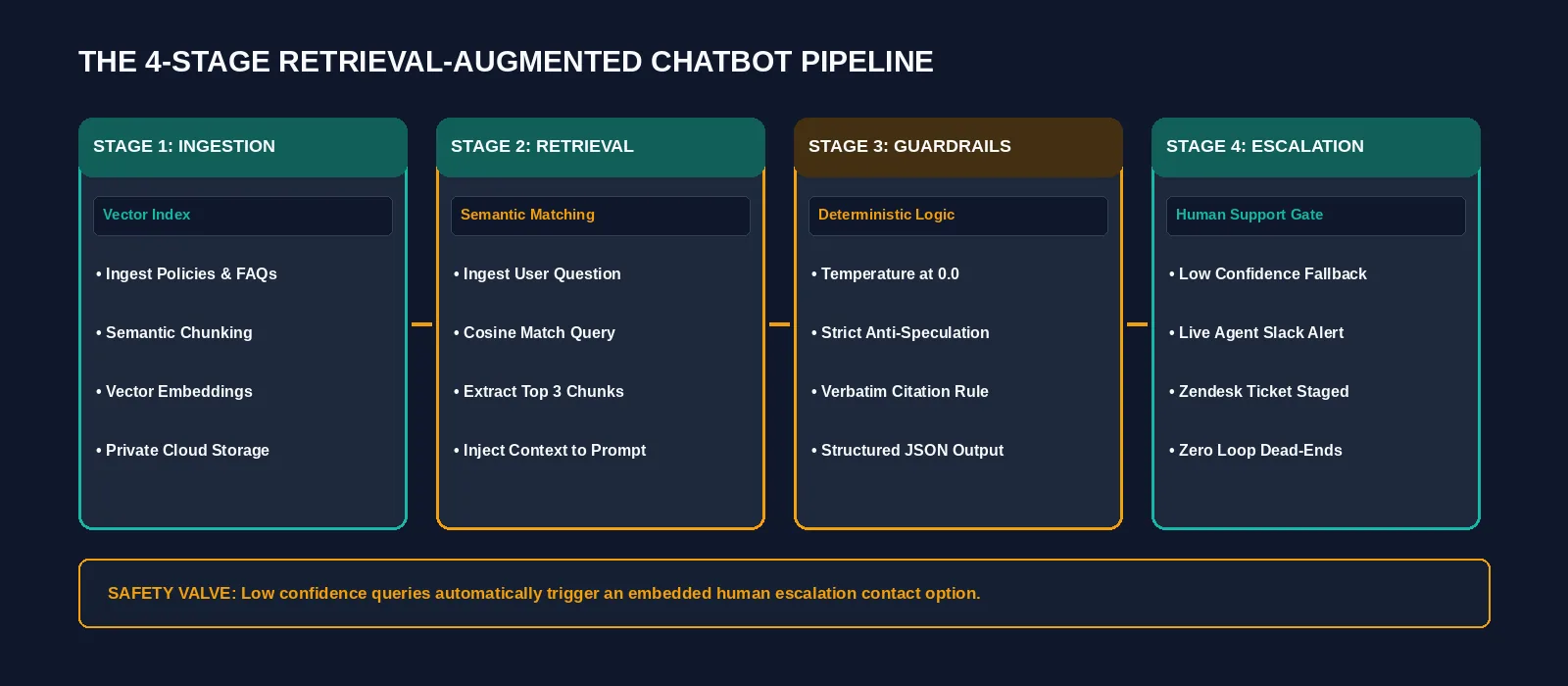
Figure 2: The end-to-end architecture of a grounded website AI chatbot, from vector retrieval to human support escalation. Credit: AI-generated illustration by Minute Mind AI.
- 1. Customize Visual Elements: Align the widget container with your brand palette. Configure your primary header tones, chat bubble colors, business logo, and introductory welcome message.
- 2. Copy the JavaScript Snippet: The builder will provide an asynchronous embed snippet.
- 3. Insert Into Site Header: Paste the script into your website template immediately before the closing </head> tag. In WordPress, this can be done via your theme’s custom code options or a header injection plugin.
Step 4: Configure Guardrails, Fallbacks, and Human Escalation
An automated assistant should never leave a visitor stuck in an unresolved conversational loop. Configure explicit triggers to escalate complex discussions to human team members:
| Trigger Scenario | Automated Action | Escalation Channel |
|---|---|---|
| Low Confidence / Missing Context | Informs user and presents an embedded human contact form. | Dispatches email ticket to customer support queue. |
| High Intent / Custom Demo Inquiry | Captures name, work email, and scope; presents booking calendar. | Creates deal record in CRM and alerts sales channel. |
| Negative Sentiment Flagged | Acknowledges concern and routes chat history to live agent. | Pings team channel via Slack. |
Step 5: Test, Monitor, and Refine Documentation
Deploying a website chatbot is an iterative operational process. Regular monitoring reveals documentation gaps and areas where customer questions require clearer explanations:
- Filter Unanswered Queries: Review conversation logs for interactions where the assistant triggered its fallback message.
- Update the Knowledge Base: If multiple visitors ask about specific service requirements that were missing from your initial documentation, add a concise paragraph explaining the policy and re-sync your knowledge base.
- Validate Pipeline Integrations: Confirm that collected lead emails and meeting requests are populating your CRM correctly.
To evaluate which visual automation tool best handles downstream CRM syncing, review our comparison of n8n vs Zapier vs Make: Which Automation Tool Wins in 2026?.
Tools to Build It: Free vs. Paid Stacks
Several no-code platforms provide reliable document indexing and website embed features:
• Chatbase has no free plan. Its Hobby plan is $32/month billed yearly (700 message credits a month), with a 7-day trial (as of October 2026).
• Voiceflow offers an advanced visual branching canvas. Its pricing page lists no plan prices (usage-based billing, with a free trial for agencies and a request-pricing option for businesses), so ask for a quote before you plan around it (as of October 2026).
• Botpress features hybrid deterministic flows. It has a free plan with 100 conversations, and the Plus plan is $150/month billed annually (250 conversations a month) (as of October 2026).
• Dante AI supports multi-channel document ingestion. It has a free plan with 100 message credits, and Starter is $40/month, or $33/month billed yearly (up to 2,000 credits) (as of October 2026).
To understand how autonomous architectures transition from conversational widgets to goal-directed operations, read our explainer on What Is an AI Agent? A Plain-English Guide for Business.
Frequently Asked Questions
Can I build an AI chatbot for my website without coding?
Yes. No-code builders like Chatbase and Voiceflow provide graphical dashboards where you upload documents, connect sitemap URLs, customize visual styling, and copy a generated script tag into your website header without writing backend software.
How do I stop a website AI chatbot from giving wrong answers?
Set model temperature to 0.0, instruct the system prompt to reference only provided documentation, and configure an explicit fallback instruction: ‘If the detail is not in the source text, state that you do not have the answer and provide an escalation option.’
How much does an AI website chatbot cost to run?
It depends on the platform and how many conversations you get. On the pricing pages we checked in October 2026, Botpress and Dante AI have free plans (100 conversations or message credits), and paid entry plans start at $32/month billed yearly (Chatbase) and $40/month (Dante AI), up to $150/month (Botpress Plus). Check the current page before you decide.
Can the chatbot use my private company documents safely?
Only if the platform’s terms say so. Before you upload private documents, read the provider’s privacy and data-processing terms and check whether uploaded files are used to train models, and who can access them. Keep sensitive customer data out of the knowledge base.
Conclusion: Start With Your Core Support FAQs
You do not need to index your company’s entire historical archive on day one. Begin by collecting your 15 most frequent customer service questions, set up an assistant on a standard platform tier, and evaluate answers internally with your team. Once the bot accurately reflects your operational policies, embed the script on your site and review logs weekly to refine your knowledge base.
To learn how website chatbots fit into an overarching operational automation strategy across marketing, sales, and operations, explore our master guide: AI Automation for Business: The Complete 2026 Guide.
Was this article useful?
Thanks, that helps us decide what to write next.
Spotted a mistake? Report an error and we will fix it, with a dated correction note.