How to Automate Customer Service With AI (Small Business)
How small teams can resolve inquiries faster and maintain 24/7 support coverage without frustrating customers or sacrificing empathy.

How small teams can resolve inquiries faster and maintain 24/7 support coverage without frustrating customers or sacrificing empathy.
Customer expectations for rapid support resolution have accelerated significantly. When a client faces an operational obstacle, waiting 24 hours for an email response creates immediate frustration and increases churn risk. Learning how to automate customer service with ai gives lean teams the operational capacity to deliver responsive, 24/7 assistance without adding overnight support shifts.
However, poorly executed automation causes more damage than delayed email replies. Customers frequently encounter looping conversational widgets that refuse to connect with human agents, misquote company policies, and fail to comprehend basic context.
Small teams do not have to choose between operational speed and customer satisfaction. By integrating modern helpdesk platforms with lightweight classification models, businesses can deflect repetitive informational queries, categorize inbound tickets by urgency, and route sensitive conversations to human specialists. This guide provides a structured blueprint for automating small business customer support safely and sustainably.
Test classification triggers in a staging environment before you route live customer tickets.
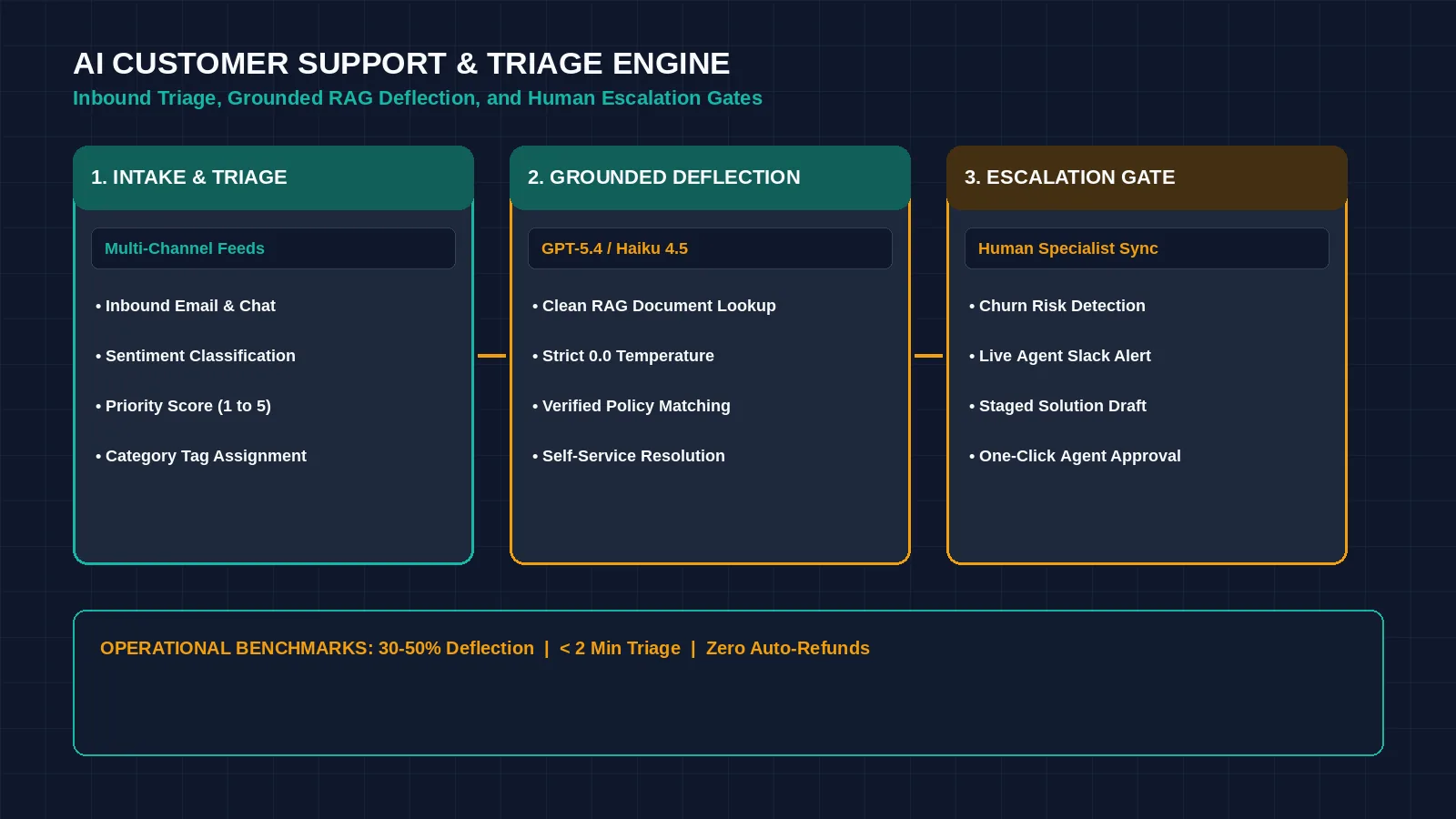
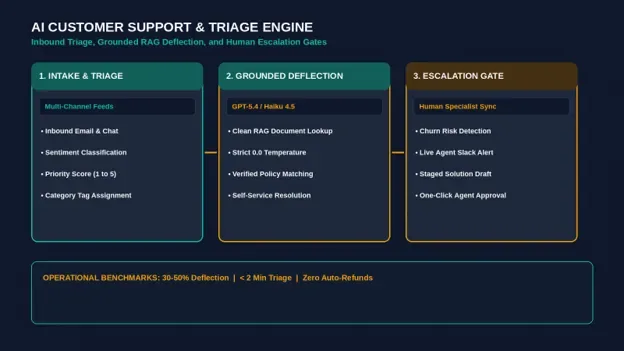
Figure 1: An automated support triage workflow categorizes incoming tickets by sentiment and deflects routine inquiries. Credit: AI-generated illustration by Minute Mind AI.
What to Know Before You Automate Customer Service With AI
Before implementing software, establish an explicit boundary between workflows that language models resolve reliably and high-stakes interactions that require human judgment.
What AI Handles Exceptionally Well
- Standard Policy Inquiries: Providing immediate answers regarding billing cycles, account provisioning, operating hours, and standard return policies.
- Transactional Status Lookups: Querying internal databases via secure APIs to provide real-time order tracking or subscription renewal dates.
- Automated Ticket Triage: Parsing freeform customer emails and applying structured metadata tags (e.g., Urgency: High, Category: Bug, Product Tier: Pro).
What Must Remain Human
- High-Frustration Complaints: Dissatisfied clients threatening cancellation require personalized, empathetic de-escalation from an experienced team member.
- Commercial Exceptions: Granting off-policy billing refunds or negotiating custom service terms should never be automated.
- High-Liability Incidents: Investigating security concerns, data privacy questions, or critical infrastructure outages.
Where to Start: Highest-Impact Support Tasks
Do not attempt to automate your entire support operations at once. Audit your recent customer inquiries to identify the top three repetitive questions that generate the majority of your ticket volume.
| Support Workflow | Automation Mechanism | Operational Outcome |
|---|---|---|
| FAQ Deflection | Grounded Knowledge Base Assistant | Answers routine informational questions without an agent. |
| Ticket Categorization | Sentiment & Intent Classification API | Eliminates manual queue sorting and routes urgent issues immediately. |
| Draft Reply Preparation | Helpdesk Copilot Generation | Accelerates human response times by staging verified draft answers. |
Step 1: Automate Common Questions and Deflect Routine Tickets
The initial layer of support automation is self-service deflection. When a user initiates a chat or submits a portal question, a grounded assistant queries your internal documentation to provide a direct answer:
- 1. Centralize Help Content: Gather your operating policies, onboarding guides, and troubleshooting steps into clean Markdown or text documents.
- 2. Deploy Grounded Retrieval: Connect your knowledge base to a customer-facing assistant (such as Chatbase, Crisp, or Zendesk AI).
- 3. Configure Deterministic Parameters: Set model temperature to 0.0 to minimize response variability, and instruct the assistant to answer strictly from provided documents. If a query is unaddressed in the text, require the assistant to offer human handoff immediately.
Step 2: Triage and Route Support Tickets Automatically
When complex inquiries arrive via email, manual triage creates response delays. You can deploy a classification node inside Make or Zapier to evaluate ticket context before an agent opens the queue:
| AI CUSTOMER SUPPORT TRIAGE · PROMPT TEMPLATE |
|---|
| SYSTEM PROMPT: You are an executive customer support triage assistant for Apex Operations (Sample — replace with your business name). Analyze the incoming customer support ticket and output valid JSON only. Evaluation Criteria: INPUT DATA: OUTPUT FORMAT (Valid JSON Only): |
The router updates ticket fields in your helpdesk (such as Zendesk or Freshdesk) and assigns priority tags automatically. For a broader perspective on multi-department automation pipelines, explore our guide on 10 AI Workflow Automation Examples for Small Teams.
Step 3: Set Smart Human Escalation Rules
The foundation of customer trust is ensuring that automation steps aside the moment complex assistance is needed:
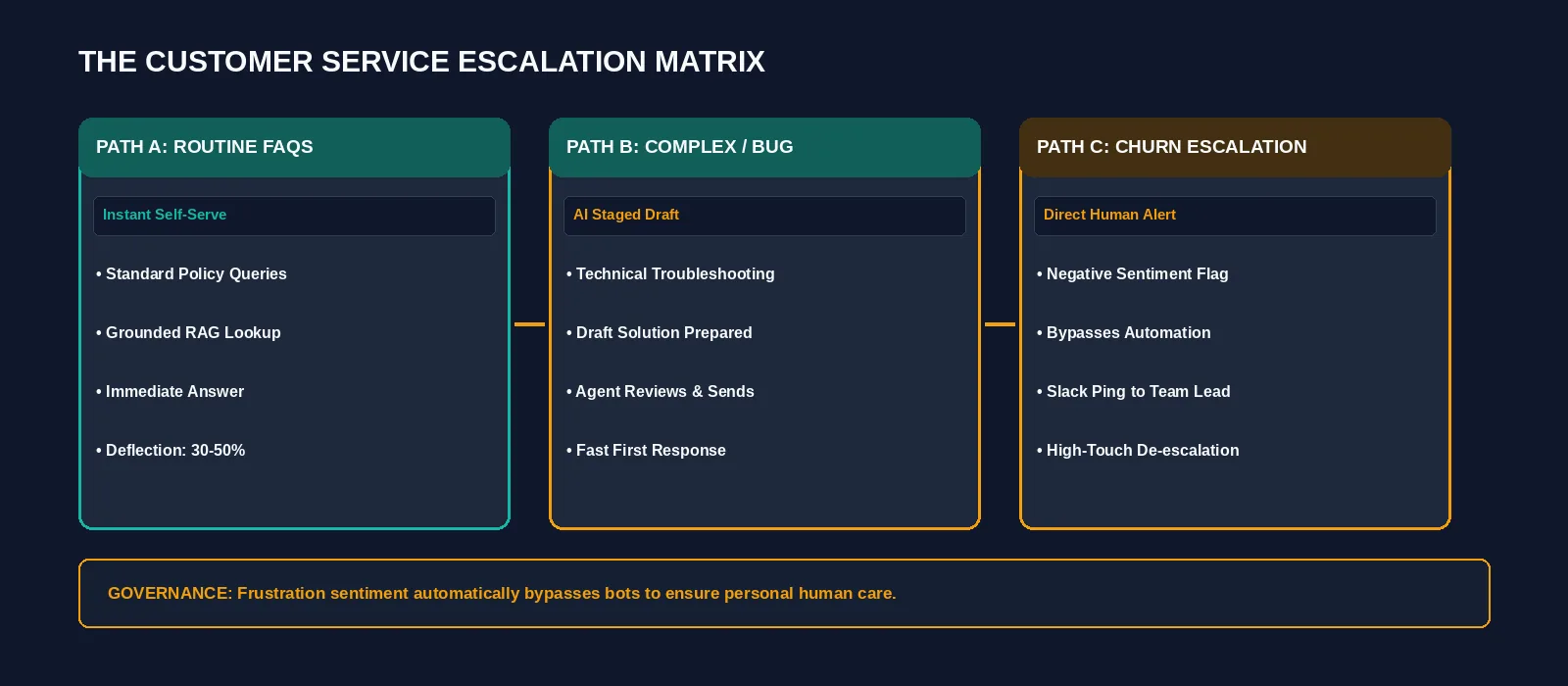
Figure 2: Customer support routing architecture featuring sentiment triggers, automated deflection, and human intervention checkpoints. Credit: AI-generated illustration by Minute Mind AI.
| Trigger Condition | Automated Action | Routing Destination |
|---|---|---|
| Negative Sentiment / Cancellation Intent | Bypasses automated bots; tags ticket as Urgent Priority. | Alerts senior account lead via internal Slack notification. |
| Low Retrieval Confidence | Informs user and captures ticket details for human follow-up. | Routes ticket to general tier-1 support inbox. |
| Enterprise / VIP Identifier | Matches sender domain against high-tier client list. | Assigns directly to dedicated client manager. |
Step 4: Measure Deflection, CSAT, and Resolution Time
Track three operational metrics to verify that automation enhances support quality without degrading customer experience:
1. Self-Service Deflection Rate
The proportion of inquiries resolved entirely through automated knowledge base retrieval without requiring staff intervention. Track your own baseline first, then see how it moves after each change.
2. First Response Time (FRT) & Resolution Latency
Automated classification can route a ticket before an agent opens it, and pre-drafted replies can shorten resolution time. Measure your own numbers before and after.
3. Customer Satisfaction (CSAT)
Deploy an automated post-resolution rating prompt asking: ‘Did this conversation resolve your inquiry?’ If CSAT falls after you automate a path, review chat transcripts to update ambiguous documentation or adjust escalation triggers.
Common Mistakes That Frustrate Customers
- Restricting Access to Human Help: Forcing users through rigid bot loops without an obvious exit option creates significant dissatisfaction. Always provide a direct path to a human agent.
- Sending Unreviewed Outbound Replies: Permitting autonomous bots to email clients directly on complex technical matters risks inaccurate guidance. Require human review for sensitive communications.
- Outdated Documentation: Failing to update help center articles when pricing terms, software features, or return policies change.
- Over-Automating Retention Touchpoints: Relying entirely on automated acknowledgments when a client requests account cancellation.
To understand how autonomous architectures expand from reactive support rules to proactive execution, explore our explainer on What Is an AI Agent? A Plain-English Guide for Business.
Tools to Build It: Free vs. Paid Stacks
You can assemble a dependable support stack using modular tools:
• Crisp provides a Free tier (2 seats) and a Mini tier at $45/month per workspace (4 seats) (as of October 2026).
• Zendesk Suite Team is listed at $55/agent/month billed annually ($69 billed monthly) by HelpDesk.com, a competitor, so confirm on Zendesk’s own pricing page (as of October 2026).
• Freshdesk is listed at $19/agent/month (Growth) and $55/agent/month (Pro) billed annually by HelpDesk.com, also a competitor, so confirm on Freshdesk’s own pricing page (as of October 2026).
• Reasoning Models: Connect a fast, low-cost model tier through the OpenAI API or the Anthropic API on pay-as-you-go terms; check each pricing page for the current model names and rates.
• Knowledge Retrieval: Chatbase has no free plan; its Hobby plan is $32/month billed yearly (as of October 2026).
• Workflow Automation: Use Make (free plan; paid plans from roughly $9–$12/month billed annually) or Zapier (paid plans from $19.99/month) to route payloads. Confirm current plans on each page.
For an architectural breakdown of workflow connectors, review n8n vs Zapier vs Make: Which Automation Tool Wins in 2026?.
Frequently Asked Questions
Can AI completely replace customer support?
No. Artificial intelligence manages repetitive informational requests, ticket classification, and draft preparation. Human team members remain essential for complex problem-solving, contract discussions, and sensitive customer escalations.
What support tasks should never be automated?
Billing refund approvals, security incident communications, custom commercial negotiations, and conversations with churn-risk clients should always require direct human oversight.
How much can automation reduce support ticket volume?
There is no reliable public benchmark that fits every business. A verified knowledge base with a grounded assistant can handle repetitive tier-1 questions, so measure your own deflection rate from your first month of data.
Which platforms suit small business customer support best?
For website live chat and knowledge base deflection, Crisp and Chatbase offer accessible, flat-rate setups. For multi-channel email ticketing and SLA management, Freshdesk and Zendesk deliver reliable routing frameworks.
Conclusion: Start Small With Ticket Triage
You do not need to overhaul your entire customer service operation immediately. Begin by configuring an automated triage prompt to tag incoming tickets by sentiment and urgency. Once your team experiences the efficiency of structured queue routing, deploy a grounded assistant on your public documentation to handle recurring FAQs.
To see how customer support automation fits into a company-wide operational roadmap covering marketing, sales, and operations, explore our pillar guide: AI Automation for Business: The Complete 2026 Guide.
Was this article useful?
Thanks, that helps us decide what to write next.
Spotted a mistake? Report an error and we will fix it, with a dated correction note.