AI Automation for Business: The Complete 2026 Guide
A practical guide to AI automation for business: maturity levels, core tools, use cases and governance.


Most business software claims to be “AI-powered,” yet many teams still spend hours copying data between browser tabs, writing repetitive follow-ups, and sorting files.
Deploying AI automation does not mean buying fragmented point solutions or letting unvetted chatbots hallucinate answers to your clients.
Real AI automation connects foundational software systems (CRMs, inboxes, ERPs, databases) with intelligent reasoning models that parse unstructured information, execute complex logic, and return clean outputs without manual human input.
This guide to AI automation for business delivers an end-to-end operational blueprint for modern leadership teams: from diagnosing operational friction to choosing an integration engine and governing autonomous execution safely.
Quick Answer: What Is Business AI Automation?
Business AI automation is the integration of machine learning models and Large Language Models (LLMs) into digital software workflows to handle tasks requiring contextual interpretation, pattern recognition, or creative synthesis.
Unlike traditional deterministic automation—which relies strictly on rigid “If This, Then That” (IFTTT) rules—AI automation handles messy, unstructured data:
- Traditional Automation: Takes a typed email address from a form field and creates a contact record in a CRM. (Fails if the input format changes).
- AI Automation: Reads a rambling, 3-paragraph customer email, isolates the core complaint, checks warranty status across internal records, drafts an empathetic resolution, and routes the ticket to the correct regional manager.
The 4-Tier AI Automation Maturity Model

Before purchasing software or writing prompts, businesses must identify their current operational maturity level. Attempting to leap directly from manual spreadsheets to autonomous agents almost always leads to wasted budget and system failures.
| Tier | Automation Stage | Technical Foundation | Example Business Outcome |
|---|---|---|---|
| Tier 1 | Linear / Deterministic | Webhooks, Zapier, native API connectors | Moving form entries into a Google Sheet or CRM automatically. |
| Tier 2 | Cognitive Augmentation | Visual builders + LLM prompt nodes (Make, OpenAI API) | Categorizing incoming support tickets, parsing PDF invoices, summarizing calls. |
| Tier 3 | Orchestrated Pipelines | Complex multi-branch workflows + Vector memory (RAG) | End-to-end lead qualification, cross-platform data enrichment, automated reporting. |
| Tier 4 | Autonomous Agentic Loops | Multi-agent frameworks, tool-calling reasoning models | Self-directed research agents, automated code testing, autonomous account reconciliation. |
Step 1: The Core Tech Stack (Choosing Your Automation Engine)
Your automation engine is the central switchboard through which all company data flows. Selecting the wrong platform creates technical debt that limits scalability.
For modern businesses, three enterprise-grade visual workflow engines dominate the market:
- Make: A strong option for visual, multi-step orchestration. Offers high modularity, advanced data mapping, and cost-effective execution pricing for high-volume data transformation. Explore Make.
- Zapier: Widely used for direct software integrations, with a gentle learning curve and quick setup, making it ideal for non-technical sales and marketing units, though it carries a premium price point at enterprise scale. Explore Zapier.
- n8n: The premier choice for organizations with strict privacy requirements or a need for self-hosted deployment on private cloud infrastructure. Explore n8n.
To determine which platform matches your technical capacity and budget, review our deep comparative analysis: n8n vs Zapier vs Make: Which Wins in 2026?.
Step 2: Selecting Your Intelligence Layer
Workflows require a reasoning engine to analyze text, images, and documents. Leading businesses utilize a multi-model strategy based on task complexity:
- Fast Utility Tier (Low Cost, High Speed): Small, fast models from providers such as OpenAI or Anthropic. Ideal for high-volume categorization, data extraction from receipts, and sentiment tagging.
- Deep Reasoning Tier (Complex Context, High Precision): Each provider’s larger flagship reasoning models. Best suited for legal contract analysis, nuanced client communication, and cross-document synthesis.
If your team is starting without dedicated technical engineers, build your first automated sequence using visual drag-and-drop connectors following our step-by-step walkthrough: How to Automate Your Business With AI (No-Code, Step-by-Step).
High-Impact Business Use Cases by Department
Organizations that achieve immediate ROI deploy automation against specific, text-heavy bottlenecks rather than attempting enterprise-wide overhauls:
1. Sales & Revenue Operations
- Instant Lead Triage: Ingest incoming inquiries from web forms, analyze company size and intent, and route qualified opportunities to HubSpot with personalized briefing notes.
- Enriched Account Research: Scrape prospect websites and executive profiles to automatically populate CRM account records.
2. Operations & Customer Experience
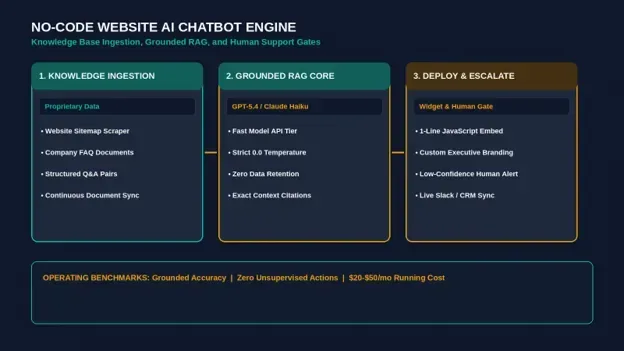
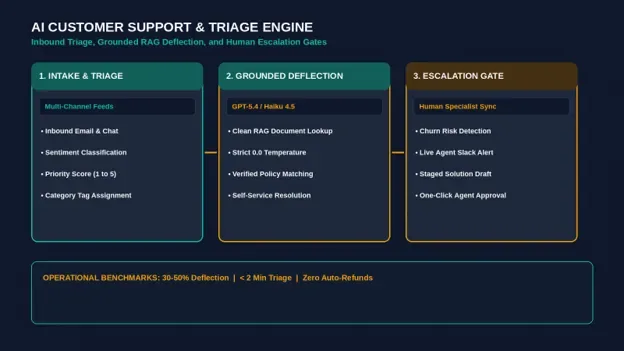
- Intelligent Ticket Dispatch: Parse unstructured support tickets in Zendesk or Freshdesk, draft accurate troubleshooting responses based on company documentation, and queue them for staff sign-off.
- Automated Meeting Synthesis: Transcribe client reviews, extract action items, and create structured execution cards in Asana or ClickUp.
3. Finance & Back-Office
- Invoice OCR & Ledger Sync: Extract metadata from PDF vendor receipts and push drafted bills directly to QuickBooks Online or Xero.
To review concrete, battle-tested workflows with prompt logic and app mappings, explore our comprehensive breakdown: 10 AI Workflow Automation Examples for Small Teams.
The Shift from Linear Workflows to Autonomous AI Agents
While linear pipelines solve deterministic data handoffs, forward-thinking organizations are transitioning toward Tier 4: Agentic Systems.
An AI agent does not follow a pre-programmed path; it receives an objective, evaluates its environment, plans a series of actions, calls third-party APIs via tool-calling architectures, and self-corrects until the target outcome is achieved.
To understand how agentic architectures work and where businesses are safely deploying them today, read our architectural explainer: What Is an AI Agent? (And How Businesses Actually Use Them).
Governance, Security, and Human-in-the-Loop (HITL)
Unchecked automation creates liability. When scaling automation across sensitive customer data, implement these four governance safeguards:
- Human-in-the-Loop Sign-Off: Never allow an automated system to fire external customer emails, submit financial transactions, or delete database records autonomously. Route the proposed action to a private Slack channel with single-click “Approve” and “Reject” buttons.
- API Data Policies: Before sending client data to any model provider, read its current data-usage and retention terms for the API (OpenAI and Anthropic both publish them) and confirm they meet your privacy obligations. Ensure company policies prohibit staff from pasting sensitive client data into consumer-facing web chat interfaces.
- Strict Token and Iteration Caps: Bound all autonomous nodes to a maximum of 5 tool-calling loops to prevent infinite runtime execution during API outages.
- Audit Trail Logging: Maintain central logging for every automated execution, recording the input timestamp, model version used, raw prompt, and output payload.
Related reading: how AI dashboards turn business data into decisions.
Frequently Asked Questions
How much does it cost to implement AI automation for a small-to-midsize business?
Costs depend mostly on volume. Zapier, Make and n8n each offer a free or low-cost entry plan (see the current Zapier, Make and n8n pricing pages), and LLM API usage is billed per token, so a small team can start with a modest monthly spend and scale as workflow volume grows.
Will AI automation replace my current administrative team?
In practice, automation eliminates repetitive administrative tasks (data entry, transcription, inbox sorting) rather than replacing human roles. Teams that deploy automation systematically shift staff capacity toward high-touch client work, strategic planning, and relationship management.
What is the fastest way to get started with business AI automation?
Identify the single most time-consuming text-based task your team repeats daily (such as lead qualification or meeting recap notes). Build a simple 3-node automation using a no-code tool, test it with a human approval step, and refine it before automating adjacent systems.
AI automation is not an all-or-nothing proposition; it is an operational flywheel where small, high-frequency automations create the bandwidth to tackle foundational operational leverage.
Was this article useful?
Thanks, that helps us decide what to write next.
Spotted a mistake? Report an error and we will fix it, with a dated correction note.