How to Automate Social Media Posting With AI (2026)
How small teams can plan, repurpose, and schedule multi-platform social content without sounding robotic or spending hours drafting posts.

How small teams can plan, repurpose, and schedule multi-platform social content without sounding robotic or spending hours drafting posts.
Maintaining an active presence across professional networks is essential for brand authority and organic pipeline generation. However, manually formatting, drafting, and scheduling updates every single day drains critical operational bandwidth. Learning how to automate social media with ai gives small teams the leverage to run consistent multi-platform distribution without hiring an external marketing agency.
The danger lies in over-automation. Social feeds are currently flooded with low-effort, synthetic posts that sound completely identical: generic motivational hooks, predictable bullet lists, and corporate platitudes that readers immediately ignore.
Effective social automation does not mean letting an autonomous model publish unreviewed thoughts on your behalf. By implementing a structured repurposing pipeline, you can turn a single long-form asset—such as a case study, podcast transcript, or product guide—into platform-native LinkedIn updates, concise X threads, and newsletter snippets in minutes. This guide details how to build an automated content calendar, configure prompt constraints, and schedule publishing safely.
Always review staged social posts manually before they go live.
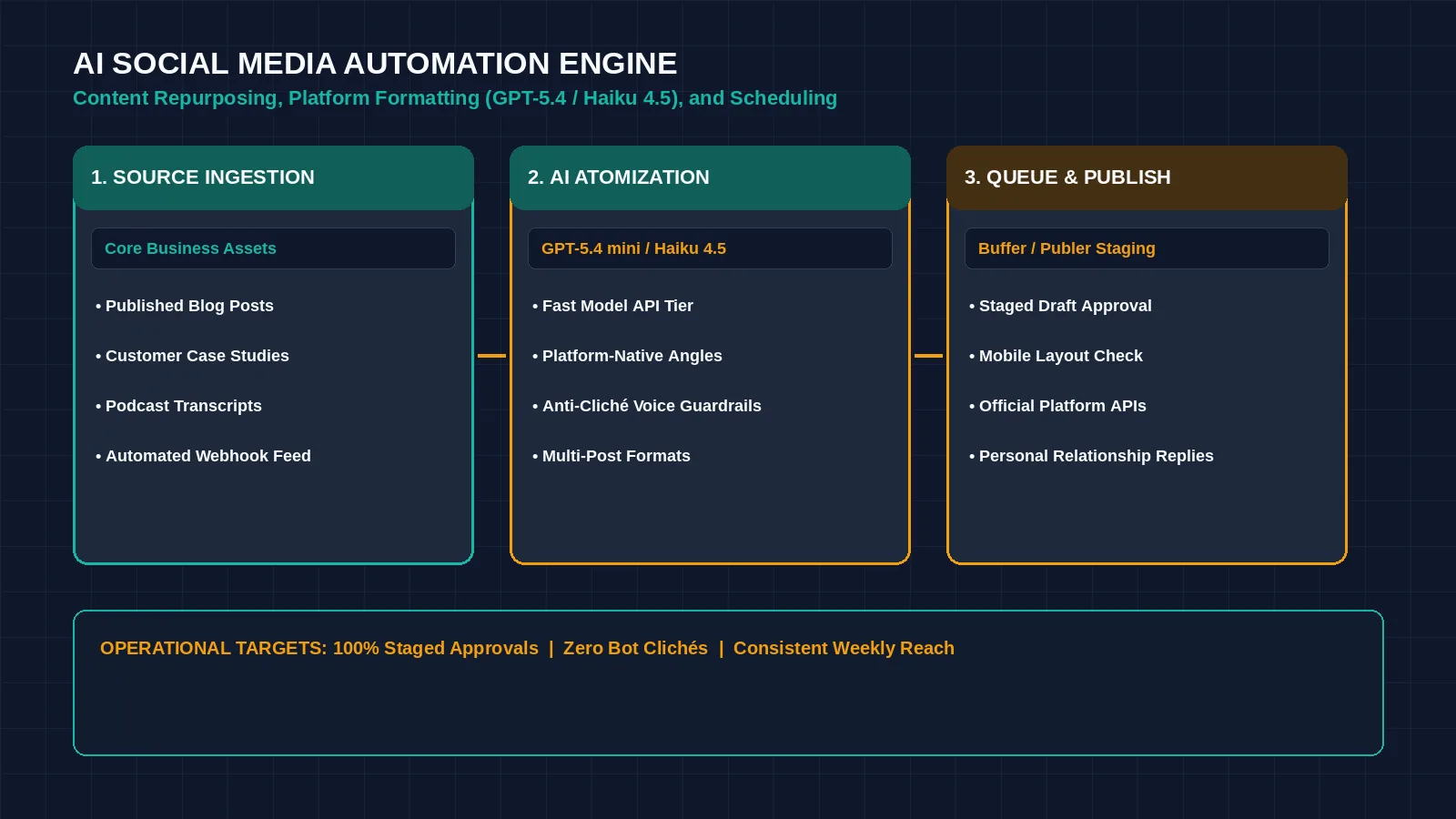
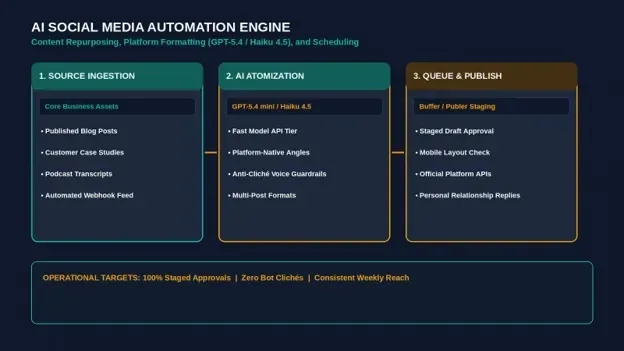
Figure 1: An automated social media workflow transforms core business assets into platform-specific posts while keeping human verification intact. Credit: AI-generated illustration by Minute Mind AI.
What to Automate vs. What to Keep Human
To succeed with social distribution in 2026, you must separate mechanical tasks that software accelerates from personal interactions that require genuine human involvement.
What to Automate
- Content Repurposing: Extracting key takeaways from long-form blog articles, whitepapers, or customer interview transcripts.
- Platform Reformatting: Rewriting a technical concept into a punchy LinkedIn post, a short text update, or an executive summary.
- Publishing Cadence: Automating queue management so content publishes consistently at pre-determined schedule windows.
What Must Remain Human
- Direct Messaging and Replies: Responding to comments, answering private direct messages, and building relationships must always be handled personally.
- Original Strategic Perspective: The core insight, contrarian opinion, or operational lesson must originate from real business experience.
- Final Editorial Review: A team member must spend two minutes verifying that the generated copy matches company voice and contains functional links.
The Core Tech Stack: What You Need to Start
A reliable automated social workflow requires three modular components:
| Stack Component | Recommended Tools | Primary Function |
|---|---|---|
| Social Media Scheduler | Buffer, Publer, or native tools | Queues approved posts and publishes directly via official platform APIs. |
| Language Model API | OpenAI API or Anthropic API | Extracts core insights, generates platform-specific hooks, and adapts tone. |
| Workflow Router | Make or Zapier | Triggers automatically when a new blog post or document is published. |
To evaluate which workflow engine matches your infrastructure budget, review our comparative analysis of n8n vs Zapier vs Make: Which Automation Tool Wins in 2026?.
Step 1: Build an AI-Assisted Content Calendar
Inconsistency occurs when teams try to invent new topics every morning. Instead, organize your social content around structured weekly themes:
| Publishing Day | Content Theme | Source Material | Target Platform |
|---|---|---|---|
| Monday | Industry Analysis / Trends | Recent client observation or market shift | LinkedIn (Longer-form text) |
| Wednesday | Practical How-To / Framework | Standard operating procedure or internal guide | LinkedIn + X (Carousel or thread) |
| Friday | Customer Case Study / Win | Anonymized project results or customer feedback | LinkedIn + Newsletter |
Use language models to brainstorm specific angles within these predefined themes rather than asking for general ideas.
Step 2: Generate and Repurpose Long-Form Content
The most sustainable way to populate your schedule is content atomization—taking one comprehensive piece of content and breaking it into modular social updates:
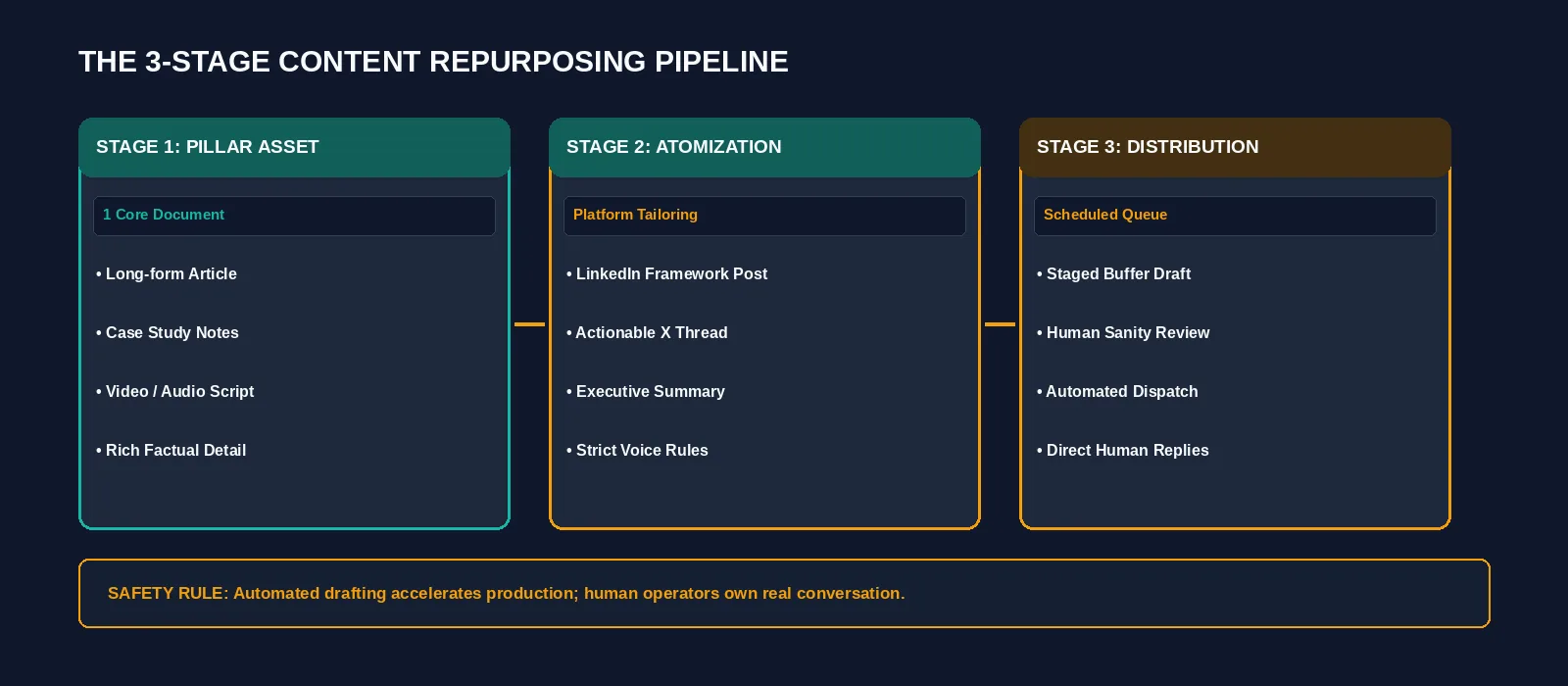
Figure 2: The atomization pipeline converting long-form articles into platform-native social updates. Credit: AI-generated illustration by Minute Mind AI.
| AI CONTENT REPURPOSING · PROMPT TEMPLATE |
|---|
| SYSTEM PROMPT: You are an executive content distribution specialist for Apex Solutions (Sample — replace with your business name). Repurpose the provided long-form article into one platform-native LinkedIn post. Formatting Rules: SOURCE TEXT: |
To see how automated repurposing connects with customer acquisition and outbound communication, read our teardown of 10 AI Workflow Automation Examples for Small Teams.
Step 3: Schedule and Auto-Publish Safely
Once copy is drafted, pipe the text into your scheduling tool as a Draft rather than setting it to publish automatically:
- 1. Staging Approval Queue: Direct your automation to create a draft post in Buffer or Publer.
- 2. Review Formatting: Inspect platform-specific previews. Verify line breaks on mobile displays and ensure that tagged profile handles are correct.
- 3. Queue Distribution: Approve the draft into your posting schedule. Stagger updates so you do not flood networks simultaneously.
Step 4: Review Performance and Iterate
Every two weeks, review analytics inside your scheduler to identify top-performing content patterns:
- Track Engagement Velocity: Identify which hooks generated the highest comment counts and click-through rates.
- Double Down on Formats: If operational frameworks get clearly more engagement than general news summaries, adjust your weekly content calendar to emphasize actionable teardowns.
- Recycle Winning Insights: Take high-performing posts from three months ago, rephrase the opening hook, and queue them for future distribution.
How to Automate Social Media Posting With AI Without Sounding Robotic
The primary risk of social automation is audience detachment. When readers sense that a feed is entirely automated, trust drops immediately. To maintain an authentic executive voice:
- Inject Specific First-Party Data: Mention concrete project metrics, anonymized operational numbers, and direct quotes from real business scenarios. Language models cannot invent genuine operational experience.
- Eliminate Formulaic AI Vocabulary: Ban overused words in your system prompts: ‘delve’, ‘game-changer’, ‘tapestry’, ‘supercharge’, ‘in today’s fast-paced world’.
- Show Up in the Comments: Set a 15-minute calendar reminder each day to personally reply to comments and engage with industry peers. Automated publishing combined with manual relationship building produces the highest return.
Tools to Build It: Free vs. Paid Stacks
You can assemble a dependable distribution stack across accessible budget levels:
• Buffer offers a free plan and paid plans priced per channel. Check its pricing page for current limits and rates.
• Publer offers a free tier and paid tiers. Check its pricing page for current limits and rates.
• Reasoning Model APIs: Connect a fast, low-cost model tier through the OpenAI API or the Anthropic API on pay-as-you-go terms to handle draft reformatting; check each pricing page for current model names and rates.
• Workflow Automation: Use Make (free plan; paid plans from roughly $9–$12/month billed annually) or Zapier (paid plans from $19.99/month) to route content from your CMS into scheduling queues. Confirm current plans on each page.
To explore how autonomous architectures expand from scheduled posting to multi-agent task execution, explore our explainer on What Is an AI Agent? A Plain-English Guide for Business.
Frequently Asked Questions
Can AI completely run my company’s social media?
No. AI models accelerate drafting, ideation, and reformatting, but successful social accounts depend on authentic industry perspectives, personal relationship building, and active comment engagement that cannot be outsourced to software.
What is the best AI social media scheduler for small teams?
Buffer and Publer are two simple options to compare for small teams. Larger teams with formal approval workflows may want to compare enterprise schedulers such as Hootsuite or Sprout Social.
Will auto-posting hurt my reach or engagement?
We could not find a platform statement that scheduled posts get less reach, and the networks do not publish their ranking rules in full, so test it on your own account. What readers respond to is the quality and relevance of the post, which is why the review step matters.
How do I prevent AI-generated social posts from sounding generic?
Provide clear negative constraints in your prompt, ground the copy in real-world business case studies, and spend two minutes editing the draft to inject your authentic voice before scheduling.
Conclusion: Start With One Repurposing Pipeline
You do not need to launch an elaborate five-platform campaign on day one. Start by building a single, reliable repurposing workflow: connect your company blog to an AI prompt node that drafts one weekly LinkedIn post, stage it in Buffer as a draft, and spend two minutes reviewing it before publishing.
Once that initial distribution pipeline runs consistently, expand into additional formats and publishing channels.
To understand how automated social media distribution fits into an overarching operational roadmap across marketing, sales, and customer support, explore our pillar guide: AI Automation for Business: The Complete 2026 Guide.
Was this article useful?
Thanks, that helps us decide what to write next.
Spotted a mistake? Report an error and we will fix it, with a dated correction note.