What Is an AI Agent? (And How Businesses Actually Use Them)
What AI agents are, how they differ from chatbots and traditional automation, and how businesses deploy them safely.


The term “AI agent” is rapidly replacing “chatbot” in pitch decks, software demos, and marketing campaigns.
So, what is an AI agent, exactly? Most vendors use the label to describe the exact same conversational interfaces they sold two years ago — it is not another customer chat window waiting for a user to type a prompt.
True AI agents represent an architectural shift from reactive models to autonomous execution systems. Instead of generating a single paragraph of text and waiting for human instructions, an agent perceives an environment, creates a multi-step execution plan, calls software tools to retrieve data, and iterates until it achieves an assigned business outcome.
Understanding that loop is what separates teams that get real time back from teams that just bought a more expensive chatbot.
What Is an AI Agent, in Plain English?
An AI agent is software that pairs a reasoning model with tools, memory, and a goal, then runs in a loop — perceiving, planning, acting, and checking its own work — until that goal is met or it hits a guardrail. It isn’t defined by which vendor’s logo is on the interface; it’s defined by that loop and the tools wired into it.
Quick Answer: AI Agents vs. Traditional Automation vs. Chatbots
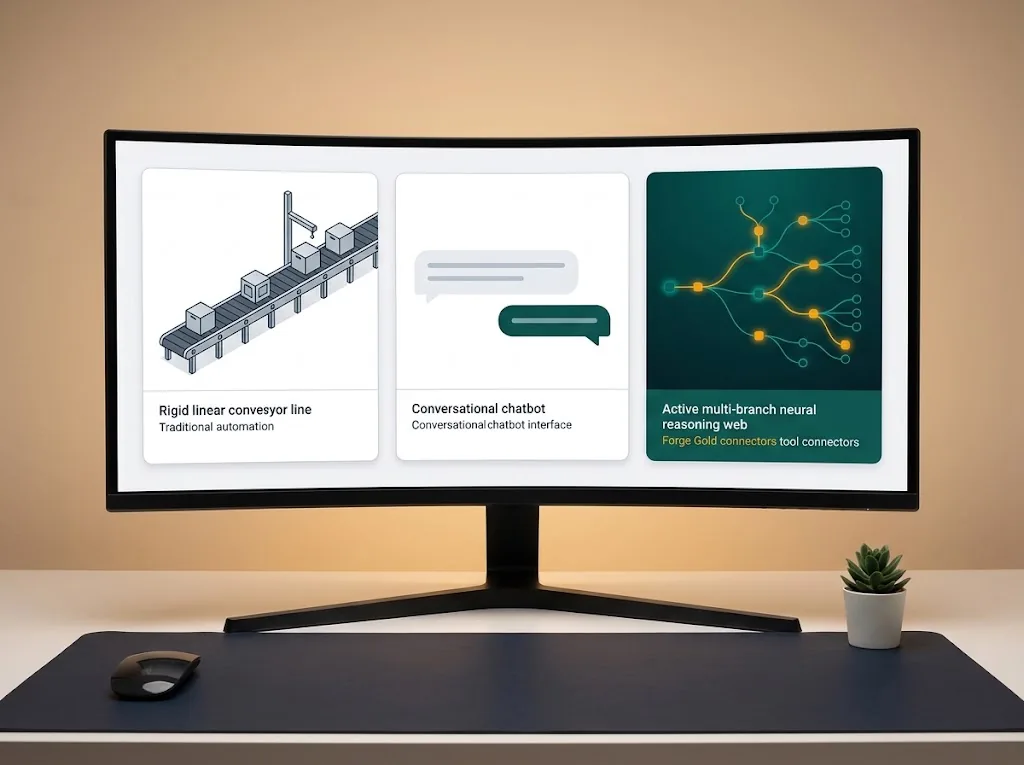
To understand where agents fit in your operations, contrast how these three technologies handle a messy business objective:
- Traditional Automation (Zapier / Make): Rigid and deterministic. If Step A happens, execute Step B. If incoming data lacks the expected structure, the workflow breaks immediately. Compare these builders in n8n vs Zapier vs Make: Which Wins in 2026?.
- A Bare Chat Window: Pure text-in, text-out. You provide a prompt, and the model generates a response based on its weights alone. Products like ChatGPT and Claude now ship with web search, code execution, and connector modes that call outside tools — but in a plain chat window with none of that switched on, the model still can’t browse your internal databases or take real-world actions without a human copy-pasting its output. The dividing line is tools, a loop, and a goal, not which product’s name is on the window.
- Autonomous AI Agents: Given an open-ended goal (e.g., “Find all past clients churned in Q3, determine why they left, and draft personalized win-back offers”), an agent dynamically decides which internal systems to search, uses API tools to fetch records, spots missing details, and evaluates whether its plan worked before notifying your team.
| Metric | Traditional Automation | Chatbot / Copilot | Autonomous AI Agent |
|---|---|---|---|
| Trigger Mechanism | Fixed webhook or static schedule | Human-typed prompt | Objective-driven or dynamic event |
| Logic Layer | Fixed Boolean rules (If/Then) | Static prompt completion | Multi-step reasoning & tool calling |
| Self-Correction | None (Fails on unhandled errors) | Manual re-prompting | Retries alternate steps upon failure |
| Tool Execution | Executes predefined endpoints | Text generation only | Dynamically selects & fires APIs |
The Anatomy of an AI Agent: How the Core Loop Works

Behind the marketing buzzwords, an autonomous agent consists of four interconnected systems executing in an active loop:
1. Perception & Inputs
The agent monitors data streams across your organization. This can be an incoming customer support ticket in Zendesk, an inventory deficit inside Shopify, or an unread thread in Slack.
2. The Planning Engine (Reasoning Core)
Using a reasoning foundation model (such as the current reasoning models from OpenAI or Anthropic), the agent breaks an abstract goal down into discrete sub-tasks:
- “Query internal documentation on return policies.”
- “Check customer purchase date in our order database.”
- “Evaluate whether the order qualifies for an exception.”
3. Tool Calling & Memory
LLMs cannot interact with the real world natively. Agents use structured Tool Calling (Function Calling) — see OpenAI’s and Anthropic’s official docs — to execute code, browse the web, or read external databases. Short-term memory tracks actions taken during the active session; long-term memory (often backed by a vector database like Pinecone) stores company policies, SOPs, and customer interaction logs.
4. The Action & Evaluation Step
The agent fires the external API call, inspects the returned payload, and asks itself: “Did this resolve the user’s objective?” If an API endpoint returns an error or incomplete parameters, an agent adjusts its query and tries again rather than throwing an exception.
Example: One Refund Request, Step by Step
A customer emails asking for a refund on a late order. Here is what the loop above looks like in practice:
- Perceive: The agent picks up the new ticket in the support queue and reads the customer’s order number.
- Plan: It breaks the goal into sub-tasks — check the order status, check the refund policy, check whether this customer has refunded before.
- Act: It calls the order-management API, pulls the shipping record, and queries the policy document for the late-delivery exception clause.
- Evaluate: The order qualifies. Rather than issuing the refund itself, the agent drafts the approval and posts it to the checkpoint described below, so a human clicks “Approve” before money moves.
Nothing here required a person to open five tabs and cross-reference them by hand — but nothing happened without a person signing off, either.
How Businesses Actually Deploy AI Agents in 2026
Forget fully autonomous sci-fi agents running entire enterprises without human supervision. Real businesses generate ROI by deploying domain-specific, constrained agents designed for targeted operational workflows.
1. Autonomous Research & SDR Agents
Account research eats a disproportionate share of an outbound rep’s week. Sales agents monitor company funding announcements, read corporate 10-K filings, analyze hiring boards on LinkedIn, and draft tailored briefing dossiers. See practical examples of lead workflows in our roundup of 10 AI Workflow Automation Examples for Small Teams.
2. Level-2 Technical Support Agents
Basic bots quote standard FAQ paragraphs. An agentic support bot actively investigates issues:
- Queries your production database via secure read-only APIs to check account status.
- Matches the issue against internal engineering post-mortems in Notion.
- Generates a step-by-step resolution tailored to the customer’s specific configuration.
- Escalates edge cases to senior staff with an annotated summary of actions already attempted.
3. Financial Reconciliation & Anomaly Detection
Finance agents continuously analyze bank account feeds, credit card receipts, and accounts payable databases inside tools like Xero or QuickBooks Online. When a recurring vendor charges 20% above contract rates, the agent identifies the discrepancy, pulls the original signed agreement, and drafts a billing inquiry email for finance approval.
The Core Guardrail: Keeping a Human in the Loop

The biggest risk in deploying AI agents is compounding drift—where an early reasoning mistake ripples through downstream API actions.
| 1. PerceptionInbound request | 2. ReasoningAgent plans & calls tools | 3. CheckpointHuman review in Slack | 4. ExecutionAction goes live |
|---|
To deploy agents safely without catastrophic operational risk:
- Grant Read-Access First: Let agents query databases, draft documents, and conduct investigations autonomously.
- Gate Destructive Actions Behind Approval: Never give an autonomous agent unmonitored write access to delete records, trigger financial disbursements, or dispatch unreviewed customer-facing emails. Require an operator to click an “Approve” badge in Slack or your CRM.
- Set Hard Loop Limits: Cap the agent’s maximum reasoning iterations — 5 steps is a reasonable starting point, not an industry standard — so an unexpected tool error does not spin into an infinite API loop burning computational credits.
If you are beginning your automation journey, master foundational, deterministic visual pipelines before introducing autonomous agents. Learn the complete framework in our primer on How to Automate Your Business With AI (No-Code, Step-by-Step).
Frequently Asked Questions
What is the difference between an AI agent and a chatbot?
A chatbot responds strictly to typed user prompts with text generation. An AI agent is given an overarching goal, formulates its own execution plan, dynamically selects software tools (APIs) to query records, and independently takes actions to accomplish that goal.
Do you need to write code to build an AI agent?
No. Platforms like Make, Zapier Agents, and n8n now provide visual agentic modules that support tool calling, vector memory retrieval, and LLM reasoning loops without programming knowledge.
What are the primary business risks of autonomous agents?
The main risks include model hallucinations leading to inaccurate data entry, infinite looping caused by broken API endpoints, and unauthorized actions taken on sensitive client data. These are mitigated by bounding permissions and requiring Human-in-the-Loop review for irreversible actions.
The loop is the whole trick: perceive, plan, act, check, and hand control back to a person at the one moment that matters. Get that handoff right and an agent will run your existing procedures faster than any team could by hand; get it wrong and it will run them wrong just as fast. To build an end-to-end organizational roadmap that incorporates both linear automations and intelligent agents, read our comprehensive anchor guide: AI Automation for Business: The Complete 2026 Guide.
Related Reading
- How AI Is Changing Auditing: What Every Auditor Should Know: a regulated field where agents are being tested.
Was this article useful?
Thanks, that helps us decide what to write next.
Spotted a mistake? Report an error and we will fix it, with a dated correction note.