How to Automate Email Marketing With AI (Step by Step)
How small teams can segment subscriber lists, draft context-aware copy, and trigger high-converting sequences without a full-time copywriter.

How small teams can segment subscriber lists, draft context-aware copy, and trigger high-converting sequences without a full-time copywriter.
For lean marketing teams and small business operators, email remains a cornerstone channel for scalable customer acquisition and retention. However, maintaining consistent campaigns manually is an operational bottleneck. Learning how to automate email marketing with ai allows you to deliver timely, relevant messages to your audience without spending hours drafting copy or managing spreadsheets.
Most businesses treat email marketing as a blunt broadcast tool: they blast the exact same newsletter to their entire list once a week and experience gradual open rate decay. Enterprise brands counter this by assigning dedicated teams to build complex behavioral funnels and multivariate testing pipelines. Small teams rarely have the headcount for that level of manual administration.
You do not need an enterprise budget or a full-time copywriter to run intelligent email campaigns. By pairing modern email service providers with language model APIs, you can cluster subscribers based on intent, generate context-aware draft copy, and schedule self-optimizing nurture sequences. This step-by-step guide explains the architecture, the tools, and the technical deliverability guardrails required to keep your domain out of the spam folder.
Note: Test every sequence on a small internal list before it goes to real subscribers.
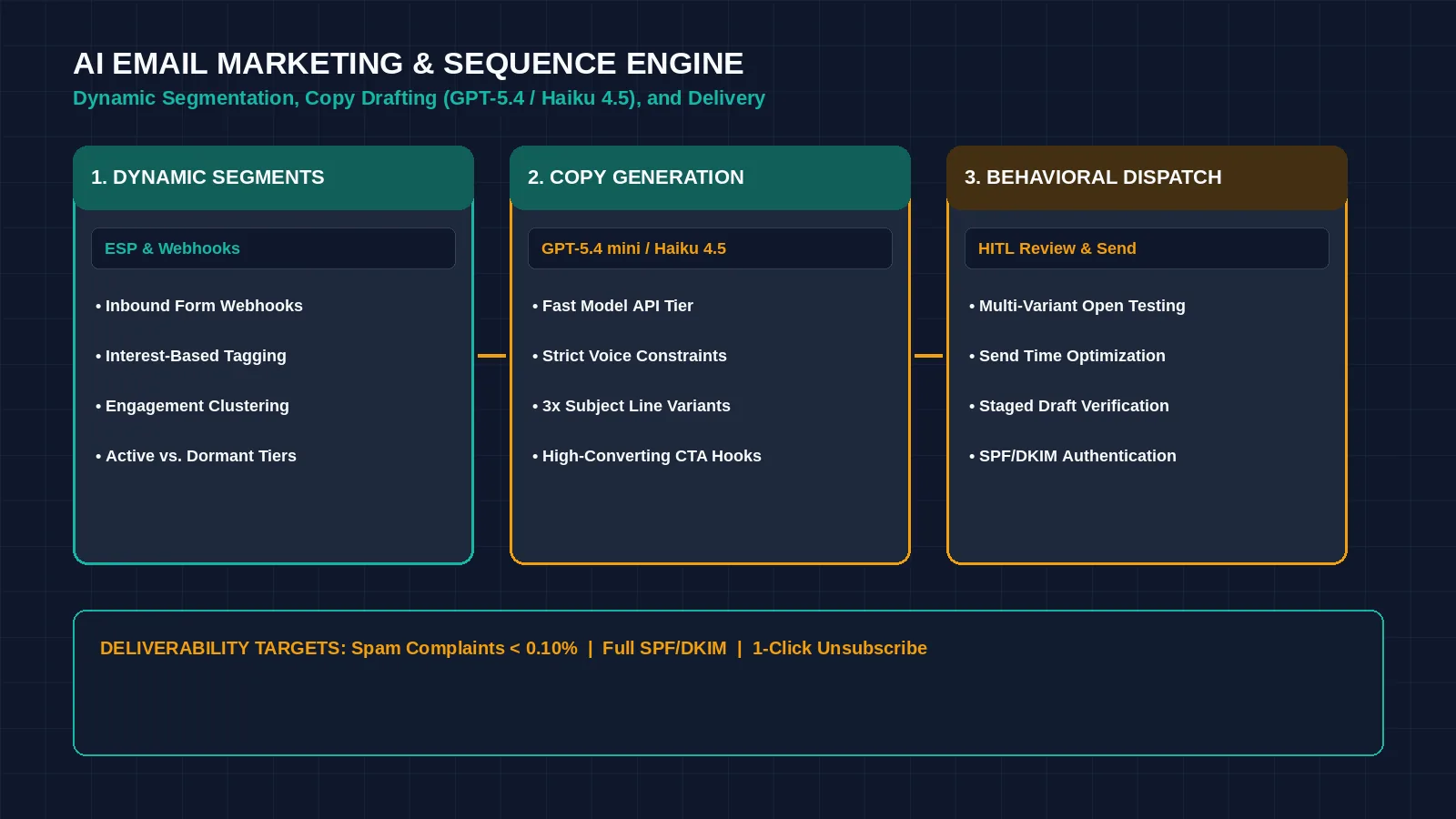
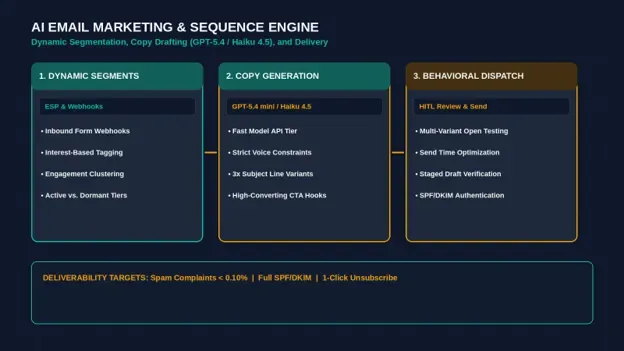
Figure 1: AI-powered email automation transitions campaigns from static weekly blasts to intelligent behavioral sequences. Credit: AI-generated illustration by Minute Mind AI.
What Changes When You Automate Email Marketing With AI
Automating email marketing with artificial intelligence does not mean setting a script loose to send unchecked messages to your customer list. True automation applies language model reasoning to three specific bottlenecks: list segmentation, draft generation, and behavioral send timing.
1. Dynamic Behavioral Segmentation
Instead of manually updating static lists, automated workflows track how subscribers interact with your content—which links they click, how frequently they visit high-intent web pages, and when their activity cools off. The system continuously shifts subscribers into relevant micro-segments.
2. Context-Aware Copy and Variant Generation
Rather than drafting from scratch, you can deploy structured prompt templates to generate tailored email drafts, value propositions, and concise subject line variations focused on specific customer pain points.
3. Predictive Send Time Optimization
Instead of guessing whether Tuesday morning is the ideal broadcast window, machine learning models analyze each recipient’s historical inbox activity to deliver messages when they are most active.
The Core Tech Stack: What You Need to Start
To build an automated email workflow, you need an email service provider (ESP) with native webhook support, an automation router, and a language model API.
| Stack Component | Recommended Options | Operational Role |
|---|---|---|
| Email Service Provider (ESP) | Kit, Klaviyo, or ActiveCampaign | Manages subscriber records, tracks engagement events, and handles inbox delivery. |
| Reasoning Model API | GPT-5.4 mini or Claude Haiku 4.5 | Generates draft variants, analyzes feedback sentiment, and structures campaign copy. |
| Workflow Connector | Make or Zapier | Passes webhook data between your website forms, CRM, and email platform. |
If you are evaluating which visual connector best coordinates your marketing stack, review our comparative analysis of n8n vs Zapier vs Make: Which Automation Tool Wins in 2026?.
Step 1: Segment Your Subscriber List With AI
The effectiveness of an email campaign is tied to its relevance. Blasting a promotional discount to a lead who just booked a strategic consultation damages brand credibility. To configure automated segmentation without running manual database queries:
- 1. Establish Engagement Tiers: Group subscribers into dynamic buckets based on activity over 60-day cycles: Active Subscribers (regular opens and clicks), Warm Leads (recent website visits), and Dormant Contacts (zero activity for 45+ days).
- 2. Cluster by Topic Interest: When a subscriber clicks a specific link on your site (for example, a technical guide on CRM architecture), trigger a webhook to your email tool applying an interest tag.
- 3. Route Incoming Leads by Fit: If you capture inbound inquiries on your website, pipe the responses through an automated qualification node. High-intent leads route directly into a personalized sales pipeline, while exploratory contacts join your educational newsletter sequence.
Step 2: Draft Dynamic Copy and High-Converting Subject Lines
Writing original campaign copy from a blank page creates unnecessary friction. You can use foundation models to accelerate initial drafting while maintaining complete editorial control. Supply explicit constraints, target persona details, and strict length parameters:
| AI EMAIL NURTURE GENERATOR · PROMPT TEMPLATE |
|---|
| SYSTEM PROMPT: You are an executive email copywriter for a B2B operations platform. Write a 3-part email nurture sequence for newly registered trial users. Audience: Small business owners and operations managers. Sequence Blueprint: Formatting Constraints: |
The Human-in-the-Loop Copy Review
Treat language models as a junior drafting assistant, not an autonomous publisher. Before loading copy into your automated flows, spend five minutes verifying whether the model generated inaccurate features, whether the voice matches your brand, and whether all call-to-action links resolve correctly.
Step 3: Build Automated Multi-Stage Email Sequences
Once your copy is reviewed, assemble your sequences inside your email automation canvas. Prioritize three foundational workflows:
1. The Onboarding / Welcome Sequence
Triggered when a new subscriber signs up or confirms their email address. A 3 to 4 email series over 7 days delivers promised assets, outlines your philosophy, and prompts direct replies.
2. The Behavioral Nurture Sequence
Triggered when a subscriber visits a specific service page multiple times within 5 days without converting. A 2-part sequence shares relevant case studies and offers a diagnostic call.
3. The Re-Engagement / Sunset Flow
Triggered when a subscriber has not opened an email in 60 days. A concise 2-step check-in verifies whether they wish to stay subscribed, preserving sender reputation.
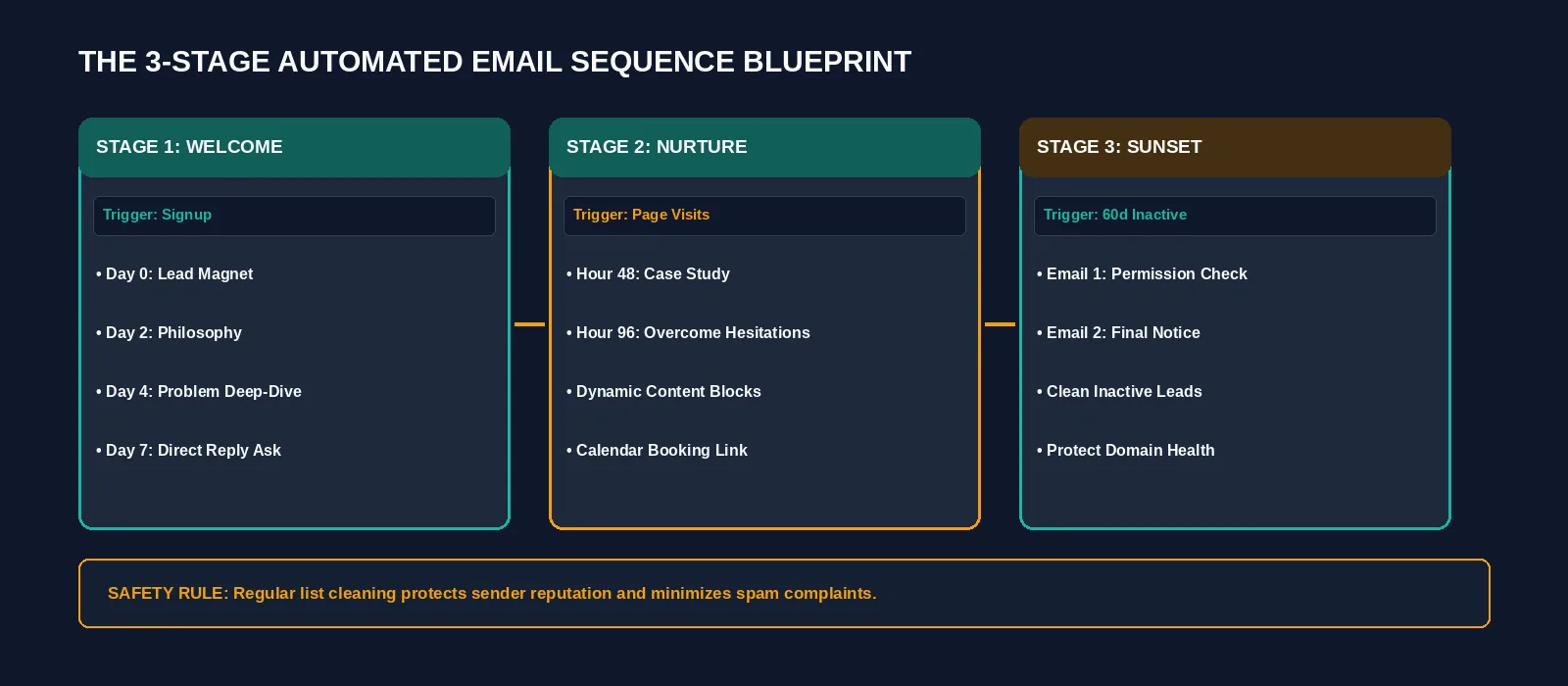
Figure 2: Strategic email sequence architecture routing subscribers based on behavioral engagement checkpoints. Credit: AI-generated illustration by Minute Mind AI.
For additional real-world workflow architectures across operations and customer support, explore our guide on 10 AI Workflow Automation Examples for Small Teams.
Step 4: Optimize Send Timing and A/B Testing
Traditional A/B testing often requires large subscriber pools to reach statistical significance. Modern email platforms accelerate optimization through algorithmic testing models that evaluate subject line variants across an initial sample (e.g., 10% to 20%) and automatically deploy the winning variant to the remaining recipients.
| Testing Dimension | Traditional Manual Testing | AI-Assisted Testing |
|---|---|---|
| Subject Lines | Test 2 static variants; manual evaluation. | Tests 4-6 dynamic variants; auto-deploys winning angle. |
| Send Timing | Static batch blast (e.g., Tuesday 9 AM). | Individualized delivery timed to recipient activity windows. |
| Content Blocks | Static global content across the list. | Modular sections adapted based on subscriber interest tags. |
Deliverability, Compliance, and Spam Guardrails
An automated email sequence is ineffective if messages fail to reach the inbox. Major mailbox providers strictly enforce sender requirements that every automated sender must adhere to:
1. Mandatory Domain Authentication (SPF, DKIM, DMARC)
Sending business marketing campaigns from consumer @gmail.com or @yahoo.com addresses severely harms delivery rates. You must authenticate your custom sending domain with three DNS records, as outlined in the official Google Email Sender Guidelines:
- SPF (Sender Policy Framework): Authorizes specific IP addresses and servers to send mail on behalf of your domain.
- DKIM (DomainKeys Identified Mail): Adds a cryptographic digital signature verifying that email headers have not been altered in transit.
- DMARC (Domain-based Message Authentication): Defines how receiving mail servers should treat messages that fail SPF or DKIM checks.
2. Legal Privacy Compliance (CAN-SPAM & GDPR)
In accordance with the FTC CAN-SPAM Act Compliance Guide, every commercial email needs a clear way to opt out, your valid physical postal address, and accurate header information, and opt-out requests must be honored within 10 business days. Google separately requires one-click unsubscribe for bulk marketing senders (see below).
3. Maintain Low Spam Complaint Thresholds
Google’s sender guidelines FAQ tells bulk senders (roughly 5,000 or more messages a day to Gmail accounts) to keep the user-reported spam rate below 0.1% and never let it reach 0.3%, and to offer one-click unsubscribe on marketing messages. Smaller senders are not held to the bulk rules, but the same habits protect your reputation. Routinely clean your subscriber database using list hygiene tools to eliminate invalid, bounced, or dormant addresses.
Tools to Build It: Free vs. Paid Stacks
You can launch an automated email workflow across multiple budget levels:
• Email Service Provider: Kit has a free plan for basic broadcasts, while visual automations and email sequences start on its paid Creator plan ($33 a month for 1,000 subscribers, checked October 2026), while Klaviyo and ActiveCampaign provide advanced behavioral automation.
• Reasoning Model APIs: Connect fast lightweight model tiers like GPT-5.4 mini via the OpenAI API or Claude Haiku 4.5 via the Anthropic API on pay-as-you-go terms.
• Workflow Connectors: Make’s free plan includes 1,000 credits a month, while Zapier Professional starts from $19.99 a month (task tier varies, checked October 2026).
Frequently Asked Questions
Can AI write marketing emails that convert?
Yes, provided you give the model explicit parameters, audience context, and clear value propositions. Language models excel at drafting structural variations, compelling hooks, and concise value points. However, final review remains essential to verify that tone and promises match your operational reality.
What is the best AI email marketing tool for small teams?
For creators and consultants, Kit offers visual automations and sequences on its paid plans. For e-commerce storefronts, Klaviyo is built around segmentation and analytics for online stores. For B2B service firms, ActiveCampaign offers pipeline and CRM add-ons alongside its email automation. Check each vendor’s current plan table before you choose.
Will AI-generated marketing emails land in the spam folder?
Mailbox providers’ published sender guidelines focus on authentication, spam-complaint rates and unsubscribe handling rather than on how a message was written. Inbox placement is driven mainly by technical authentication (SPF, DKIM, DMARC), overall sender domain reputation, bounce rates, and user engagement metrics such as opens and replies.
Do I still need to edit AI-generated emails manually?
Yes. Maintaining a human review step ensures that company facts remain accurate, technical links resolve properly, and the communication sounds authentic rather than formulaic.
Conclusion: Start With a Single Automated Welcome Flow
You do not need to build an intricate, thirty-step behavioral matrix to benefit from email automation. Begin by automating your single highest-leverage touchpoint: your welcome sequence. Draft a 3-part introductory flow using structured prompts, configure your domain authentication records, and review subscriber engagement over your next 50 signups.
Once your onboarding sequence functions reliably, expand into behavioral nurture sequences and re-engagement campaigns.
To see how automated email marketing connects into a comprehensive organizational roadmap covering sales, operations, and support, explore our pillar guide: AI Automation for Business: The Complete 2026 Guide.
Was this article useful?
Thanks, that helps us decide what to write next.
Spotted a mistake? Report an error and we will fix it, with a dated correction note.