AI Lead Generation for Small Business: A No-Code Guide
How small teams can capture, score, and follow up with qualified sales leads automatically without writing code or hiring developers.

How small teams can capture, score, and follow up with qualified sales leads automatically without writing code or hiring developers.
For an independent firm or small sales team, chasing prospective clients across scattered email inboxes and manual forms is an exhausting operational bottleneck. Setting up an ai lead generation for small business system removes this friction by connecting your public intake channels directly to intelligent reasoning models that evaluate inquiries around the clock.
Enterprise sales organizations deploy custom engineering teams and spend thousands of dollars every month on predictive data platforms. Lean operators do not need that level of complexity. Most online advice offers vague platitudes about how artificial intelligence accelerates growth while hiding the practical plumbing required to capture and convert a customer.
This guide delivers a concrete, reproducible blueprint. You will learn how to connect no-code automation platforms with foundation models to capture incoming prospects 24/7, score them against an Ideal Customer Profile (ICP), update your CRM, and stage personalized follow-up drafts without writing code.
Note: This blueprint was compiled using official platform documentation and verified API specifications. We recommend validating the sequence with mock submissions in a staging environment before routing live customer data through your production CRM.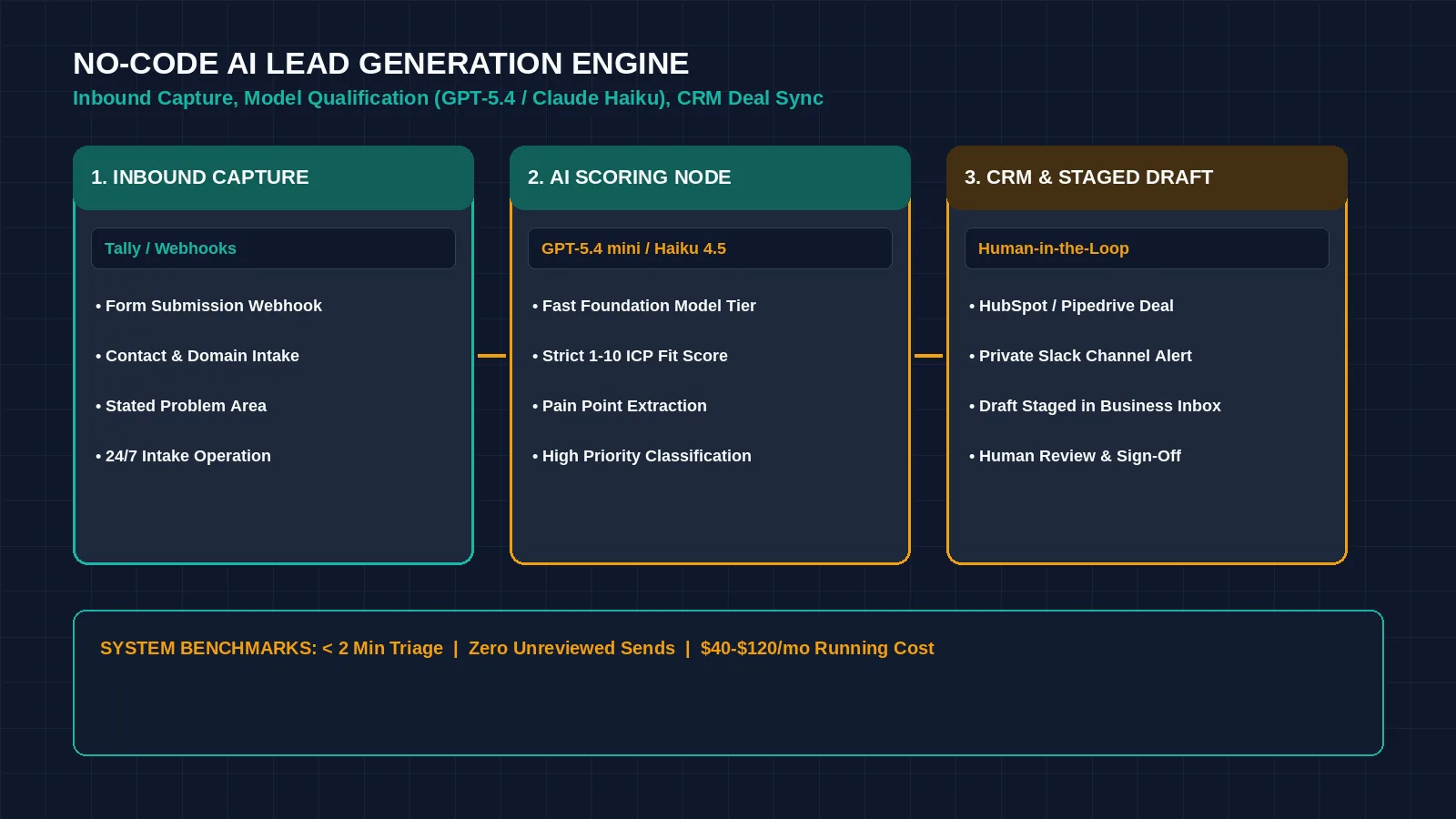
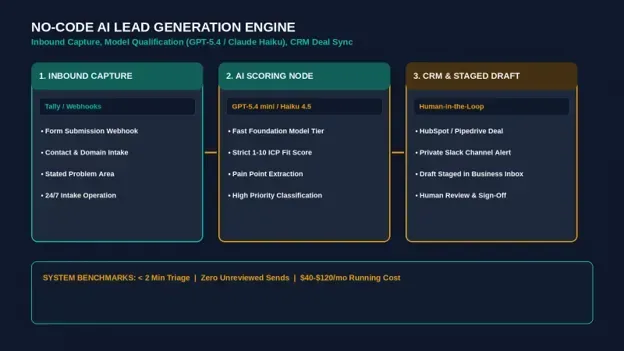
Figure 1: An automated no-code lead engine eliminates manual qualification drag for lean sales teams. Credit: AI-generated illustration by Minute Mind AI.
What AI Lead Generation for Small Business Actually Means
In practical operations, AI lead generation is the integration of visual software triggers with language model reasoning nodes to automate prospect capture, qualification, and follow-up.
1. Intake Latency
Imagine a qualified prospect filling out a website contact form on Friday evening and waiting until Monday morning for a reply, by which time their buying urgency has dropped.
2. Manual Research and Vetting
Imagine a founder spending valuable hours on every single form submission clicking through public websites and directories just to confirm whether the inquiry has an actual budget.
3. Generic Communication
Time-constrained teams frequently default to standardized, robotic auto-responders that fail to address the prospect’s specific operational challenges.
An automated system resolves all three points of friction. It reads the unstructured text submitted through your forms, evaluates the inquiry against objective scoring criteria in moments, updates your pipeline, and stages a contextual, human-sounding reply ready for an operator’s approval.
AI Lead Gen vs. Plain Marketing Automation
Traditional marketing automation relies strictly on deterministic Boolean logic: If This, Then That. For instance, a traditional automation rule might specify: ‘If the user selects Budget > $10,000 from the dropdown, mark lead as High Priority.’
- Imagine a serious buyer typing ‘We have an urgent $30k migration project starting next Tuesday’ into a general comments box — traditional automation cannot parse that freeform sentence into a numerical budget tier.
- Imagine an overseas agency selecting the highest budget dropdown tier simply to pitch outsourced services — a static rule incorrectly flags that solicitation as a VIP buyer.

Figure 2: Plain deterministic automation rules vs. semantic lead qualification. Credit: AI-generated illustration by Minute Mind AI.
AI lead generation introduces an inference layer. The model reads freeform sentences, identifies semantic intent, detects buyer urgency, extracts missing variables, and evaluates whether the prospect matches your business offerings. If you are deciding which core workflow engine best coordinates this logic, compare your options in our analysis of n8n vs Zapier vs Make: Which Automation Tool Wins in 2026?.
The Workflow You’ll Build (System Architecture)
Before assembling individual applications, review the end-to-end architecture across a single operational canvas:
| Pipeline Stage | Core Component | Operational Action | Governance / Output |
|---|---|---|---|
| Stage 1: Capture | Web Form / Interactive Intake | Collects name, work email, domain, and open-text challenge 24/7. | Fires instant webhook payload to workflow builder. |
| Stage 2: AI Scoring | GPT-5.4 mini / Claude Haiku 4.5 | Evaluates inquiry against ICP rules and assigns a 1–10 fit score. | Outputs structured JSON attributes. |
| Stage 3: CRM Routing | Conditional Router | Splits high-priority deals (Score 7–10) from low-intent inquiries. | Creates CRM deal and posts team alert in Slack. |
| Stage 4: Follow-Up | Draft Generator (HITL) | Writes a tailored 3-paragraph reply referencing the stated bottleneck. | Stages draft in Gmail/Outlook for human approval. |

Figure 3: The 4-stage sequential lead qualification pipeline routing parsed form entries into CRM deals. Credit: AI-generated illustration by Minute Mind AI.
Step 1: Capture Leads (Form and Intake Setup)
Avoid lengthy 12-field forms that suppress conversion rates. Use a modern form builder like Tally or Typeform to capture four essential data points:
- Full Name and Work Email: Identifies the contact and provides a corporate domain for verification.
- Company Name and Website URL: Allows downstream nodes to verify the organization’s industry.
- Primary Operational Challenge (open text area): Gives the prospect space to describe their bottleneck in their own words, providing rich context for qualification.
- Estimated Implementation Timeline: A simple selector (Immediate, 1–3 months, Exploratory) that establishes urgency.
Pricing notes: Typeform Basic is $28/mo billed yearly (prices checked October 2026). Tally provides free unlimited forms, with webhook integration detailed in the official Tally Webhooks Documentation.
Step 2: Let AI Qualify and Score Them
Once an inquiry arrives via webhook, route the raw payload into an AI reasoning node inside Make or Zapier. Configure your prompt node using OpenAI’s latest lightweight tier like GPT-5.4 mini or Anthropic’s Claude Haiku 4.5 with strict evaluation instructions:
| AI QUALIFICATION NODE · SYSTEM PROMPT & JSON SCHEMA |
|---|
| SYSTEM PROMPT: You are an executive sales qualification assistant for a B2B operations consultancy. Analyze the incoming lead submission and evaluate it against our Ideal Customer Profile (ICP). ICP Criteria: INPUT DATA: OUTPUT FORMAT (Valid JSON Only): |
This structured JSON output converts freeform narrative text into clean database attributes that your CRM can route automatically. Always enable the JSON response toggle inside your API module so the model avoids conversational filler.
Step 3: Route Qualified Prospects into Your CRM
Branch A: High-Priority Opportunities (Score 7–10)
1. Create Deal Record: Automatically create an open deal in your CRM, such as HubSpot CRM or Pipedrive.
2. Enrich Deal Properties: Map the AI-extracted summary, score, and pain point into custom deal fields, eliminating the need for sales reps to decipher raw form submissions.
3. Instant Sales Alert: Dispatch a structured notification to your internal team channel in Slack mapped as follows:
| Slack Alert Field | Mapped Variable / Output Example |
|---|---|
| Alert Header | 🚨 New Qualified Lead: Apex Freight Solutions (Score: 9/10) |
| Primary Contact | David Vance (VP of Operations) |
| Identified Challenge | “Manual dispatch logging takes 18 hours per week across 4 coordinators.” |
| Strategic Angle | Focus on automated webhook intake and spreadsheet sync. |
| Action Button | Open Deal Record in HubSpot (Direct CRM Deal URL) |
Branch B: Nurture Leads (Score 5–6)
Prospects who match your target industry but selected an Exploratory timeline should not be discarded. Route them to a nurture sequence and invite them to read relevant case studies.
Branch C: Unqualified or Low-Intent Inquiries (Score 1–4)
Do not spend manual sales hours reviewing unsolicited vendor pitches or mismatched requests. Automatically log the contact under an archive tag, mark the record as Unqualified, and suppress sales notifications so your team stays focused on active buyers.
Step 4: Automate Personalized Follow-Up
Fast response times can improve the chance of booking discovery calls. However, generic canned templates erode buyer trust. Use a secondary AI step to generate an email draft that addresses the prospect’s stated problem directly:
| CONTEXTUAL FOLLOW-UP GENERATOR · PROMPT TEMPLATE |
|---|
| PROMPT: Write a concise, professional 3-paragraph reply to {{trigger.name}} from our managing director. – Acknowledge their specific bottleneck: {{ai_analysis.identified_pain_point}}. – Briefly state how our team addresses this problem without making unrealistic revenue guarantees. – Include an invitation to schedule an introductory 15-minute diagnostic call via our direct booking link. – Tone: Direct, pragmatic, executive-level. Strictly avoid corporate jargon and exclamation marks. |
The Critical Guardrail: Stage Drafts, Never Auto-Send
Never configure the automation to send this email to the prospect on complete autopilot. Instead, configure the workflow to create a Draft Email inside your business inbox on Google Workspace or Microsoft Outlook.
Imagine an account executive opening the drafted email, taking a brief moment to verify that the prospect’s details and industry context are accurate, making minor tone adjustments, and clicking ‘Send.’ This preserves full human oversight while eliminating drafting friction. For a deeper breakdown of safe execution models, review How to Automate Your Business With AI (No-Code, Step-by-Step).
Worked Example: End-to-End Lead Flow for a 5-Person Agency
- 1. The Submission (Step 1): At 7:15 PM on a Tuesday, an operations director at a regional logistics firm submits your form, writing: ‘Our four dispatchers spend nearly 20 hours a week copying load sheets into spreadsheets, and errors are costing us client penalties. Looking to fix this within 30 days.’
- 2. The AI Evaluation (Step 2): Your workflow platform catches the webhook and passes the text to a fast model node running GPT-5.4 mini. The model recognizes a multi-employee B2B company, a concrete operational pain point, and an immediate 30-day timeline, returning fit_score: 9 and qualification_tier: High Priority.
- 3. The CRM & Slack Handoff (Step 3): The workflow creates a deal in HubSpot under the Discovery Qualified stage, populates the summary field, and alerts the agency’s #sales-alerts Slack channel.
- 4. The Human-Verified Reply (Step 4): A second model node drafts a three-paragraph reply referencing load-sheet extraction and stages it in the founder’s Gmail Drafts folder. The founder reviews the draft, confirms the booking link, and sends a tailored response shortly after submission.
Tools to Build It: Free vs. Paid Stacks
| Stack Component | Free / Starter Stack ($0–$30/mo) | Scaling Business Stack ($75–$200/mo) |
|---|---|---|
| Form Intake | Tally Free Tier (Free unlimited forms) | Typeform Basic ($28/mo billed yearly, checked Oct 2026) |
| Workflow Engine | Make Free (1,000 credits/mo) | Zapier Professional (from $19.99/mo; task tier varies, checked Oct 2026) |
| Reasoning Model | GPT-5.4 mini via OpenAI API (pay-as-you-go) | Claude Haiku 4.5 via Anthropic API (pay-as-you-go) |
| CRM Destination | HubSpot Free CRM | HubSpot Starter or Pipedrive |
| Outbound Email | Google Workspace ($7/user/mo billed yearly) | Google Workspace + Native CRM Email Sync |
To review more production-ready workflows mapped across different departments, read our teardown of 10 AI Workflow Automation Examples for Small Teams.
What AI Lead Generation for Small Business Costs, Realistically
The ongoing monthly operating cost for a small business falls into predictable software tiers:
- Workflow Automation Platform (Make or Zapier): $9 to $50 per month depending on execution volume. Make charges per operation, whereas Zapier charges per completed task. Processing 200 to 500 leads monthly comfortably fits within entry-level plans.
- Model API Usage: Processing a typical form inquiry (roughly 500 input tokens and 250 output tokens) on a small model tier is a fraction of a cent. For example, Claude Haiku 4.5 is priced by Anthropic at $1 per million input tokens and $5 per million output tokens (checked October 2026), which works out to about $0.00175 per submission, or roughly $1.75 per 1,000 scored leads. Rates differ by model, so check your provider’s pricing page before budgeting.
- CRM & Email Platform: $0 to $100 per month, depending on whether your business utilizes free CRM tiers or paid user seats.
In total, a small business can run an automated lead qualification engine for $40 to $120 per month in total software expenditure.
Where AI Gets It Wrong (And How to Set Guardrails)
1. Define an Objective ICP
If you instruct a model to determine whether a prospect is ‘qualified’ without explicit criteria, it will invent arbitrary standards. You must specify required industries, minimum team sizes, geographic restrictions, and clear negative disqualifiers inside your system prompt.
2. Prevent Hallucinated Company Backgrounds
Never ask a model to guess a business’s revenue or head count based purely on its domain name. Restrict the scoring model’s evaluation strictly to the verified information provided in the user’s form submission or a connected enrichment tool.
3. Enforce Human-in-the-Loop Sign-Off
Allowing an automated model to draft and immediately send sales emails without manual review creates unnecessary liability. Always require a human operator to verify staged drafts before dispatch.
For a strategic look at how autonomous decision-making expands beyond linear qualification rules, read our architectural guide on What Is an AI Agent? A Plain-English Guide for Business.
Frequently Asked Questions
Is AI lead generation worth it for a small business?
Yes, because it eliminates response latency and administrative data entry. A small business that replies to qualified inquiries with personalized context shortly after submission is more likely to keep a prospect’s attention than one that waits days for a manual reply.
How much does an automated lead generation workflow cost to run?
For most small teams processing several hundred inquiries per month, the total software overhead ranges between $40 and $120 per month across no-code workflow builders, form software, and pay-as-you-go model API tokens.
Can AI completely replace a salesperson?
No. Artificial intelligence replaces administrative lead qualification, data entry, initial research, and draft preparation. High-value B2B sales still require human conversations to establish personal trust, navigate organizational requirements, and negotiate agreements.
Do I need an existing lead list to use this system?
No. This inbound architecture qualifies prospects who discover your business through search, social content, or marketing campaigns. It converts incoming web traffic into structured sales opportunities without requiring scraped cold lists.
Marketing automation vs. AI lead gen — what is the core difference?
Traditional marketing automation runs static ‘if-then’ rules on structured parameters, such as checking form dropdown fields. AI lead generation uses language models to interpret unstructured text, understand buyer intent, evaluate fit, and draft contextual replies.
Conclusion: Build Your Lead Qualification Pipeline First
You do not need to overhaul your entire sales tech stack on day one. Start with the single highest-leverage step: connect your existing website contact form to an LLM scoring prompt in Make or Zapier, route the JSON score into an internal Slack channel, and compare the AI’s 1–10 ratings against your own judgment over your next 20 inbound inquiries. Once the scoring rubric aligns with your real buyer criteria, turn on automated Gmail draft generation.
To see how automated lead qualification connects into a broader operational roadmap covering customer support, finance, and back-office workflows, read our complete pillar guide: AI Automation for Business: The Complete 2026 Guide.
Was this article useful?
Thanks, that helps us decide what to write next.
Spotted a mistake? Report an error and we will fix it, with a dated correction note.