11 Best AI Budgeting Apps to Save Money in 2026
Eleven AI budgeting apps compared on features, pricing, pros and cons, plus how to pick the right one.
Finding the best AI budgeting apps in 2026 is harder than it should be. Almost every finance app now puts an “AI” label on its homepage, even when it still runs on the same basic rules it used ten years ago. The real test is simple: can the app predict a cash shortfall, answer a plain-English question about your spending, or learn from your corrections instead of repeating the same mistake? Below, we compare 11 apps on three things — predictive forecasting, natural-language chat, and categorization that actually improves over time — so you can see which ones deliver real AI and which one fits your situation best.
How We Evaluated These Apps
We compared publicly available pricing, features, and user reviews for each app, checked directly against each company’s own site as of September 2026, and scored them on three things: how well they forecast upcoming cash flow, how naturally you can ask them questions in plain English, and how much their categorization improves as you correct it. Pricing and features change often, so confirm current details on each company’s site before you subscribe.
Quick Answer
Copilot Money is the top pick for Apple users who want great design and machine learning that adapts to how you spend, especially with Apple Card. If subscriptions and high bills are your problem, Rocket Money can help cancel or negotiate them. For all-in-one planning — budgeting plus tax and 401(k) tracking — Origin offers the most complete package. Couples juggling joint and separate accounts should look at Monarch Money for premium features, or Honeydue for a free option.
What Actually Makes a Budgeting App “AI”?
Most financial software runs on fixed rules: if the data matches a pattern, it takes a preset action. Real AI does more — it reads messy, real-world transaction data, gets more accurate the more you use it, and talks to you in plain language. Before you commit to an app, it helps to know what AI can and can’t do for your money, so you go in with realistic expectations.
- Natural-Language Q&A: Basic apps make you click through several menus to find a spending chart. AI apps let you type a question — “How much did I spend on Uber this weekend versus last weekend?” or “Is my PG&E bill higher than usual?” — and get a clear answer back.
- Predictive Forecasting: Basic apps show you what you already spent. AI apps look at your cash flow patterns, catch irregular bills, and can warn you before an account might overdraft.
- Contextual Categorization: Basic apps tag “Target” as groceries every time. AI apps weigh the amount and your past corrections to guess whether that Target run was groceries, home goods, or something else.
Is It Safe to Connect Your US Bank Account?
Handing a third-party app access to your checking account can feel risky. In practice, most budgeting apps never touch your money directly — they only read your data.
Read-Only Architecture
Most budgeting apps connect to your bank through data aggregators like Plaid, Yodlee, or Finicity. These services act as a one-way bridge: the app can see your balances and transactions, but it cannot move money, make payments, or withdraw funds.
Encryption and Regulation
Legitimate budgeting apps encrypt your data with AES-256 and TLS — the same standards banks and federal agencies use. There’s also a federal rule in progress: the CFPB’s Personal Financial Data Rights rule (under Section 1033 of the Dodd-Frank Act) would give you a clear legal right to share your banking data without handing over your login.
As of September 2026, that rule is on hold. A federal court has blocked the CFPB from enforcing it, and the agency itself has asked the court to strike the rule down while it writes a replacement. Check the CFPB’s own Section 1033 rulemaking page for the current status before treating it as active law. In practice, your protection today comes mainly from the read-only architecture described above, not from this rule.
Data Privacy
Look at how an app makes money before you connect your accounts. Apps that charge a subscription usually rely on that fee for revenue rather than your data — though it’s worth checking each app’s specific privacy policy rather than assuming. Free apps with no paid tier often make money by selling anonymized spending data to marketing companies, so read the privacy policy before connecting a fully free app.
The 11 Best AI Budgeting Apps, Ranked
Cleo
What it is: A chat-based AI money assistant that jokes about — or hypes up — your spending.
Best for: Conversational budgeting and gamified saving, especially for younger users.
Key AI feature: Cleo’s chatbot answers spending questions in plain English and switches tone from sarcastic (“Roast Mode”) to encouraging (“Hype Mode”).
Pricing:
- Free tier: core budgeting, Roast/Hype modes, and savings games.
- Plus: $5.99/month — cash advances up to $250 and US credit-score tracking.
- Pro: $8.99/month — advanced coaching and a high-yield savings option.
- Builder: $14.99/month — a secured credit-builder card and $500 advance limits.
Source: meetcleo.com pricing — verified September 2026.
Pros:
- The playful tone keeps people engaged who usually give up on traditional budgeting apps.
- Savings games help build a first emergency fund.
- Cleo’s own marketing says its subscription-cleanup feature saves users about $180 a year on average. That figure comes from Cleo, not an independent study, so treat it as an estimate rather than a guarantee.
Cons:
- Instant cash advances cost $3.99–$11.99, a steep fee relative to the small amounts advanced.
- Auto-categorization can be inconsistent — it sometimes tags Venmo transfers as spending.
Rocket Money
What it is: A tracker built around finding and killing recurring charges.
Best for: Subscription tracking and automated bill negotiation.
Key AI feature: Automatic detection of recurring bills, including ones you forgot about or that are about to jump in price.
Pricing:
- Free tier: unlimited account connections and subscription detection.
- Premium: $7–$14/month — you choose your price on a sliding scale.
- Bill negotiation: a 35–60% fee on your first year of savings, charged only if it succeeds.
Source: rocketmoney.com pricing — verified September 2026.
Pros:
- The concierge team will cancel unwanted subscriptions for you, from old gym memberships to forgotten streaming bundles.
- Free-tier users often find $30–$50 a month in forgotten subscriptions, according to Rocket Money — actual results depend on your own subscriptions.
- Rocket Money’s own marketing cites a 90% success rate on bill negotiation. That figure comes from the company, so treat it as marketing; results vary by provider, especially with US internet and cable companies like Spectrum and Xfinity.
Cons:
- The free tier caps you at two custom budget categories.
- Negotiation fees are charged as one lump sum up front — for example, a $120 fee on $300 in projected first-year savings — so you pay before you’ve actually banked the savings.
Copilot Money
What it is: A premium, well-designed financial tracker built only for the Apple ecosystem.
Best for: Apple users who care about design and want machine-learning accuracy.
Key AI feature: Machine-learning categorization that adapts to your custom tags and learns your spending patterns automatically.
Pricing:
- $13/month or $95/year, with a one-month free trial and no permanent free tier.
Source: copilot.money pricing — verified September 2026.
Pros:
- One of the best-designed iOS apps in the category, with widgets, Apple Watch support, and a native Mac app.
- Strong Apple Card integration, pulling in real-time data that many competitors miss.
- Solid investment tracking (including 401(k) and brokerage accounts) alongside daily expense tracking.
Cons:
- No native Android app. It runs on iPhone, iPad, Mac and the web.
- No support for joint accounts or multiple logins, which makes it a poor fit for couples.
Monarch Money
What it is: A customizable financial dashboard built to show your whole household’s net worth and cash flow in one place.
Best for: Couples managing household finances, and anyone tracking net worth across several US institutions.
Key AI feature: Syncing that cleanly merges data from different institutions — from local credit unions to large brokerages like Fidelity — while flagging recurring subscriptions and removing duplicate pending transactions.
Pricing:
- Core: $14.99/month or $99.99/year, with a 7-day free trial.
- Monarch also offers a Plus tier at $199/year with deeper forecasting and business or rental-income tracking, for users who outgrow Core.
Source: monarch.com pricing — verified September 2026.
Pros:
- Joint account access lets partners collaborate with separate logins at no extra cost.
- You can tag your partner on specific transactions, which makes money check-ins easier.
- Highly customizable dashboard layouts and reporting charts.
Cons:
- No permanent free tier — only a 7-day trial.
- The subscription cost is a lot to pay for a single person with simple finances.
Origin
What it is: An all-in-one wealth platform that combines AI-powered budgeting with tax prep, estate planning, and investing.
Best for: People who want budgeting, investing, and tax planning under one subscription.
Key AI feature: A generative AI assistant called “Sidekick” that reviews your connected accounts and flags opportunities — for example, suggesting a dependent care FSA (a tax-advantaged account for child or dependent-care costs) to cut your federal tax bill, or ways to make the most of a Roth IRA.
Pricing:
- $99/year standard rate. Origin is currently running a promotion offering new users’ first year for $1 (confirmed active as of September 2026; Origin has run shorter versions of this promo before, so check the current terms).
Source: useorigin.com pricing — verified September 2026.
Pros:
- Includes free expert tax filing covering all 50 US states and itemized deductions.
- Offers automated index-ETF portfolios with no internal advisory fees. If you’re interested in growing wealth beyond day-to-day tracking, it’s worth reading how robo-advisors use AI for tax-loss harvesting (selling losing investments to offset gains at tax time).
- Generates ongoing recommendations tied to your financial health score and US tax bracket.
Cons:
- No permanent free tier — you’ll need to enter a card that auto-renews after the promo ends.
- The budgeting tool is less detailed than dedicated zero-based apps for strict manual trackers.
YNAB (You Need A Budget)
What it is: A disciplined app built entirely around the zero-based budgeting method.
Best for: Zero-based budgeting discipline and breaking the paycheck-to-paycheck cycle.
Key AI feature: Smart transaction matching that learns payee categorization, cutting down on manual entry.
Pricing:
- $14.99/month or $109/year, with a 34-day free trial.
Source: ynab.com/pricing — verified September 2026.
Pros:
- Its four rules change how you handle money by making you give every dollar a job before you spend it.
- Family sharing lets up to six people use the platform under one subscription.
- YNAB cites its own internal survey data claiming new users save an average of $600 in their first month and over $6,000 in their first year. This reflects self-reported figures from active, engaged users, not a guaranteed outcome.
Cons:
- Steep learning curve in the first month.
- Requires active, hands-on engagement — it doesn’t work well if used passively.
- One of the most expensive base subscriptions in the category.
PocketGuard
What it is: A simplified tracker that boils your finances down to one daily spending number.
Best for: A simple “safe to spend” snapshot without managing detailed categories.
Key AI feature: The “In My Pocket” calculation, which takes your incoming cash, subtracts fixed bills and savings goals, and adjusts your safe daily spending limit using real-time bank data.
Pricing:
- Free tier available with limited accounts and categories.
- PocketGuard Plus: $12.99/month, $74.99/year, or a $149.99 lifetime option.
Source: pocketguard.com pricing — verified September 2026.
Pros:
- Cuts decision fatigue by giving you one clear daily spending number.
- Includes a debt-payoff planner using avalanche and snowball methods.
- The lifetime-subscription option avoids ongoing fees.
Cons:
- The free tier is limited to a couple of accounts and two categories.
- Some users report sync issues with specific US card issuers like Amex and Synchrony.
Quicken Simplifi
What it is: A forward-looking cash flow monitor that projects your balances weeks into the future.
Best for: Streamlined cash flow tracking and forecasting.
Key AI feature: Cash-flow projections that read upcoming bills and past spending to predict future account balances.
Pricing:
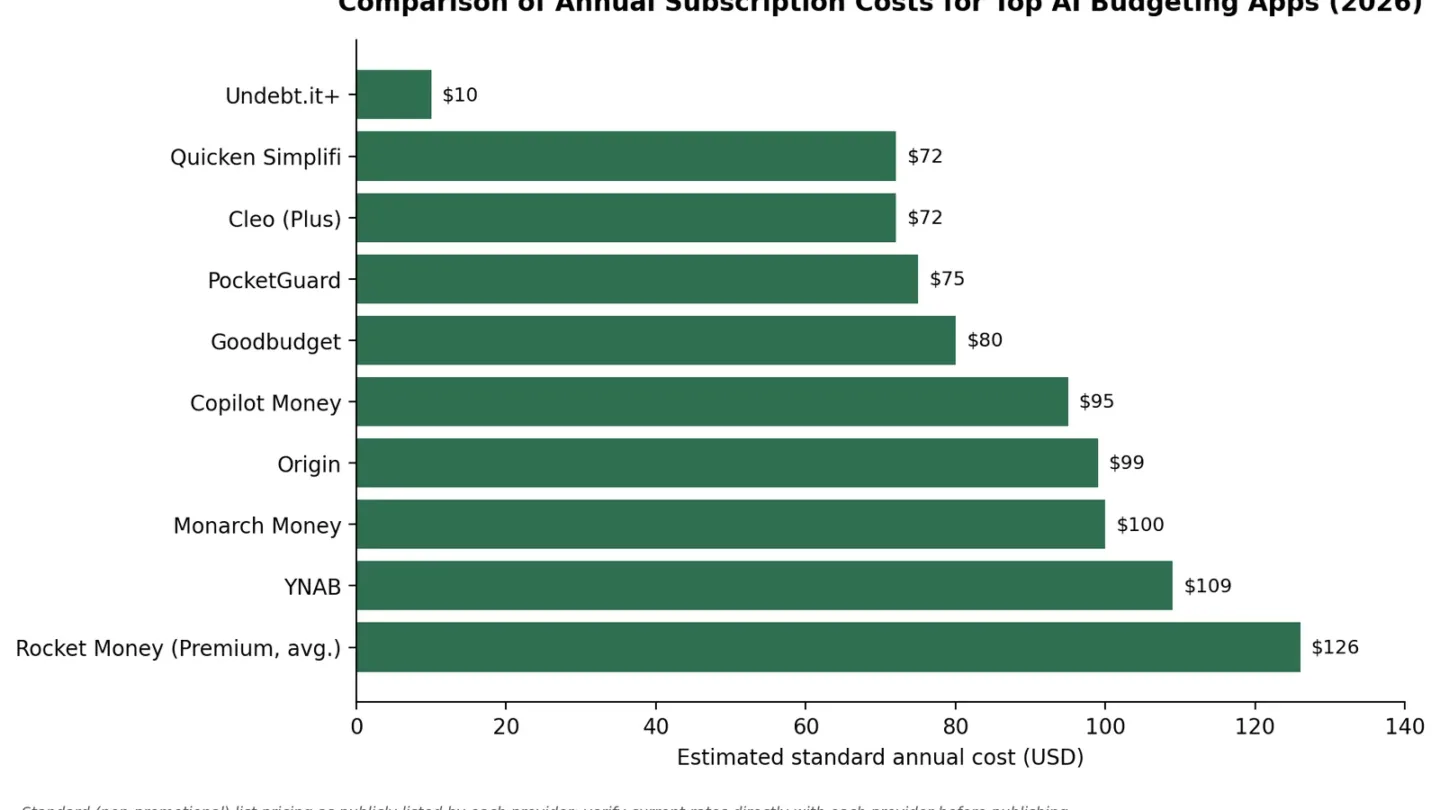
- $3.99/month for new subscribers (billed annually, so $47.88 for the first year), renewing at the standard rate of $5.99/month ($71.88/year). Billed annually only — there’s no monthly-billing option.
Source: quicken.com/simplifi pricing — verified September 2026; introductory rate applies to year one only.
Pros:
- One of the more affordable premium tiers compared with competitors like YNAB or Copilot.
- Custom watchlists let you track specific problem-spending areas without full budgeting.
- Backed by Quicken, a long-standing US financial software company with connections to thousands of regional banks.
Cons:
- No monthly billing — you commit to a year upfront.
- Doesn’t support zero-based budgeting.
Goodbudget
What it is: A digital version of the traditional cash-envelope budgeting system.
Best for: The best free envelope-method option for manual trackers.
Key AI feature: Cloud sync that updates your envelope balances across devices whenever you or a partner make a manual entry.
Pricing:
- Free tier: 10 regular envelopes and manual entry.
- Premium: $10/month or $80/year.
Source: goodbudget.com pricing — verified September 2026.
Pros:
- The free version is genuinely useful if you’re willing to enter transactions by hand.
- Good for building financial discipline, since you interact with every purchase.
- Premium adds automatic bank sync for US institutions.
Cons:
- The free tier has no automatic transaction import.
- Free-plan history is limited to one year.
Undebt.it
What it is: A specialized, math-focused web app built entirely around paying off debt faster.
Best for: AI-assisted debt-payoff modeling and comparison.
Key AI feature: Payoff modeling that recalculates interest savings and payoff dates whenever you apply extra payments to a mortgage or auto loan.
Pricing:
- Core app: free forever, with unlimited debts.
- Undebt.it+: a flat $10/year with no auto-renewal.
Source: undebt.it pricing — verified September 2026.
Pros:
- The developer states it does not track, sell, or monetize user financial data.
- Instantly compares the debt snowball and debt avalanche methods for tackling student loans or credit card debt.
- The $10 yearly fee is a one-time charge, not an auto-renewing subscription.
Cons:
- Not a general expense tracker — it focuses strictly on debts and payments.
- The interface is functional but lacks the polish of mobile-first apps.
Honeydue
What it is: A collaborative finance app built specifically for couples managing money together.
Best for: Couples who want to manage shared and separate money without paying a subscription.
Key AI feature: Smart categorization plus an in-app chat that lets partners comment on and ask about specific transactions.
Pricing:
- 100% free, supported by optional tips of $1–$10.
Source: honeydue.com — verified September 2026.
Pros:
- Lets couples sync joint accounts while keeping individual accounts private.
- Full access with no mandatory subscription cost.
- Built-in chat for quick conversations about household expenses.
Cons:
- Savings-goal tools are fairly basic.
- Budgeting features are simpler than Monarch Money’s.
Free vs. Paid: What You Actually Lose Without Upgrading
| Budgeting App | Free Tier Utility | Paid Cost (USD) | What You Lose by Staying Free |
|---|---|---|---|
| Cleo | High | $5.99–$14.99/mo | Cash advances, US credit-score tracking, and high-yield savings. |
| Rocket Money | Moderate | $7–$14/mo | Automated subscription cancellation, unlimited custom budgets, and smart savings. |
| Copilot Money | None (trial only) | $95/year | The entire app — there is no free version after the 30-day trial. |
| Monarch Money | None (trial only) | $99.99/year | The entire app — there is no free version after the 7-day trial. |
| PocketGuard | Low | $74.99/year | Linking more than a few bank accounts or creating more than two budget categories. |
| Goodbudget | High (manual entry) | $80/year | Automated bank sync and unlimited digital envelopes. |
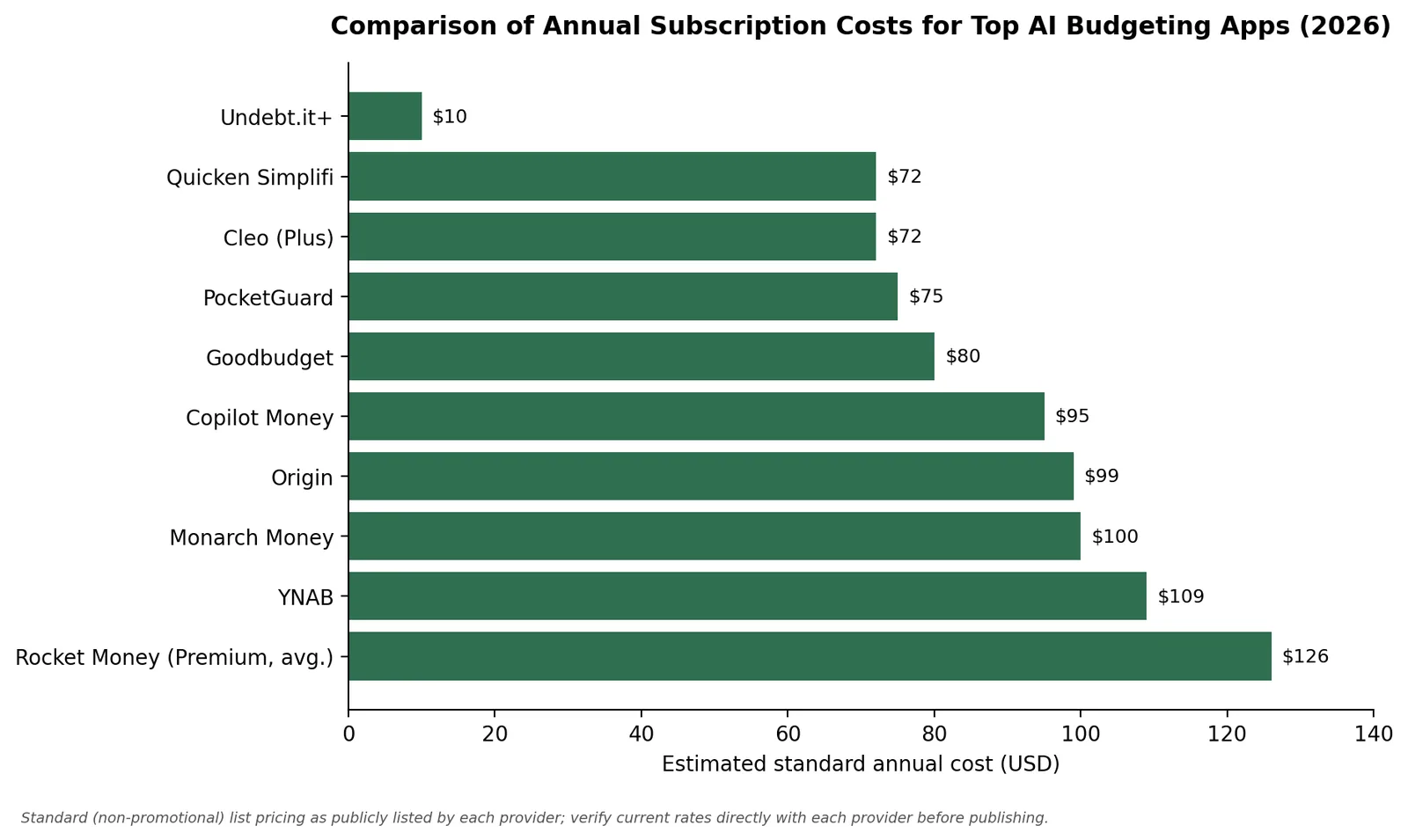
When you search for the best free AI budgeting apps in 2026, keep in mind that real automation costs money to run. Apps that offer full US bank sync for free often earn money in other ways, such as partnerships or data deals, so read the privacy policy. PocketGuard and Rocket Money offer solid free tiers but cap usability — limiting budget categories or locking concierge features behind a paywall to push upgrades. If you want ad-free automation with no data-selling, expect to pay somewhere between $75 and $180 a year, depending on how many premium features you need: PocketGuard and Goodbudget sit at the low end, while Cleo’s top tier and Rocket Money’s negotiation fees can push the total higher.
How to Pick the Right App for Your Situation
Matching an app to your money problem only works if it also fits your personality. Use the profiles below to find the app built for how you actually think about money, not just your general financial situation.
The Beginner
If spreadsheets overwhelm you and you just want to see where your money goes, skip the zero-based tools. Try Quicken Simplifi or the free tier of Rocket Money — both passively categorize your past spending and show simple cash-flow charts without demanding daily attention.
The Debt-Payoff Focused
If your main goal is paying off high-interest credit card debt or student loans, a basic categorizer won’t cut it. Use Undebt.it to model your interest rates exactly, paired with YNAB to put every available dollar toward that payoff plan before the month starts.
The Couple
Merging finances creates friction. If you want a detailed, premium dashboard for household net worth, Monarch Money is the strongest option — it lets you sync accounts, share a household view, and tag your partner on specific transactions. If you want a free way to see a joint checking account while keeping individual credit cards private, try Honeydue.
The Subscription-Bleeding
If you suspect you’re losing money to unused gym memberships, forgotten streaming services, and inflated bills, use Rocket Money. Its algorithm is built to spot recurring charges, and its concierge team handles the customer-service calls needed to cancel them.
The Investor-Minded
If your day-to-day cash flow is stable and you’re focused on growing wealth, you need broad asset tracking. Origin pairs a high-yield cash account with automated ETF portfolios and AI-driven tax guidance under one subscription. As your finances get more complex, it’s worth weighing software convenience against choosing between AI and a human financial advisor for long-term planning. Alternatively, Copilot Money offers a clean interface for tracking stock portfolios, 401(k)s, and other assets natively on macOS and iOS.
FAQ
What is the best budgeting app for 2026?
It depends on your operating system and household situation. Monarch Money is widely considered the best all-around tracker for couples and multi-platform users. YNAB remains the top pick for people who want to actively change spending habits, and Copilot Money leads for individual tracking on Apple devices.
Is it safe to connect my US bank account to an AI budgeting app?
Yes, as long as you use reputable software. Top apps use third-party aggregators like Plaid to create a read-only connection to your bank. The app receives your transaction data over AES-256 encryption but never gets your login credentials or the ability to move money. A federal rule meant to formalize these protections (the CFPB’s Section 1033 rule) is currently on hold pending litigation — see the safety section above for details.
What’s the difference between a “budgeting app” and an “AI budgeting app”?
A standard budgeting app applies fixed rules — for example, always labeling Starbucks as “Coffee.” An AI budgeting app uses predictive modeling and natural language processing. It can forecast when a bill will drain your account based on irregular patterns, learn from ambiguous merchant codes, and let you ask questions through chat instead of digging through menus.
Do free AI budgeting apps actually work, or do I need to pay?
Free apps are genuinely useful for basic tracking, but they often limit key automation. Rocket Money and PocketGuard both have solid free tiers that cap custom categories to encourage upgrades. If you want unrestricted, ad-free automated syncing and deeper AI categorization, you’ll generally need to pay.
How much can an AI budgeting app actually save me per year?
Savings vary a lot based on how much you actually use the app. Cleo says its subscription-cleanup feature saves typical users about $180 a year — a figure that comes from Cleo, not an independent study. YNAB’s own data shows active users report saving $600 in their first month, climbing to over $6,000 in their first year — real numbers, but ones that reflect engaged, active budgeters rather than a typical or guaranteed result.
Bottom Line: Which AI Budgeting App Should You Choose?
There’s no single best AI budgeting app in 2026 — just the best fit for how you manage money. If you want machine learning that quietly gets smarter about your spending, Copilot Money or Monarch Money will do the most work for you automatically. If you’d rather change your habits than automate around them, YNAB still delivers the most measurable results for people willing to put in the effort. And if every subscription dollar matters, Honeydue and Goodbudget prove that free tools can still be genuinely useful.
The best next step is to stop guessing and test it yourself. Most of the apps on this list offer a free trial or a free tier, so connect one account, give it a week, and see whether the AI actually saves you time and money before you commit to a subscription.
Related reading: AI personal finance tools and strategies.
Related Reading
- How to Use ChatGPT for Budgeting (Step-by-Step + Prompts): prefer a chatbot over an app? start here.
- How to Use AI to Save Money: 9 Practical Ways (2026): nine ways to cut spending with AI.
- How to Use AI to Pay Off Debt Faster (Beginner Guide): put your budget to work on debt.
- AI in Personal Finance: The Complete 2026 US Guide: the bigger picture of AI in personal finance.
Was this article useful?
Thanks, that helps us decide what to write next.
Spotted a mistake? Report an error and we will fix it, with a dated correction note.
Disclaimer. This article is general information, not financial, tax, or investment advice. Figures describe specific cases at specific dates. Talk to a licensed professional before acting on anything here. Full disclaimer.