AI Tools for Freelancers: The Complete 2026 Toolkit
How solo operators can pitch faster, produce higher-tier work, and automate non-billable admin without risking client confidentiality.

How solo operators can pitch faster, produce higher-tier work, and automate non-billable admin without risking client confidentiality.
Mastering the right ai tools for freelancers allows a solo contractor to operate with the capacity, speed, and polish of a boutique agency. Instead of spending half your working week on unbillable administrative tasks—drafting repetitive proposals, taking manual meeting notes, chasing unpaid invoices, and categorizing receipts—you can automate the operational drag and focus entirely on billable client execution.
The economic advantage is measurable. According to Upwork’s Future Workforce Index 2026 release, freelancers performing AI work on the Upwork Marketplace earn 34% more per hour than those not incorporating AI. That figure comes from Upwork’s own marketplace data (the separate survey covered 2,400 U.S. skilled workers in March–April 2026), so treat it as a platform average, not a guarantee.
However, succeeding as a modern freelancer does not mean blasting generic, automated copy at every open contract. Clients can spot low-effort synthetic pitches immediately. The winners in 2026 use AI selectively: accelerating research, refining first drafts, structuring client calls, and automating background logistics while keeping their strategic judgment, authentic voice, and client relationships unmistakably human.
This guide provides an end-to-end toolkit organized around the five stages of a freelance project: winning the contract, executing the work, running client calls, managing invoicing and tax records, and automating background administration. Every price and plan limit was verified on official vendor documentation in October 2026.
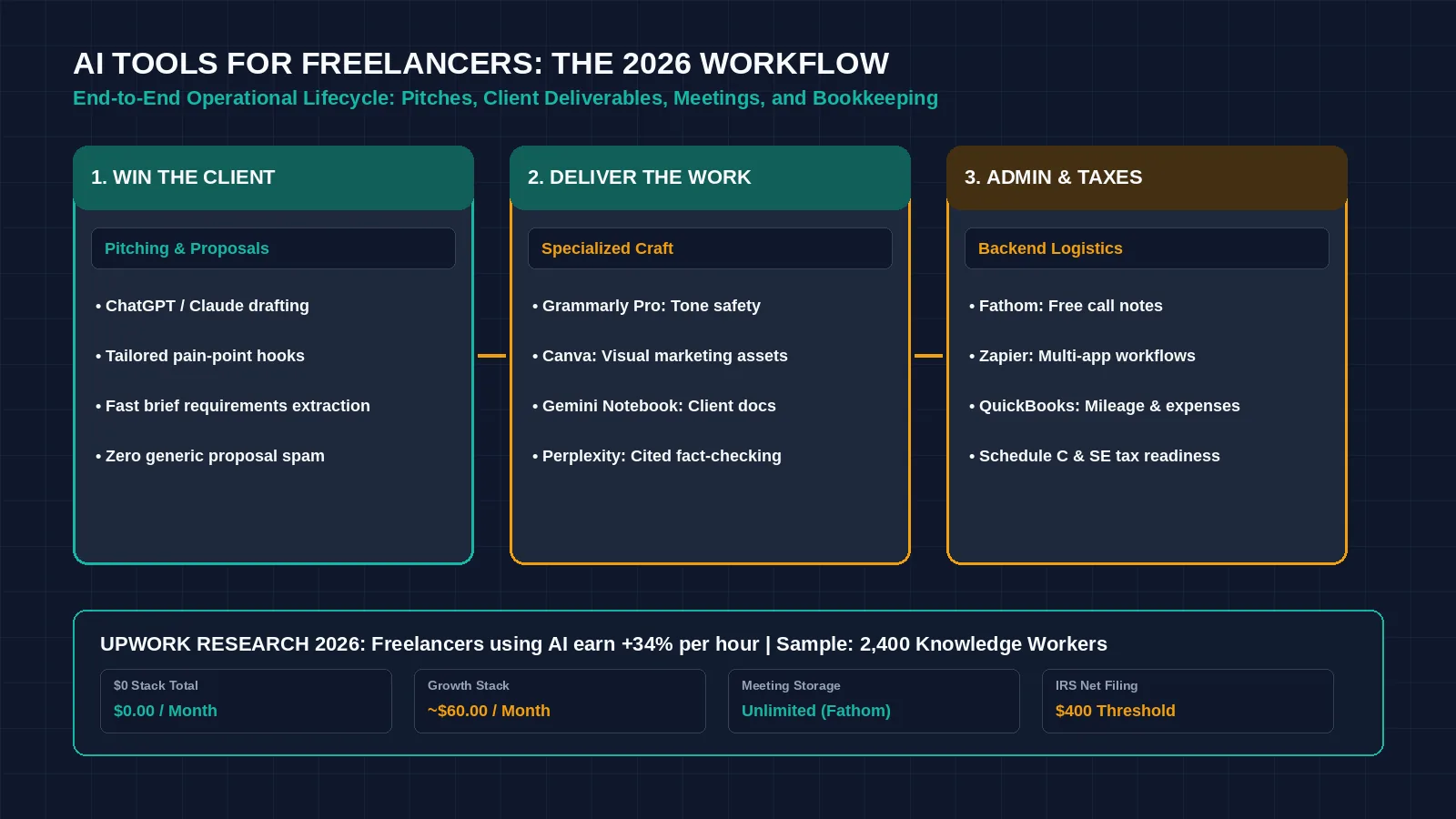
Figure 1: Structuring your freelance business around an automated five-stage workflow expands billable capacity while preserving client data privacy. Credit: AI-generated illustration by Minute Mind AI.
The Freelancer AI Toolkit at a Glance
The table below outlines our recommended tools across the complete freelance client lifecycle, including verified free options and baseline entry pricing:
| Workflow Stage | Tool | Primary Function | Free Option? | Paid From (Official Page) |
|---|---|---|---|---|
| 1. Pitching & Proposals | ChatGPT / Claude | Tailoring client pitches, extracting RFP requirements, drafting proposals | Yes (dynamic limits) | ChatGPT Plus $20/mo; Claude Pro $17/mo (annual) |
| 2. Craft: Writing & Editing | Grammarly | Real-time grammar auditing, sentence clarity, and brand tone safety | Yes (100 AI prompts/mo) | Pro: $12/user/mo (billed annually) |
| 3. Craft: Visual Design | Canva | Client presentation decks, social banners, and marketing collateral | Yes (core templates & assets) | Pro: $12/mo ($144/year billed annually) |
| 4. Craft: Research & Analysis | Gemini Notebook / Perplexity | Synthesizing client documents and conducting cited market research | Yes (100 notebooks; unlimited basic search) | Gemini Notebook: free tier; Perplexity: see its pricing page |
| 5. Client Meetings | Fathom | Automated call transcription, timestamped summaries, and action items | Yes (unlimited recording & storage) | Premium: $16/mo (annual); CRM sync on Business ($25/user/mo annual) |
| 6. Invoicing & Bookkeeping | QuickBooks Solopreneur | Income tracking, mileage logs, and expense categorization | Yes (basic mileage & expense logging) | Lite: $20/mo (promo: 50% off for 3 mo) |
| 7. Workflow Automation | Zapier | Auto-routing form submissions to CRM and triggering client onboarding | Yes (100 tasks/month) | Professional: $19.99/mo (billed annually) |
Note: Pricing and promotional terms verified October 2026. Promotional rates expire; always evaluate business expenses against regular list rates.
Win Clients Faster: AI for Proposals and Pitches
The proposal stage is the biggest unbilled time sink in freelancing. Spending two hours writing a tailored proposal for a job that pays $500 destroys your effective hourly rate. Conversely, pasting a canned, generic cover letter guarantees rejection. Use an advanced assistant like ChatGPT or Claude (Free plan available; Pro at $17/mo annual or $20 monthly) to analyze the client’s job brief, extract their underlying pain points, and draft a structured proposal draft in minutes:
| COPY-READY PROPOSAL PROMPT · CLIENT BRIEF CONVERSION |
|---|
| SYSTEM PROMPT: You are an expert proposal strategist for an elite independent B2B consultant. Analyze the client’s job posting and draft a compelling, concise 130-word proposal. Guidelines: INPUT DATA: |
The Proposal Guardrail: Own the Opening and Pricing
Never let an AI write your pricing strategy or your introductory sentence unsupervised. Review the draft to ensure your personal tone comes through, verify that your proposed turnaround time is realistic, and specify your exact fixed-price or milestone rate manually. For strategies on monetizing your copy directly, explore our practical guide on how to make money with AI writing.
Do Better Work: AI Tools by Freelance Specialty
General assistants help with administrative drafting, but high-tier execution requires specialized tools tailored to your specific trade.
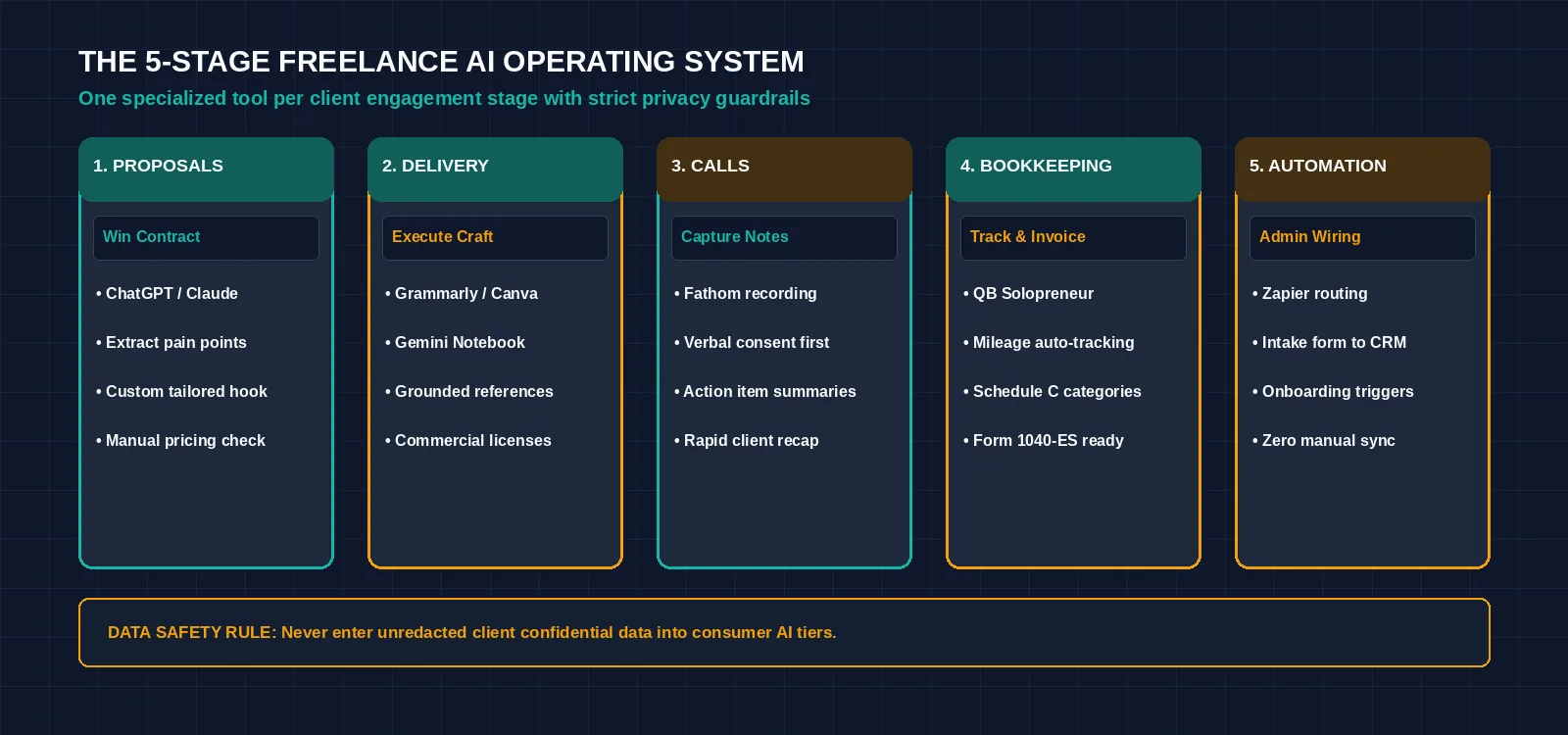
Figure 2: The five-stage freelance operating system: connecting client acquisition, specialty delivery, and automated administrative operations. Credit: AI-generated illustration by Minute Mind AI.
For Writers and Editors
Drafting long-form articles, whitepapers, and web copy requires a balance between creative cadence and technical precision:
• Use Claude Pro ($17/mo annual or $20 monthly) for outlining, structural organization, and synthesizing interview transcripts into narrative drafts. Pass your completed draft through Grammarly Plans (Free tier includes 100 AI prompts/mo; Pro is $12/mo billed annually) to eliminate passive phrasing, tighten sentence structure, and verify that tone matches client guidelines.
For a comprehensive comparison across platforms, explore our benchmark of the best AI writing tools.
For Designers and Social Media Freelancers
Clients frequently expect freelancers to deliver complete visual asset packages alongside their core deliverables:
• Use Canva Pricing (Free tier available; Pro at $12/mo billed annually as $144/year) to rapidly adapt a primary client visual into multiple platform dimensions (LinkedIn banner, Instagram carousel, presentation slide).
• Licensing Guardrail: Always audit commercial-use rights when generating visual assets using AI models. Ensure your client contract specifies whether AI-generated image elements are included in the deliverables, as certain platforms restrict trademark registration on synthetic imagery.
For Researchers, Consultants, and Virtual Assistants
Consultants and researchers must analyze client documentation quickly without leaking confidential information into public datasets:
• Use Gemini Notebook (formerly NotebookLM, accessible on Google Notebook Help) to ingest up to 50 private client documents, transcripts, and PDFs per notebook (up to 100 notebooks on the free tier). The tool answers questions strictly grounded in your uploaded materials.
• Pair document analysis with Perplexity Help Center (practically unlimited basic search; 3 Pro Searches/day on the free tier) to find verified industry statistics with clickable source links.
• Data Safety Rule: Never upload proprietary client files into any AI platform unless your client agreement explicitly permits third-party cloud processing.
Run Client Calls Without Taking Notes
Taking frantic handwritten notes during a discovery or kickoff call prevents you from actively listening to the client’s strategic priorities. Deploy Fathom Pricing Documentation across your Zoom, Google Meet, or Microsoft Teams calls. Fathom offers a 100% free individual tier with unlimited recording and transcription storage:
- Automated Action Items: Within two minutes of hanging up, Fathom produces an accurate, timestamped executive summary highlighting decisions made and agreed next steps.
- Instant Client Follow-Up: Copy the generated action items directly into a recap email. Sending an executive summary twenty minutes after a discovery call demonstrates exceptional professionalism.
- Compliance Note: Always obtain explicit verbal consent from all participants before hitting the record button to comply with regional privacy and wiretapping regulations.
Get Paid and Stay Tax-Ready: AI for Invoicing and Bookkeeping
Administrative bookkeeping is often a freelancer’s most neglected responsibility. Neglecting your expenses throughout the year turns tax season into an expensive, stressful emergency. According to the IRS Self-Employed Individuals Tax Center, you must file an income tax return if your net earnings from self-employment were $400 or more. Solo operators must calculate self-employment tax using Schedule SE, report profits and losses on Schedule C, and make quarterly estimated tax payments using Form 1040-ES to avoid underpayment penalties.
• The Tool: QuickBooks Solopreneur Pricing provides a dedicated platform for solo contractors. It features a basic Free tier (covering bank feeds and up to 5 tracked mileage trips per month), and a Lite tier at $20/month (discounted 50% for the first three months when checked in October 2026). If you outgrow it, QuickBooks Online Simple Start lists at $38/month.
• Automated Triage: The platform uses machine learning to parse connected bank feeds, categorize business expenses against Schedule C tax categories, and track mileage automatically via your smartphone’s GPS.
• What AI Does Not Do: QuickBooks Solopreneur does not automatically prepare or file your tax returns on its base tier. Paid tiers offer assisted filing via TurboTax integration, but algorithmic categorization should never substitute for an annual review by a certified tax professional.
Disclaimer: This section provides general operational information based on IRS publications and does not constitute formal tax or legal advice. For detailed deduction strategies, review our dedicated guide to AI for freelancer taxes.
Automate the Admin Between Clients
Non-billable operational busywork occurs between projects: taking details from an inquiry form, adding a new contact to a spreadsheet, generating an invoice, and emailing a welcome packet. Connecting your tools using Zapier Pricing (Free tier includes 100 tasks/month across unlimited 2-step Zaps; Professional starts at $19.99/mo billed annually) eliminates manual handoffs:
- 1. Intake to CRM: Connect your website form directly to HubSpot CRM (free for up to 2 users and 1,000 contacts).
- 2. Instant Team Alert: Configure Zapier to post an instant notification to your private Slack channel when a high-value lead submits a project scope.
- 3. Automated Onboarding: Once a contract is signed, trigger an automated sequence that provisions a shared Google Drive folder and sends the client their kickoff onboarding questionnaire.
To review more production-ready automation sequences, read our teardown of AI workflow automation examples.
Should You Tell Clients You Use AI?
The short answer is yes, with clarity and positioning. Clients do not pay you for manual typing; they pay you for domain expertise, strategic problem-solving, and reliable business outcomes. Attempting to hide your AI usage creates legal and reputational risks. Many enterprise clients, publishers, and digital marketplaces now include explicit clauses prohibiting unapproved generative tools or restricting where proprietary data can be processed.
- Position AI as an Accelerator, Not a Replacement: Explain that you utilize advanced intelligence tools to accelerate research and data analysis, while retaining 100% human accountability, manual fact-checking, and final editing.
- Guarantee Client Confidentiality: Assure clients that their proprietary files, customer records, and internal documents are never pasted into public, consumer-grade AI models that use inputs for training.
- Check Platform Policies: If you source contracts through Upwork, Fiverr, or specialized talent networks, review their specific guidelines regarding AI disclosure to avoid account suspension.
| SAMPLE CONTRACT CLAUSE · CLIENT AI DISCLOSURE & DATA PRIVACY |
|---|
| CLIENT CONTRACT TEMPLATE · GENERATIVE AI USAGE CLAUSE: “Contractor utilizes commercial artificial intelligence software as an internal research and drafting accelerator. All final deliverables undergo rigorous human review, manual verification, and editorial refinement to ensure complete originality and factual accuracy. Contractor warrants that Client proprietary information, confidential trade secrets, and non-public data will never be entered into public consumer AI models or systems that utilize user prompts for model training. Contractor retains full legal and professional accountability for all final deliverables submitted to Client.” |
AI Tools for Freelancers: A Stack for Every Budget
You do not need an expensive software overhead to run a profitable freelance business. Assemble your tech stack based on your current monthly revenue:
The $0 Bootstrapped Stack
| Workflow Function | Free Tool Allocation | Monthly Cost |
|---|---|---|
| Pitching & Research | ChatGPT Free / Perplexity Free | $0.00 / mo |
| Document Synthesis | Gemini Notebook (up to 100 notebooks) | $0.00 / mo |
| Editorial Polish | Grammarly Free (100 AI prompts/mo) | $0.00 / mo |
| Visual Graphics | Canva Free | $0.00 / mo |
| Call Intelligence | Fathom Free (unlimited recording & storage) | $0.00 / mo |
| Bookkeeping & Mileage | QuickBooks Solopreneur Free tier | $0.00 / mo |
| App Automation | Zapier Free (100 tasks/month) | $0.00 / mo |
For a broader look at permanent zero-dollar applications, explore our curated list of free AI tools.
The Professional Growth Stack (~$81–$84 / Month)
| Workflow Function | Paid Tool Allocation | Monthly Cost |
|---|---|---|
| Advanced Assistant | Claude Pro ($17/mo annual or $20/mo monthly) | $17.00 – $20.00 / mo |
| Editorial Safety Net | Grammarly Pro ($12/user/mo billed annually) | $12.00 / mo |
| Design & Visuals | Canva Pro ($12/mo billed annually) | $12.00 / mo |
| Bookkeeping & Taxes | QuickBooks Solopreneur Lite | $20.00 / mo |
| Meetings & Notes | Fathom Free tier | $0.00 / mo |
| Multi-Step Automation | Zapier Professional ($19.99/mo annual) | $19.99 / mo |
Total Software Overhead: ~$81 – $84 / month (calculated using verified regular rates).
Frequently Asked Questions
What AI tools do freelancers use most?
Freelancers rely most heavily on conversational assistants (ChatGPT and Claude) for drafting proposals and structuring outlines, Grammarly for real-time proofreading, Fathom for automated meeting transcription, and Canva for client presentation assets.
Are there free AI tools for freelancers?
Yes. Fathom provides unlimited recording and transcription on its free individual tier, Gemini Notebook supports up to 100 private research notebooks for free, and Canva offers thousands of zero-cost design templates.
Do I have to tell clients I use AI?
It is best practice to disclose AI usage in your contracts or proposals. Modern enterprise clients care about data privacy, copyright ownership, and factual accuracy. Outlining your use of AI as an internal accelerator while guaranteeing human oversight and data confidentiality builds trust.
Can AI help me with freelancer taxes?
Platforms like QuickBooks Solopreneur use machine learning to track mileage via GPS and automatically categorize bank transactions against Schedule C expense categories. However, software does not replace an accountant; always have a tax professional review your filings.
Will AI replace freelancers?
AI does not replace freelancers; freelancers who leverage AI replace those who do not. Clients still require human domain expertise, emotional intelligence, strategic alignment, and reliable execution that autonomous algorithms cannot provide.
The Bottom Line
Artificial intelligence should eliminate your administrative overhead, not compromise your creative voice or client trust. Use conversational models to accelerate pitch drafts, deploy meeting assistants to capture client action items, and automate your background invoicing.
Keep your judgment, your industry perspectives, and your personal client relationships strictly human. Master one tool per workflow stage, establish strict data privacy boundaries, and upgrade to paid software tiers only when the billable hours saved justify the subscription cost.
To explore how freelancing tools fit into an overarching operational technology strategy, read our comprehensive manual on the best AI tools for modern business and learn how top operators discover how to make money with AI.
Was this article useful?
Thanks, that helps us decide what to write next.
Spotted a mistake? Report an error and we will fix it, with a dated correction note.