9 Best AI Tools for Small Business Owners (2026)
A job-by-job shortlist of the nine software tools worth paying for, with verified pricing, free options, and strict data-privacy guardrails.

A job-by-job shortlist of the nine software tools worth paying for, with verified pricing, free options, and strict data-privacy guardrails.
Running a modern company means wearing half a dozen hats before lunch. Deploying practical ai tools for small business operations allows lean teams to manage marketing, client communication, and back-office administrative tasks without burning out or hiring premature headcount.
Picture an owner sitting at a desk at 10:00 PM: reconciling client invoices in accounting software, drafting three overdue follow-up emails, and resizing promotional graphics for tomorrow’s social campaign. You do not need twenty-five disjointed software applications to reclaim your evenings. You need one reliable, dedicated tool for each operational job that consumes your working hours.
This guide delivers a neutral, job-by-job evaluation of the nine tools genuinely worth integrating into a 1-to-50-person business. Every price, free allowance, and promotional rate was verified directly against official vendor documentation in October 2026. No vendor paid to be included in this guide, and no house product is pushed to the top.
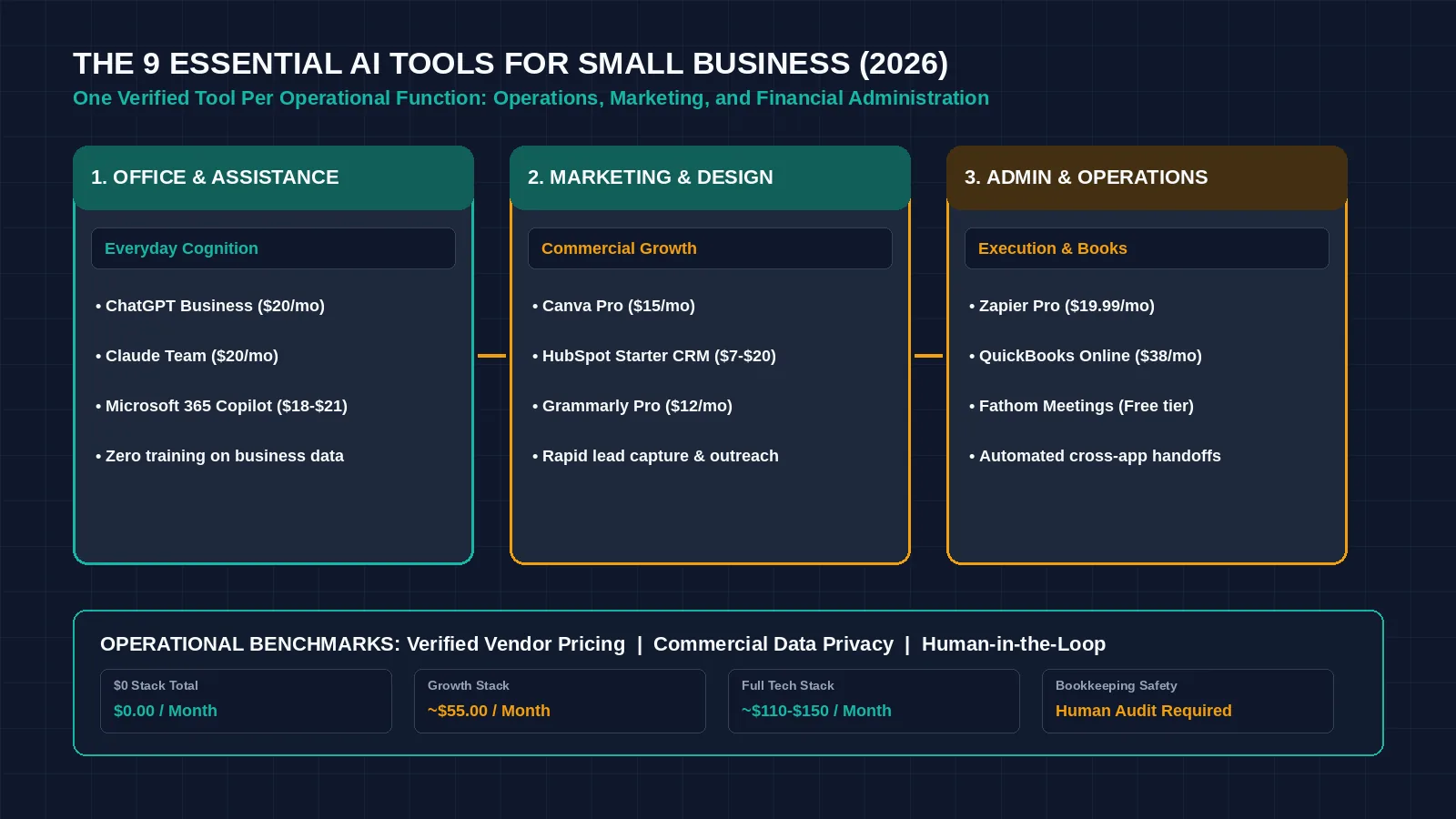
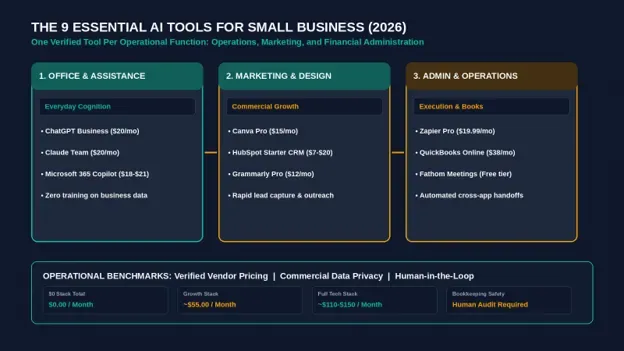
Figure 1: Deploying one dedicated AI tool per operational job eliminates administrative friction for lean small business teams. Credit: AI-generated illustration by Minute Mind AI.
Quick Comparison: The 9 Best AI Tools for Small Business at a Glance
Scan this reference table to match your company’s primary operational bottleneck with its verified software solution, free allowance, and baseline pricing:
| Tool | Job It Does | Free Option? | Paid From (Official Page) | Best For |
|---|---|---|---|---|
| ChatGPT Business (or Claude Team) | General-purpose operational assistant | Free consumer tiers available (data used for training by default) | $20/seat/mo (annual) or $25/mo (monthly); 2+ seats | Drafting correspondence, standard operating procedures, and customer inquiries with strict privacy |
| Microsoft 365 Copilot | Office productivity intelligence | Free Copilot web chat | $18/user/mo annual promo through Dec 31, 2026 (list $21/user/mo) | Teams already running their daily workflow inside Outlook, Word, and Excel |
| Gemini in Google Workspace | Cloud document & email assistant | Free Gemini web portal | Integrated across Business plans; feature access split by tier | Organizations operating primarily on Gmail, Google Docs, Sheets, and Drive |
| Canva | Commercial design & marketing collateral | Robust Free tier with basic templates and tools | Pro: $144/yr (about $12/mo); Business: multi-seat brand control | Non-designers producing on-brand social banners, flyers, and slide decks |
| HubSpot Starter | CRM, lead tracking & sales outreach | Free CRM: 2 users, 1,000 contacts (Breeze AI from Starter) | Promo: $7–$10/seat/mo; Regular list: $20/seat/mo; 500 AI credits/mo | Consolidating prospective leads, tracking deals, and drafting sales outreach |
| Zapier | Cross-app workflow automation | Free: 100 tasks/month, unlimited 2-step Zaps | Professional: $19.99/mo (annual); Team: from $69/mo | Connecting disparate forms, databases, and notification channels without code |
| QuickBooks Online | Automated bookkeeping & categorization | Free $0 plan or 30-day trial of paid plans | Promo: 50% off for 3 months; Regular list: Simple Start $38/mo, Essentials $85/mo | Small businesses automating bank feeds, receipt capture, and cash-flow monitoring |
| Grammarly | Editorial review & brand tone safety | Free: 100 AI prompts/mo + grammar/spelling | Pro: $12/user/mo (billed annually); 2,000 prompts/member/mo | Ensuring client proposals, customer tickets, and external emails remain professional |
| Fathom | Meeting transcription & executive summaries | Free: Unlimited recording & transcription storage for individuals | Team: $15/user/mo; Business (CRM sync): $25/user/mo (annual) | Automatically capturing action items and client requirements during video calls |
Note: Pricing and promotional terms verified October 2026. Promotional discounts expire; always calculate software overhead against regular list rates.
How We Picked These Tools
Our recommendations adhere to four operational standards:
- Job Specialization: Each selection solves one distinct business function (communication, design, CRM, automation, bookkeeping, writing, or meetings) without feature redundancy.
- Fair Pricing for 1–50 Users: We excluded enterprise software requiring five-figure annual commitments or mandatory implementation consultants.
- Data Protection & Privacy: Every paid tier selected provides commercial privacy controls ensuring company data is quarantined from public model training.
- Transparent Free Utility: Each software tool either offers a functional free tier or a verified trial that small teams can evaluate immediately.
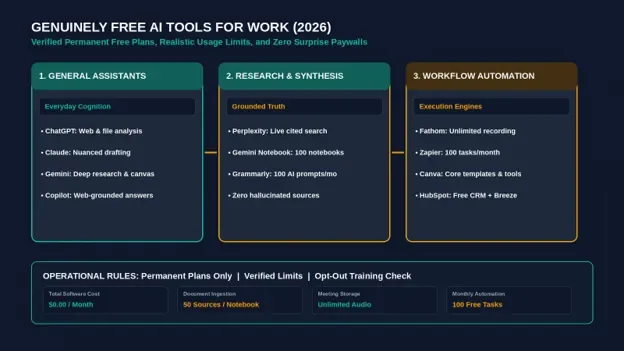
If you are operating on a zero-dollar software budget, explore our companion breakdown of the best free AI tools for work.
1. ChatGPT Business (or Claude Team): Your All-Purpose AI Assistant
A general-purpose language assistant functions as an on-demand junior analyst: summarizing messy vendor agreements, drafting clear employee job descriptions, outlining customer onboarding sequences, and translating technical specs into plain English.
• Pricing & Plans: According to official OpenAI Business Pricing, ChatGPT Business costs $20 per seat per month (billed annually) or $25 per seat on monthly billing, for workspaces of 2 or more users. Anthropic’s Claude Team operates on an identical structure: $20 per seat per month (annual) or $25 monthly.
• The Privacy Imperative: Consumer free accounts on OpenAI default to using conversation logs for model training. Crucially, OpenAI’s Business pricing page states there is no training on your data for the Business plan. If you process proprietary pricing models, customer details, or confidential strategy notes, paying for a business seat is an essential data-protection investment.
• Skip It If: Your team exclusively needs help inside spreadsheets or email inboxes, in which case native workspace integrations (Copilot or Gemini) offer lower friction.
| COPY-READY PROMPT · DE-ESCALATING A CUSTOMER COMPLAINT |
|---|
| SYSTEM PROMPT: You are an executive customer relations specialist for a small commercial service firm. Draft a professional, empathetic, and solution-focused email reply to the customer message below. Guidelines: CUSTOMER MESSAGE: |
2. Microsoft 365 Copilot: AI Inside Word, Excel, and Outlook
If your business infrastructure is already anchored in Microsoft 365, Copilot provides native computational intelligence embedded directly inside the desktop and web applications your team uses daily.
• Pricing & Plans: As detailed on Microsoft 365 Pricing, the Copilot Business add-on is offered at a promotional rate of $18 per user per month (annual commitment, list price $21/user/mo; the promotion runs July 1 to December 31, 2026), requiring an underlying commercial Microsoft 365 license. Bundled Business Standard + Copilot tiers start at $23.50/user/mo (annual, with Teams) under the same promotion.
- Core Business Use Case: Copilot excels at conversational document processing: highlighting critical action points across twenty-message Outlook email threads, drafting initial proposals in Word based on project notes, and generating Excel forecasting formulas from natural language queries.
- Skip It If: Your company operates primarily within Google Workspace or decentralized cloud tools; running Copilot outside the Microsoft ecosystem delivers limited ROI.
3. Gemini in Google Workspace: AI for Gmail, Docs, and Sheets
For teams built on Google Drive, Gmail, and Google Docs, Google Workspace integrates Gemini natively into cloud collaboration workflows.
• Pricing & Plans: According to official Google Workspace Pricing, Gemini feature availability depends on your underlying Workspace tier: Business Starter includes basic AI capabilities (in Gmail and Vids), while Business Standard and Business Plus unlock expanded Gemini integration across Docs, Sheets, Slides, and Meet.
- Core Business Use Case: Drafting quick client replies directly inside Gmail, summarizing meeting transcripts generated in Google Meet, and structuring project trackers in Google Sheets using automated schema formatting.
- Skip It If: You require complex numerical data modeling; while Gemini assists with spreadsheet formulas, complex multi-variable financial projections still require dedicated analytical platforms.
To evaluate dedicated data stacks, review our guide to AI analytics tools.
4. Canva: AI Design for Social Posts, Flyers, and Ads
Small businesses cannot afford to hire dedicated graphic designers for every promotional flyer, social media announcement, or client slide deck. Canva provides a visual production environment that empowers non-designers to maintain consistent branding.
• Pricing & Plans: According to the Canva Help Center, Canva offers Free, Pro, Business, and Enterprise plans. Canva Pro costs $144 per year (about $12 per month) as of October 2026, unlocking brand kits, one-click asset resizing, background removal, and an expanded allocation of Magic Media AI generative credits.
- Core Business Use Case: Generating a primary promotional graphic and instantly repurposing it into platform-compliant formats (such as an Instagram post, a LinkedIn banner, and a printable flyer) with automated layout adjustments.
- Skip It If: Your company requires complex vector illustration, high-end 3D rendering, or packaging design that necessitates Adobe Illustrator.
5. HubSpot Starter: AI-Assisted CRM and Email Marketing
Scattering prospective sales leads across personal text messages and spreadsheet tabs guarantees lost revenue. HubSpot consolidates customer records into a single pipeline powered by embedded AI tools.
• Pricing & Plans: As listed on the HubSpot Starter Pricing page, the platform features a regular list price of $20 per seat per month, with new-customer promotional rates frequently available between $7 (annual) and $10 (monthly). Starter includes 500 HubSpot Credits and lists the Breeze AI assistant; the free CRM does not list AI features.
- Core Business Use Case: Managing deals, logging customer interaction history, and deploying Breeze to generate personalized prospecting drafts and meeting briefings before sales calls.
- Skip It If: You run a simple consulting practice with fewer than ten ongoing clients where a visual spreadsheet or simple contact manager is completely sufficient.
6. Zapier: Connect Your Apps and Automate Busywork
Small business efficiency depends on connecting disparate web applications. Zapier functions as the digital glue linking web forms, databases, and customer notification channels.
• Pricing & Plans: According to the official Zapier Pricing documentation, the Free plan supports 100 tasks per month across unlimited two-step Zaps. The Professional plan begins at $19.99 per month (billed annually), unlocking multi-step branching logic, and filters.
• Core Business Use Case: Building an automated bridge: When a prospect submits an intake form on your website ──> Zapier routes the contact into HubSpot CRM ──> notifies your sales channel in Slack ──> stages an email draft in Gmail.
• Skip It If: You run an engineering-heavy team with self-hosting technical capabilities; open-source alternatives like n8n provide higher volume thresholds at lower infrastructure costs.
Review our detailed comparison of Zapier vs Make vs n8n and our breakdown of practical AI workflow automation examples.
7. QuickBooks Online With Intuit AI: Bookkeeping on Autopilot
Financial administration is one of the heaviest time sinks for small business operators. QuickBooks Online integrates Intuit Assist to automate transaction reconciliation and financial reporting.
• Pricing & Plans: According to QuickBooks Pricing, regular list rates are: Simple Start at $38/month, Essentials at $85/month, Plus at $140/month, and Advanced at $340/month. Intuit routinely offers introductory promotions (e.g., 50% off for the first three months).
- Core Business Use Case: Automatically parsing bank feeds, matching uploaded receipts to credit card charges, extracting expense line items, and categorizing ledger entries.
- The Accountant Reality Check: While Intuit’s machine learning models accelerate ledger matching, an automated algorithm cannot replace a certified human accountant. AI models can misinterpret tax deductions or misclassify capital assets. Always have a qualified financial professional review your books prior to tax filings.
- Skip It If: You operate a solo micro-business with only three monthly transactions, where free invoicing tools or simple accounting templates suffice.
For specialized financial practices, explore our dedicated review of AI tools for accountants.
8. Grammarly: Polish Every Email, Proposal, and Post
External communication directly reflects company competence. Grammarly provides a real-time editorial safety net across web browsers, desktop apps, and document suites.
• Pricing & Plans: As verified on the Grammarly Plans portal, the Free tier includes spelling, grammar, punctuation, and 100 AI prompt actions per month. Grammarly Pro is $12 per user per month (billed annually), providing 2,000 AI prompt actions per member, tone adjustments, and full-sentence structural rewrites.
- Core Business Use Case: Scanning high-stakes client proposals, pitch decks, and executive emails to eliminate awkward syntax, passive phrasing, and unintended aggressive tones.
- Skip It If: Your team already relies on Word’s built-in advanced editor or drafts exclusively within general-purpose assistants that handle proofreading.
For extended drafting platforms, compare the best AI writing tools.
9. Fathom: Free AI Meeting Notes and Action Items
Taking manual notes during a sales discovery call distracts founders from actively listening to customer requirements. Fathom automates call documentation across Zoom, Google Meet, and Microsoft Teams.
• Pricing & Plans: According to official Fathom Pricing Documentation, the individual tier provides 100% free, unlimited recording and transcription storage without arbitrary monthly duration limits. Paid tiers add shared team features, and CRM field sync is listed on the Business plan ($25/user/mo billed annually).
- Core Business Use Case: Joining video calls as an automated participant, generating complete verbatim transcripts, and producing a structured executive summary with timestamped action items in under two minutes post-call.
- Compliance Note: Always obtain explicit verbal consent from all call participants before initiating automated recording tools to comply with wiretapping and data privacy regulations.
- Skip It If: You do not conduct business over video conference calls.
How Many Small Businesses Actually Use AI?
When evaluating technology adoption, small business statistics appear contradictory. Understanding the underlying research data clarifies where the market truly stands:
- The U.S. Chamber of Commerce Report (August 2025): The Chamber’s Empowering Small Business study reported that 58% of small businesses use AI (up from 23% in 2023), and 44% use generative AI specifically. This survey captures broad, exploratory usage—including an owner occasionally drafting a marketing email in ChatGPT or generating a flyer in Canva.
- The U.S. Census Bureau Business Trends and Outlook Survey (May 2026): Conversely, Census BTOS data showed that 19.8% of all businesses used AI as of May 3, 2026, with usage staying between 17% and 20% over the survey period, and less than 20% of firms with four or fewer employees reporting AI use.
The Practical Reality: The majority of small business owners experiment with conversational chat tools informally, but fewer than one in five have embedded AI into core, systematic operational workflows. Establishing a structured, automated tool stack today provides an operational advantage while competitors are still using AI for one-off brainstorming.
What Not to Put Into AI Tools (Data Safety Basics)
A sensible rule for AI adoption: small teams should start with low-risk tasks, enforce human oversight on all generated content, and strictly protect proprietary business data.
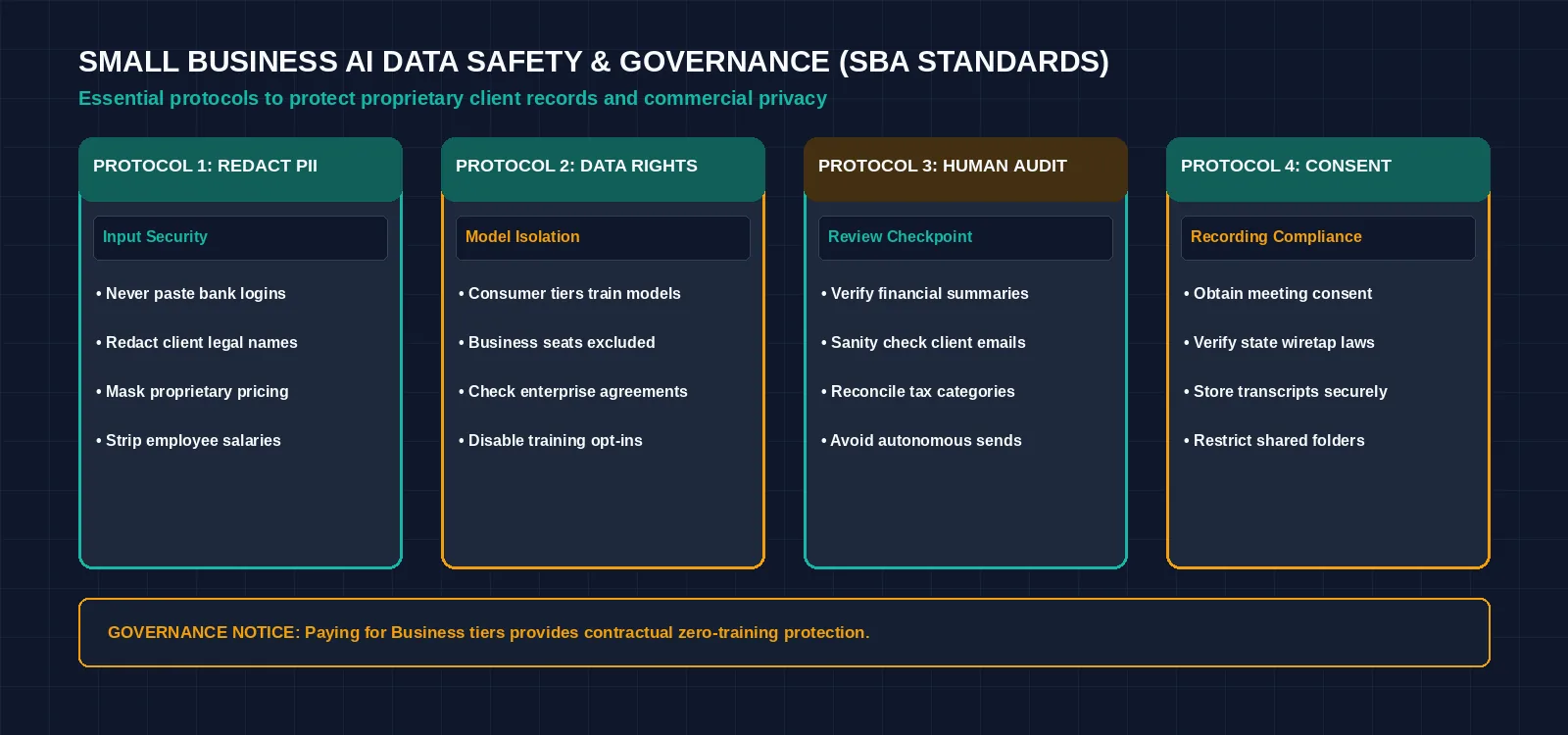
Figure 2: The small business data safety checklist: protecting client information while leveraging AI platforms. Credit: AI-generated illustration by Minute Mind AI.
To safeguard your company, implement three non-negotiable data protocols:
- 1. Never Input Sensitive Financial, Legal, or Customer PII: Do not paste unredacted customer names, credit card details, bank account credentials, employee payroll numbers, or proprietary source code into consumer AI tools.
- 2. Understand Account Data Retention Policies: Consumer free tiers (like standard ChatGPT) use interaction logs to train future foundation models by default unless opted out. Paid commercial plans (like ChatGPT Business, Claude Team, and Microsoft 365 Copilot) state that business data is not used to train their models; read each vendor’s business terms.
- 3. Enforce Human-in-the-Loop (HITL) Review: Never allow an automated tool to send unreviewed emails directly to clients, publish unverified accounting numbers to tax authorities, or publish public content without human sign-off. Language models can sound completely authoritative while generating inaccurate facts.
For an overarching framework on managing automated business risks, explore our pillar guide to AI automation for business.
Starter Stacks by Budget
You do not need to purchase all nine applications simultaneously. Assemble your technology stack based on your monthly cash flow:
1. The $0 Budget Stack (Free Tier Leverage)
Ideal for solo founders, freelancers, and early-stage startups testing the waters:
- Drafting & Research: ChatGPT Free or Claude Free ($0)
- Visual Marketing: Canva Free ($0)
- Call Summaries: Fathom Free ($0)
- Customer Management: HubSpot Free CRM ($0)
- Workflow Plumbing: Zapier Free (100 tasks/month) ($0)
- Total Software Cost: $0.00 / month
2. The Practical Growth Stack (~$52 / Month)
Ideal for 2-to-5-person teams requiring data privacy and multi-step automation:
- Business AI Assistant: ChatGPT Business ($20/seat/mo annual) or Claude Team ($20/seat/mo annual)
- Marketing Design: Canva Pro (about $12/mo, billed $144/yr)
- Multi-Step Automation: Zapier Professional ($19.99/mo annual)
- Call Intelligence: Fathom Free ($0)
- Total Software Cost: ~$52 / month for one seat (computed using verified list rates)
3. The Full Commercial Stack (~$76–$111 / Month)
Ideal for established small businesses running comprehensive sales, marketing, and accounting operations:
- Office & Communication Suite: Microsoft 365 Copilot Business ($18 promo / $21 list/user/mo)
- CRM & Inbound Sales: HubSpot Starter ($7 promo / $20 list/seat/mo)
- Accounting Automation: QuickBooks Online Simple Start ($19 promo / $38 list/mo)
- Workflow Automation: Zapier Professional ($19.99/mo)
- Editorial Polish: Grammarly Pro ($12/user/mo annual)
- Total Software Cost: ~$76/mo during initial promotional periods; ~$111/mo at regular list prices.
Next Step: AI for Your Business Numbers
Before investing in expensive third-party business intelligence (BI) suites, leverage the computational capabilities already present in your office tools. Microsoft Copilot inside Excel and Gemini inside Google Sheets can analyze historical sales trends, generate summary pivot tables, and identify inventory anomalies from natural language prompts. Master spreadsheet intelligence first, then graduate to specialized platforms as outlined in our overview of AI analytics tools.
Frequently Asked Questions
What is the best AI tool for a small business?
For broad everyday utility, ChatGPT Business or Claude Team provides the highest return on investment by handling drafting, research, and data synthesis with strict commercial privacy controls. If your team already operates within Microsoft 365 or Google Workspace, native copilot add-ons offer the lowest workflow friction.
Are there free AI tools for small business that are good enough?
Yes. Fathom offers unlimited meeting recording and transcription on its free individual plan, Canva Free covers essential graphic design templates, and Zapier Free provides 100 automated tasks per month. However, consumer free chatbots should not be used for sensitive customer data unless data-sharing is disabled.
How much do AI tools cost a small business per month?
A solo operator can run a capable workflow for $0 per month. A growing small business typically spends between $50 and $150 per month across core seats for an assistant, workflow automation, design, and accounting software.
Is it safe to put customer data into ChatGPT?
Consumer free tiers of ChatGPT use conversation data for model training by default unless you manually disable the setting in your data controls. OpenAI’s Business pricing page states there is no training on your data for ChatGPT Business, which makes it a better fit for business use; still read the terms before you add customer data. However, you should never input unredacted sensitive financial records or passwords.
Can AI replace a bookkeeper or virtual assistant?
No. Artificial intelligence automates repetitive data entry, categorizes transactions, and drafts initial correspondence in seconds. However, human bookkeepers and administrative specialists are essential for auditing records, managing complex exceptions, and ensuring legal compliance.
The Bottom Line
You do not need twenty-five software subscriptions to modernize your business. Start by pairing one general-purpose assistant with the single application that eliminates your company’s worst weekly time drain—whether that is automated bookkeeping in QuickBooks, social design in Canva, or meeting transcription in Fathom. Master that core workflow, confirm the economic return, and expand your software stack only when your workload demands it.
To explore how small business software fits into an overarching operational technology strategy, read our comprehensive manual on the best AI tools and our architectural guide to AI automation for business.
Was this article useful?
Thanks, that helps us decide what to write next.
Spotted a mistake? Report an error and we will fix it, with a dated correction note.