How to Use AI to Save Money: 9 Practical Ways (2026)
Nine practical ways to use AI to save money, each with a ready-to-use prompt.

Not medical, legal, or financial advice. This article is for general education. If you’re unsure how any of this applies to your situation, a licensed financial professional or a nonprofit credit counselor can point you in the right direction.
Household budgets rarely leak from one big place. It’s usually a dozen small ones — a forgotten subscription, a grocery trip with no plan, a bill nobody ever bothered to negotiate. That’s precisely the kind of small, repetitive problem AI handles well, and it’s where learning how to use AI to save money pays off. It won’t invest your money or guarantee an outcome, but it’s genuinely useful for spotting the leaks and turning “save more” from a vague wish into a specific number with a specific action attached.
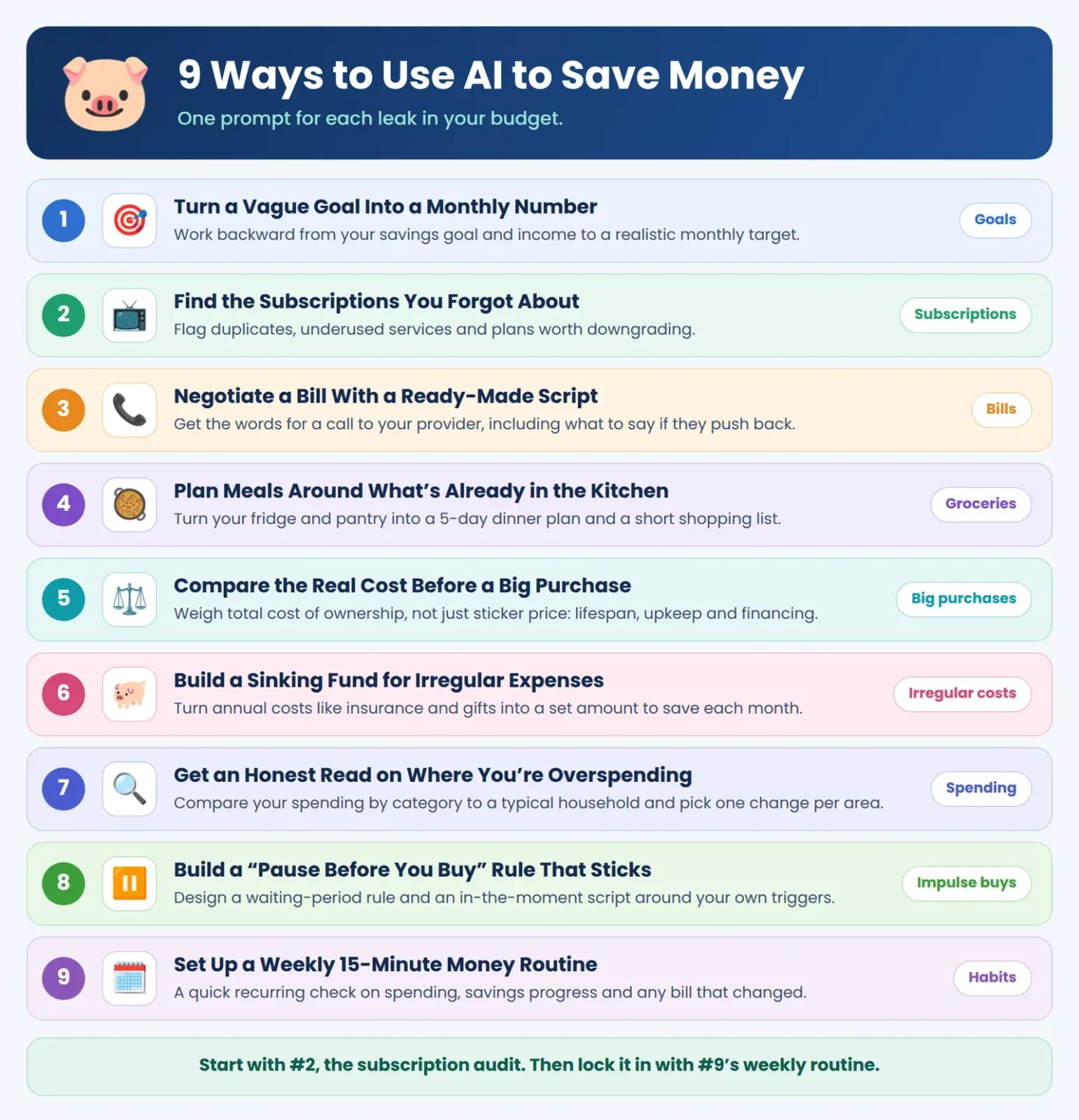
Here are nine practical ways to use AI to save money, each with a prompt ready to copy.

How AI Actually Helps You Save
Its real strength is turning fuzzy goals into concrete plans and catching patterns you’d probably miss buried in a pile of statements. It isn’t a magic subscription-canceller, and it can’t watch your bank balance in real time — for that, you need something actually connected to your accounts. Think of AI as the planning and pattern-spotting layer, with a dedicated app (see our best AI budgeting apps roundup) handling the tracking.
The 9 Methods
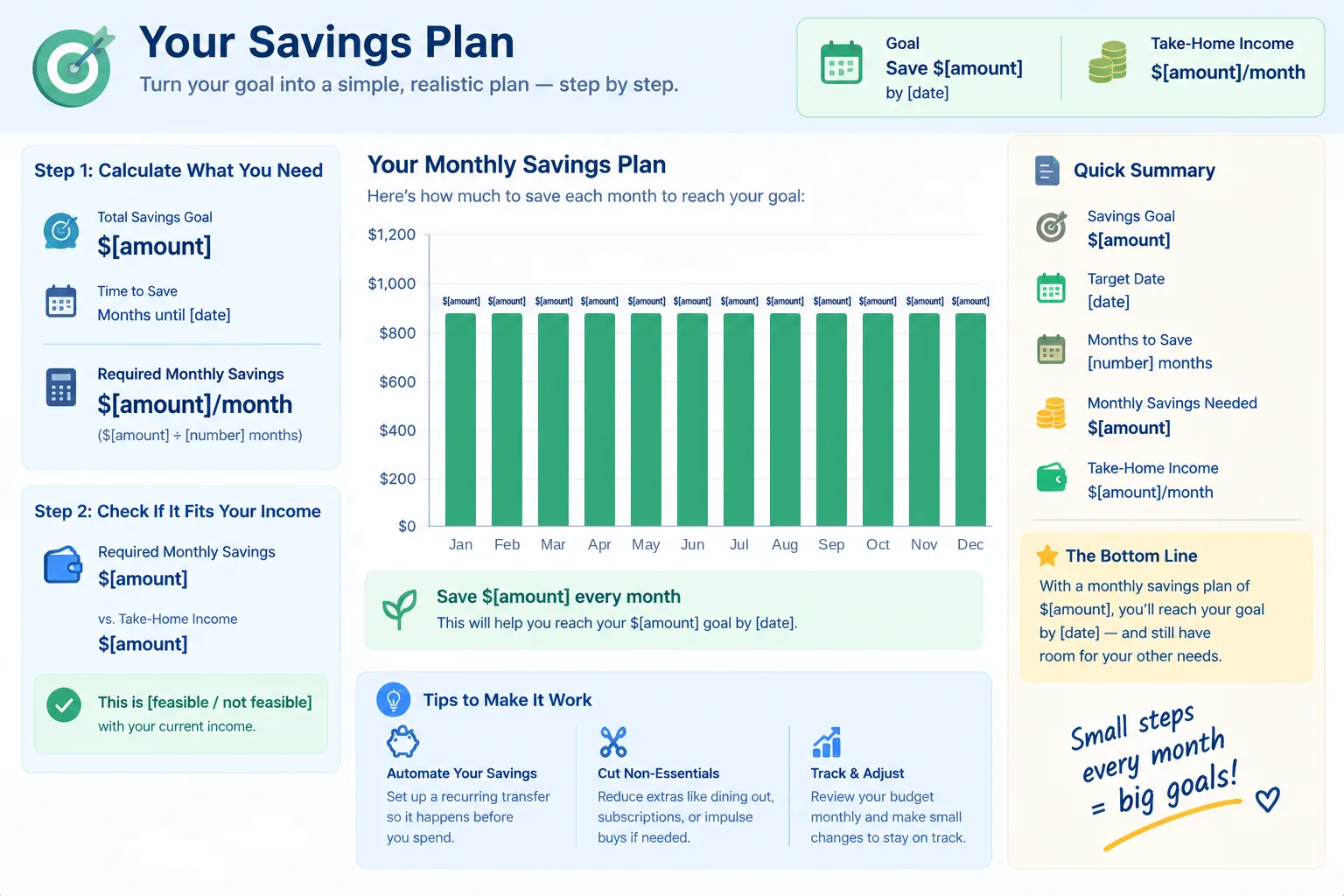
1. Turn a Vague Goal Into a Monthly Number
“Save more” isn’t a plan on its own. Have AI reverse-engineer a concrete monthly target from your real income.
Prompt: “Help me turn a goal of saving $[amount] by [date] into a realistic monthly savings plan, based on a take-home income of $[amount]/month.”
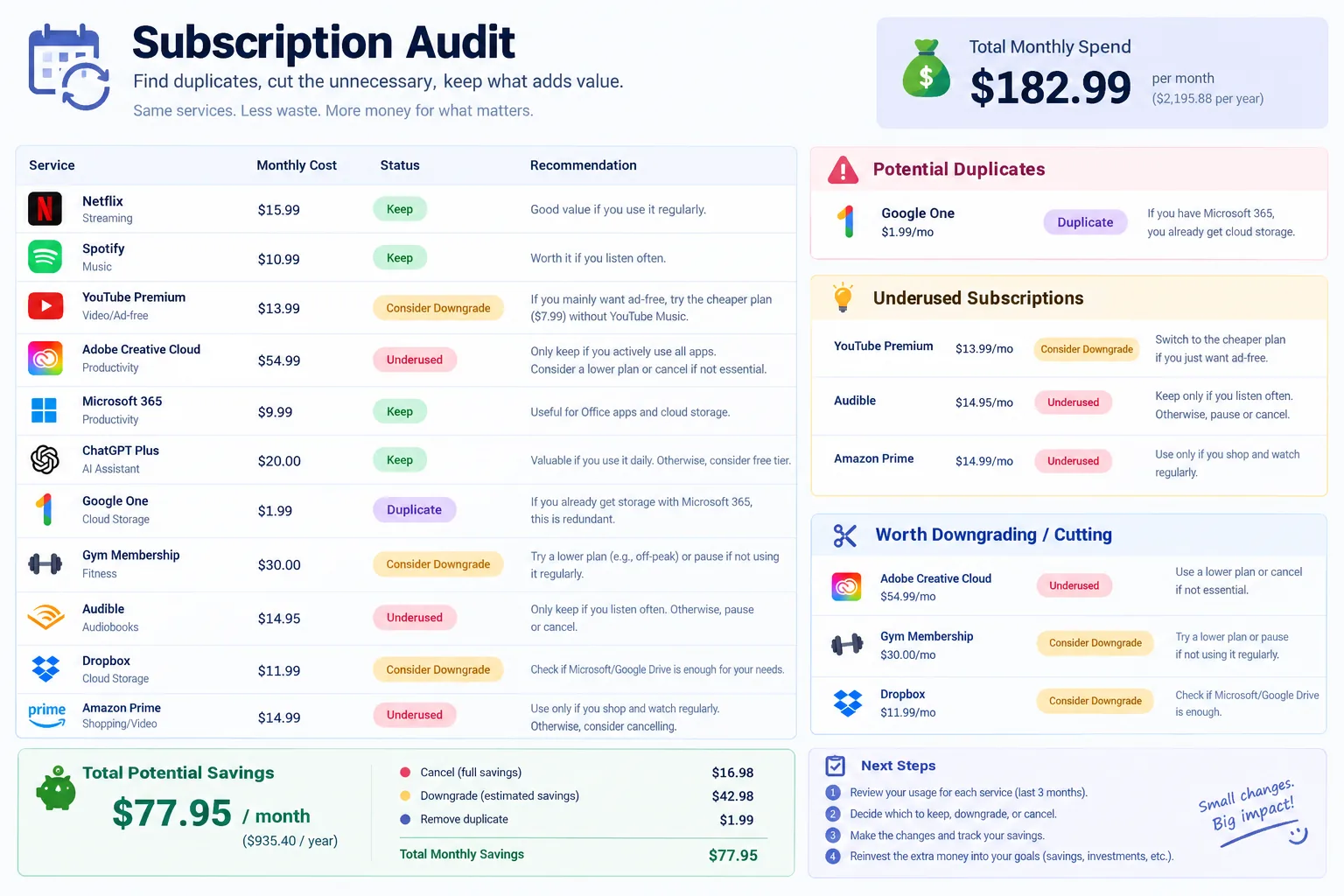
2. Find the Subscriptions You Forgot About
Many people find they’re paying for more recurring subscriptions than they realized, and some of that goes toward services nobody’s used in months.
Prompt: “Here’s a list of my recurring subscriptions and their monthly cost: [list]. Which of these look like duplicates, underused, or worth downgrading, and what would I save by cutting them?”
3. Negotiate a Bill With a Ready-Made Script
Having AI draft the actual words for a retention-department call removes the biggest barrier most people run into: not knowing what to say.
Prompt: “Write a short, polite script I can use to call my [internet/phone/insurance] provider and ask for a lower rate or a promotional discount, including what to say if they push back.”
4. Plan Meals Around What’s Already in the Kitchen
Food waste and last-minute takeout can quietly add up to avoidable food spending.
Prompt: “Here’s what I already have in my fridge and pantry: [list]. Build me a 5-day dinner plan that uses most of this up before I buy anything new, plus a short shopping list for anything missing.”

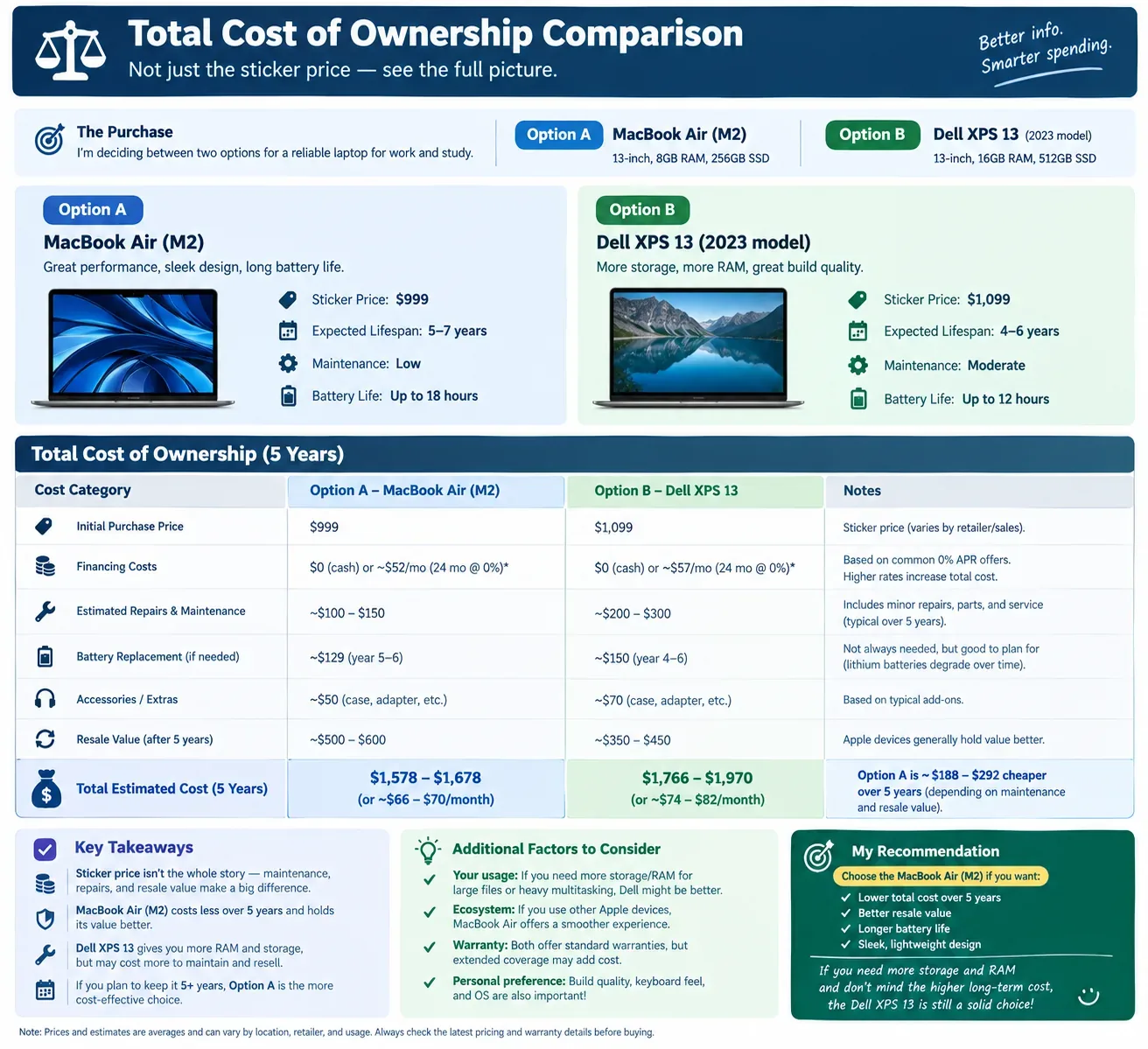
5. Compare the Real Cost Before a Big Purchase
Before a major purchase, get a structured comparison instead of going with gut feel or one review site’s opinion.
Prompt: “I’m deciding between [option A] and [option B] for [purchase]. Help me build a comparison of total cost of ownership, not just sticker price, including expected lifespan, maintenance, and financing costs.”
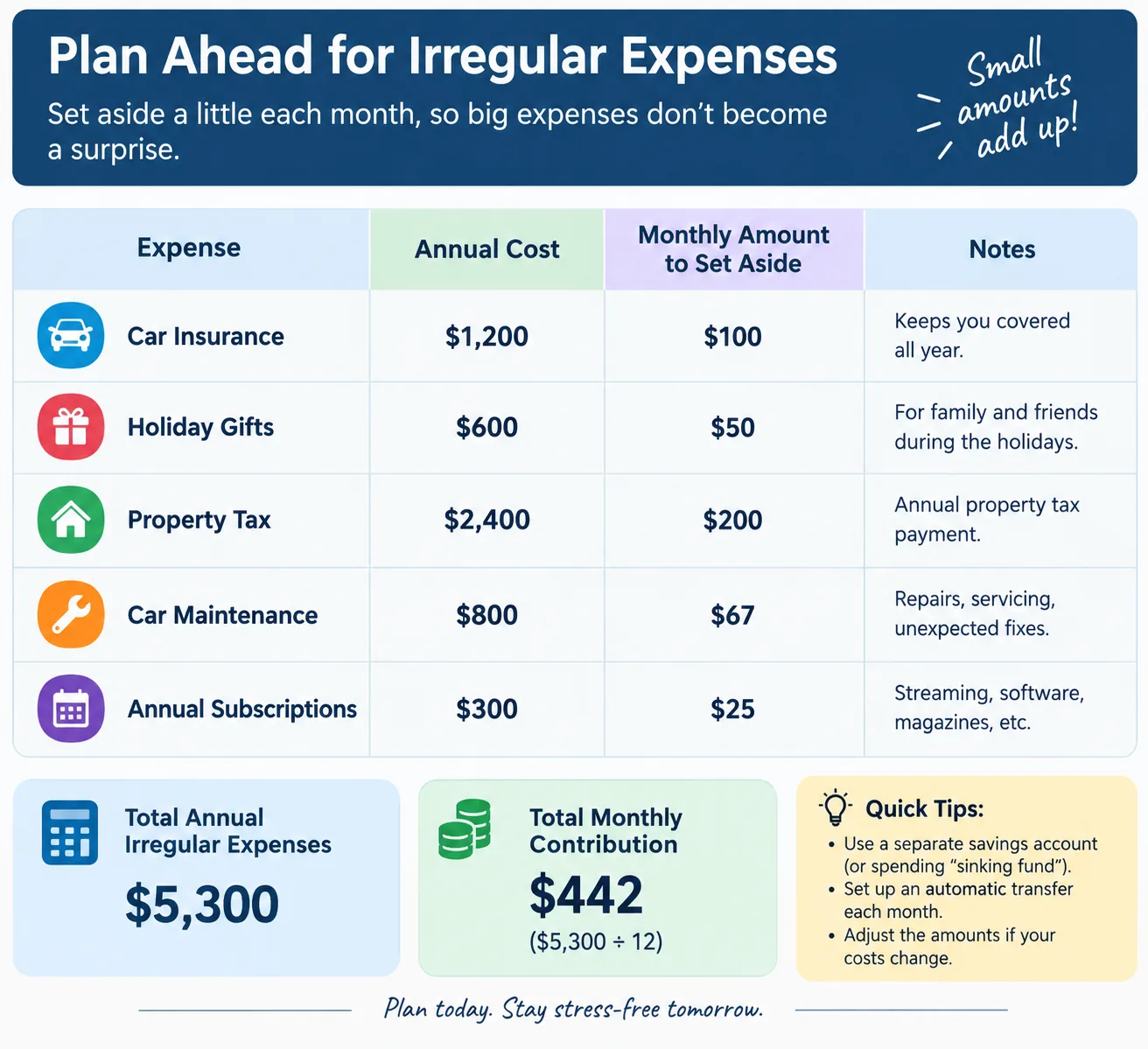
6. Build a Sinking Fund for Irregular Expenses
Car repairs, holiday spending, annual insurance premiums — these blow up budgets not because they’re unaffordable, but because nobody planned for them ahead of time.
Prompt: “I have these irregular annual expenses: [list, e.g., car insurance $1,200, holiday gifts $600]. Calculate how much I need to set aside each month so I’m not caught off guard when each one hits.”
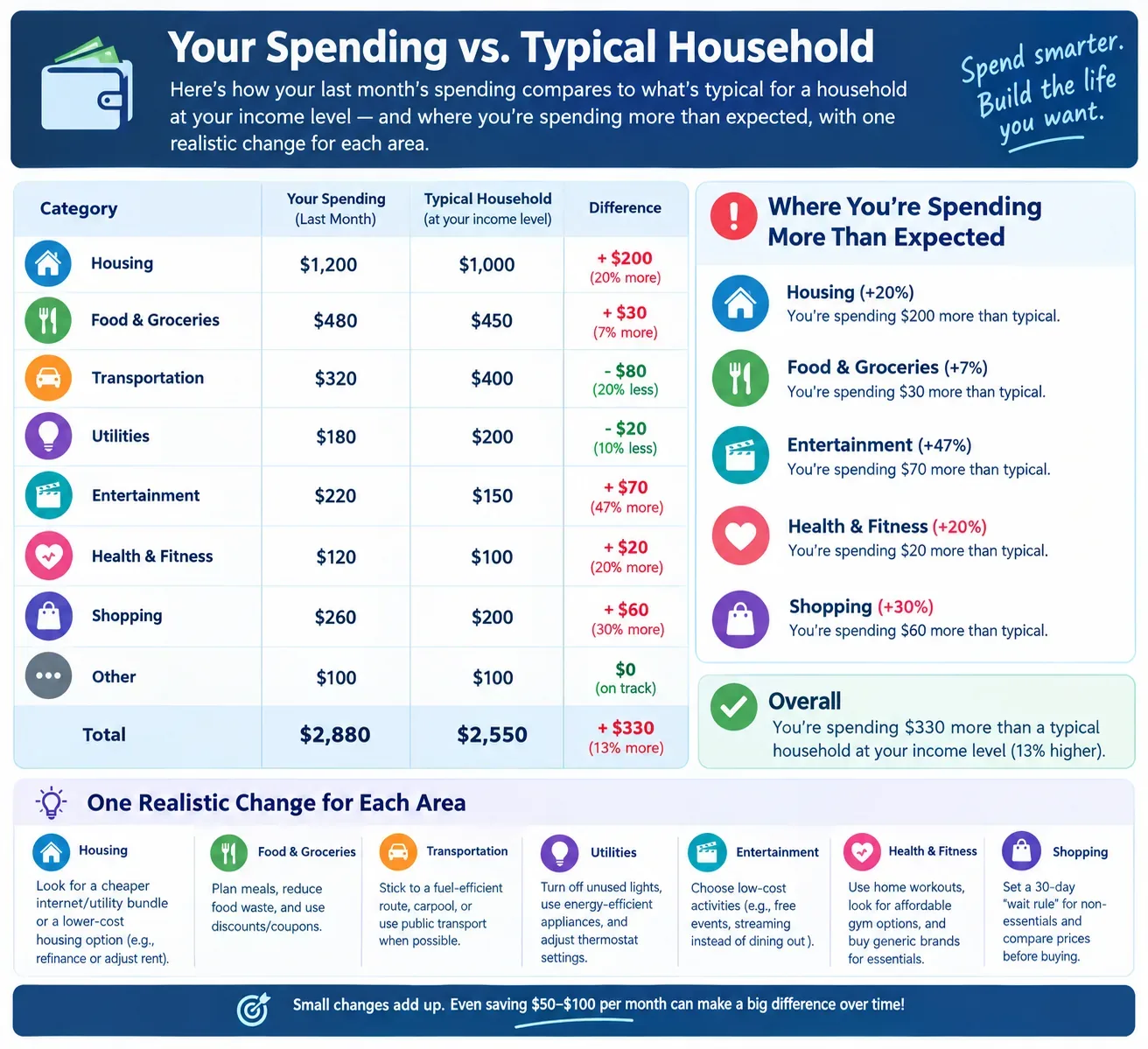
7. Get an Honest Read on Where You’re Overspending
Prompt: “Here’s my spending by category for the last month: [list categories and amounts]. Compared to a typical household at my income level, where am I spending more than expected, and what’s one realistic change in each area?”
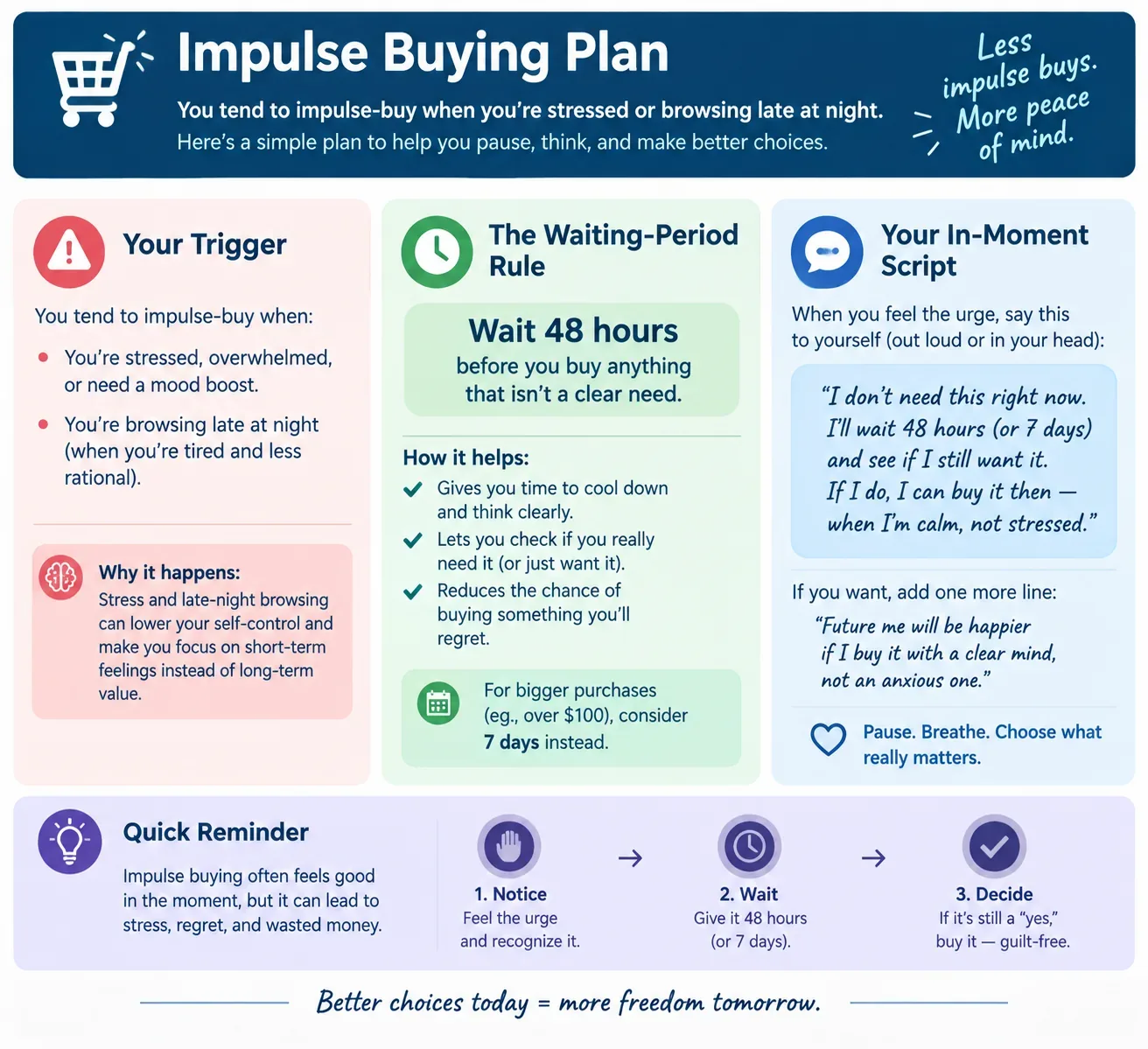
8. Build a “Pause Before You Buy” Rule That Sticks
Impulse spending responds well to a bit of friction. Rather than a generic tip, have AI design one specific to your own triggers.
Prompt: “I tend to impulse-buy when [describe trigger, e.g., stressed, browsing late at night]. Suggest a specific waiting-period rule and a script I can tell myself in the moment to make it easier to follow.”
9. Set Up a Weekly 15-Minute Money Routine
Most savings plans don’t fail from bad numbers. They fail because nobody revisits them. Turn the habit into something low-effort and recurring.
Prompt: “Design a 15-minute weekly money review routine for me, covering: checking spending against budget, checking progress toward my savings goal, and flagging any bill or subscription that changed.”
Making It a Weekly Habit
Stack methods 1, 7, and 9 into a single Sunday-evening routine: five minutes checking last week’s spending against the budget, five minutes checking progress toward your savings goal, five minutes flagging anything unusual — a new charge, a price hike, a subscription you’d genuinely forgotten. That’s a review most people can actually sustain, unlike a full monthly deep-dive that’s easy to keep pushing off.
Safety and Privacy Notes
Keep things general when prompting an AI tool:
- Use rounded dollar amounts rather than exact figures pulled from a bank statement.
- Keep account numbers, card numbers, and passwords out of the conversation entirely.
- Be cautious with anything asking to connect directly to your bank — reputable, regulated apps are the right place for that, not a general-purpose chat tool.
For general consumer-protection guidance around financial tools and your data, see the Federal Trade Commission’s guide to protecting your personal information.
Frequently Asked Questions
Can AI really help me save money?
Mostly as a planning and pattern-spotting tool — turning goals into numbers, flagging likely-forgotten subscriptions, drafting scripts for things like bill negotiation. Moving money or monitoring accounts on its own is outside its lane.
What’s the easiest AI money-saving win?
Auditing subscriptions tends to pay off fastest — many people spot at least one they’d forgotten within minutes of just listing them out.
Is it safe to share bills with AI?
Categories and rounded amounts, sure. Exact statements and account numbers, no — treat it the same way you would any place you wouldn’t want a stranger seeing your login details.
Which free AI tools help with saving?
General-purpose chat tools like ChatGPT work well for the prompt-based approach here. For automatic tracking tied to your actual accounts, pair it with a dedicated budgeting app — see our 11 best AI budgeting apps list.
Bottom Line
None of these nine methods require paying for anything — a free AI chat and about fifteen minutes a week is enough to catch the small leaks quietly draining most household budgets. Start with the subscription audit. It’s usually the fastest way to see a result you can point to.
Related Reading
- How to Use ChatGPT for Budgeting (Step-by-Step + Prompts): a step-by-step budgeting workflow.
- How to Use AI to Pay Off Debt Faster (Beginner Guide): put the savings toward debt.
- Can AI Manage Your Money? What It Can and Can’t Do: how far to trust AI with your money.
- AI in Personal Finance: The Complete 2026 US Guide: the full guide to AI in personal finance.
Was this article useful?
Thanks, that helps us decide what to write next.
Spotted a mistake? Report an error and we will fix it, with a dated correction note.
Disclaimer. This article is general information, not financial, tax, or investment advice. Figures describe specific cases at specific dates. Talk to a licensed professional before acting on anything here. Full disclaimer.